# User Profile

Here we will present the functionality menu of the user profile access screen.

**How to access the features menu on the user profile access screen:**

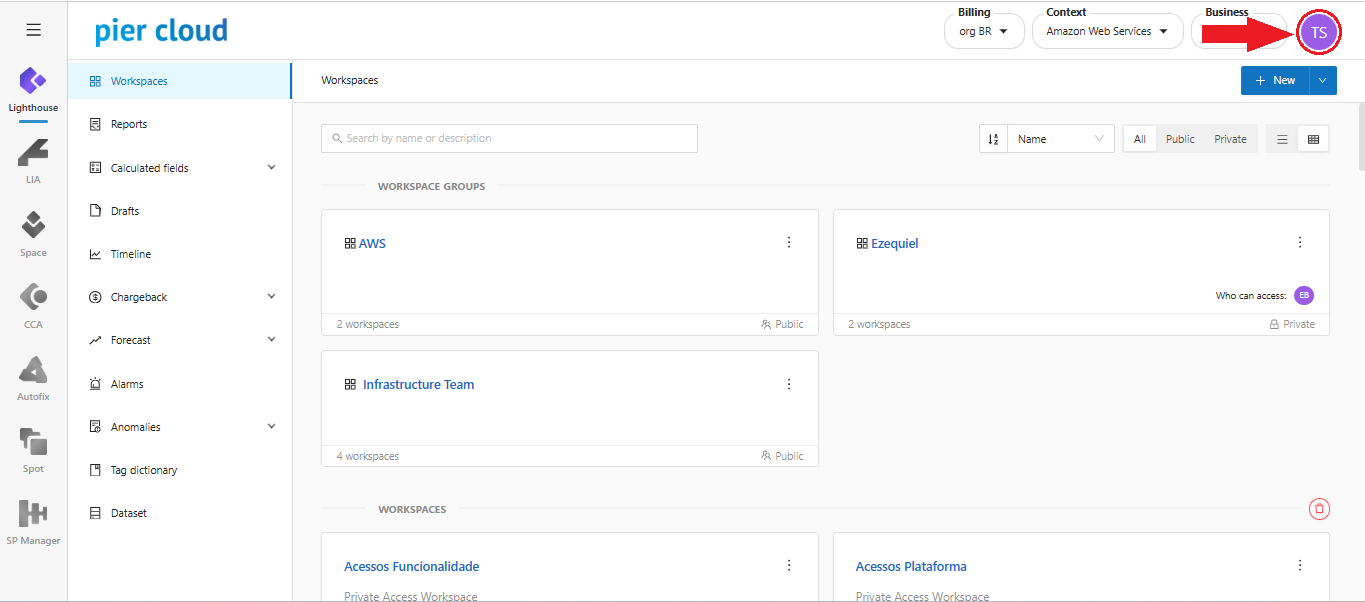
1. In the upper right corner click on the highlighted icon representing the user:

<figure><img src="https://1687673077-files.gitbook.io/~/files/v0/b/gitbook-x-prod.appspot.com/o/spaces%2FZ9sinLUl52lDK1vg6b8g%2Fuploads%2FRIg3V1xnZLHMQlYHvgGx%2Fimage.png?alt=media&#x26;token=b84a00c4-45c3-46dc-ac0a-d107e81723af" alt=""><figcaption></figcaption></figure>

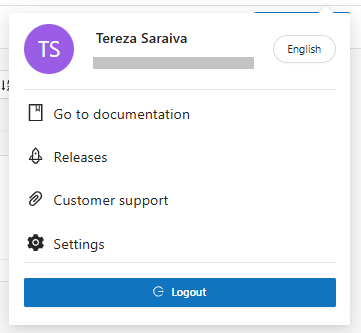
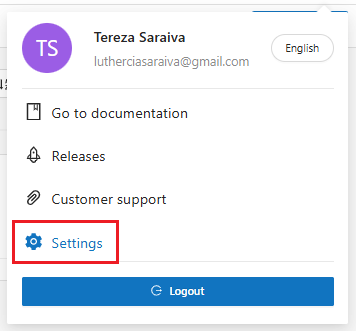
2. The System will display a screen with a menu of features:

<figure><img src="https://1687673077-files.gitbook.io/~/files/v0/b/gitbook-x-prod.appspot.com/o/spaces%2FZ9sinLUl52lDK1vg6b8g%2Fuploads%2FdFZEZZHGZA1mMGnr7XWM%2Fimage.png?alt=media&#x26;token=4b70166b-fa75-4510-9943-ea23cb5b51ec" alt=""><figcaption></figcaption></figure>

3. On this screen you can perform the following actions:

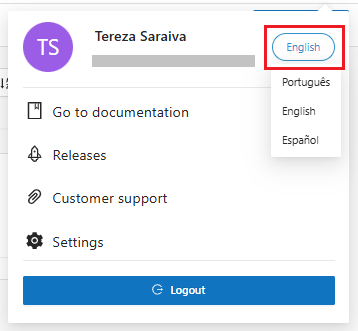
* **Language**: The system allows you to select the desired language to use the platform

By clicking on the language displayed, as illustrated below, the system will display a list of the language options available on the platform:

<figure><img src="https://1687673077-files.gitbook.io/~/files/v0/b/gitbook-x-prod.appspot.com/o/spaces%2FZ9sinLUl52lDK1vg6b8g%2Fuploads%2FQ3eTLO2zHAMScDfuQxV1%2Fimage.png?alt=media&#x26;token=49859fe0-8f90-4164-915a-1da5d11bde13" alt=""><figcaption></figcaption></figure>

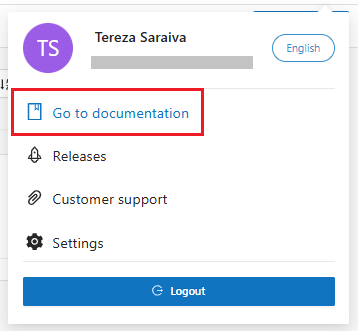
* **Go to documentation:**

By clicking on the "![](https://1687673077-files.gitbook.io/~/files/v0/b/gitbook-x-prod.appspot.com/o/spaces%2FZ9sinLUl52lDK1vg6b8g%2Fuploads%2Fc9jHmITRSHRMwyEdDrLA%2Fimage.png?alt=media\&token=c4b2f635-5fc8-4fa8-8661-f79850ecaadd)" icon, as illustrated below:

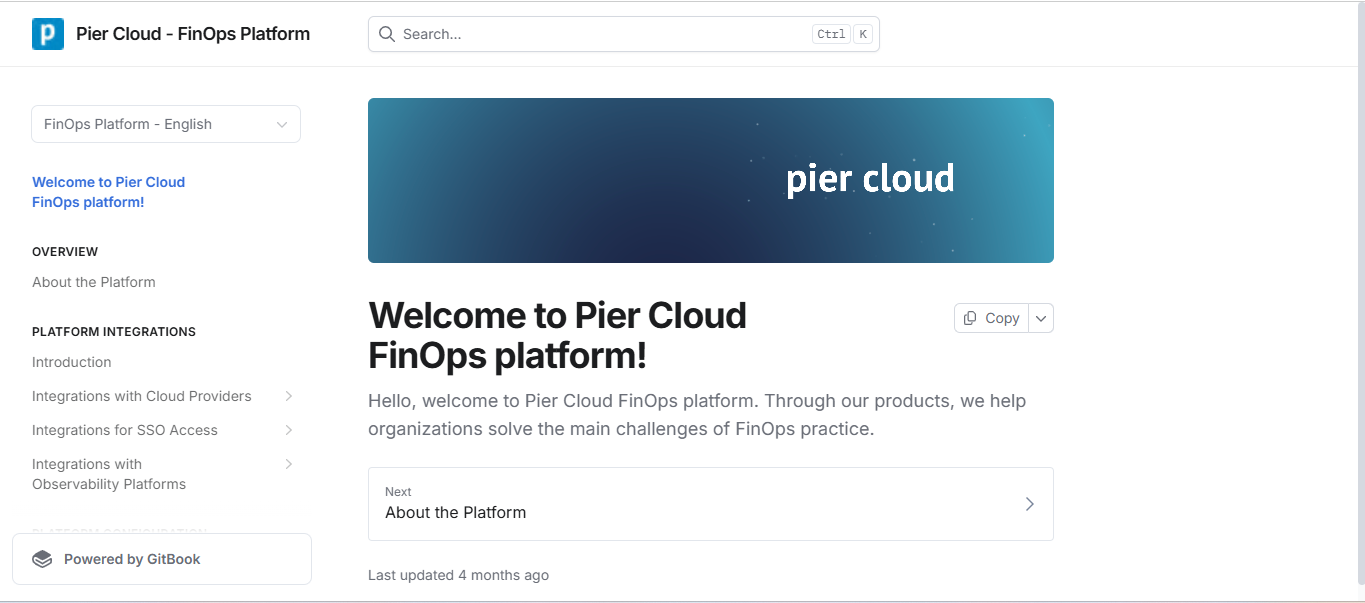
<figure><img src="https://1687673077-files.gitbook.io/~/files/v0/b/gitbook-x-prod.appspot.com/o/spaces%2FZ9sinLUl52lDK1vg6b8g%2Fuploads%2FZUjGEMV0oImfjOKuCaeI%2Fimage.png?alt=media&#x26;token=ec76a672-daa6-4b35-ae5a-b3635682ac11" alt=""><figcaption></figcaption></figure>

The system will direct you to the GitBook page, a tool used by Pier Cloud to provide access to all platform documentation.

<figure><img src="https://1687673077-files.gitbook.io/~/files/v0/b/gitbook-x-prod.appspot.com/o/spaces%2FZ9sinLUl52lDK1vg6b8g%2Fuploads%2FSbYcXQ122yu1pOfjcjka%2Fimage.png?alt=media&#x26;token=4abf1507-8e18-4bcc-9014-e8ca196c8c02" alt=""><figcaption></figcaption></figure>

To view the platform documentation, click [here](https://docs.piercloud.com.br/plataforma-de-finops/finops-platform-english)!

* **Releases**:

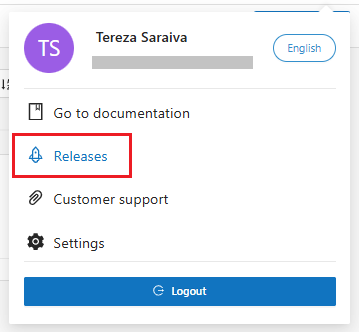
By clicking the "![](https://1687673077-files.gitbook.io/~/files/v0/b/gitbook-x-prod.appspot.com/o/spaces%2FZ9sinLUl52lDK1vg6b8g%2Fuploads%2Flup2abnUUrCMatzMU2LY%2Fimage.png?alt=media\&token=ee9e2510-119a-40fa-8db9-2055c333d966)" icon, as illustrated below:

<figure><img src="https://1687673077-files.gitbook.io/~/files/v0/b/gitbook-x-prod.appspot.com/o/spaces%2FZ9sinLUl52lDK1vg6b8g%2Fuploads%2FcwSUmWuIwj4hIfH2uPQ4%2Fimage.png?alt=media&#x26;token=e6fe8266-2096-4742-b8a0-9f7d6904204a" alt=""><figcaption></figcaption></figure>

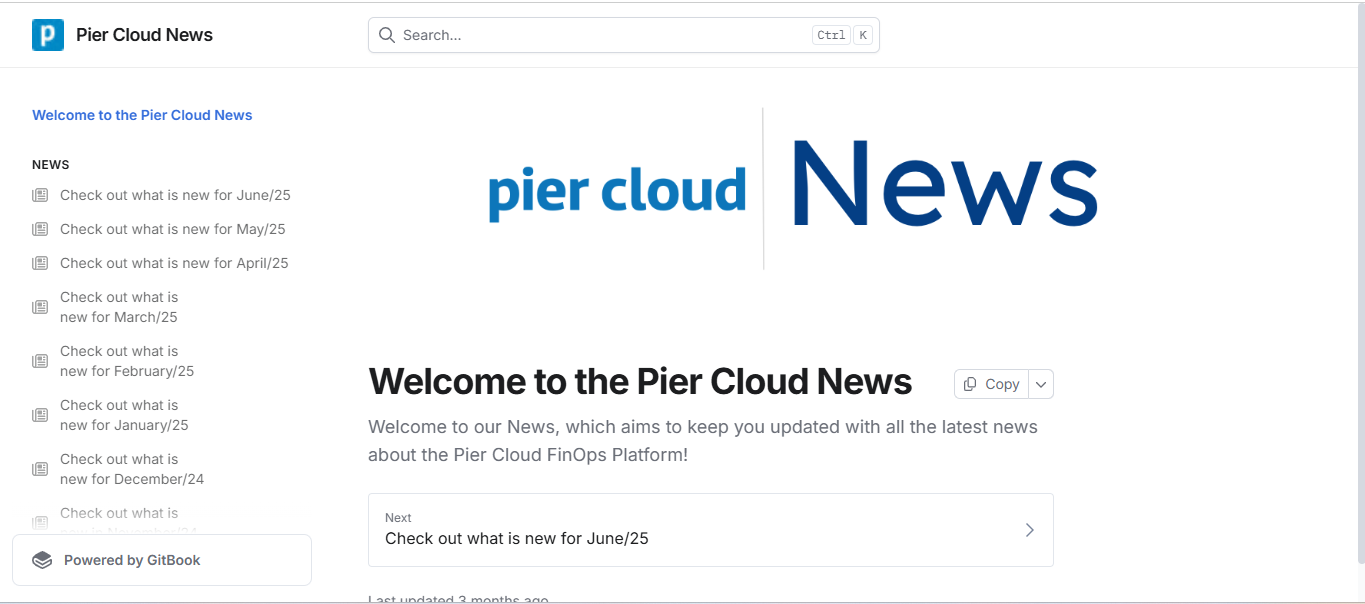
The system will redirect you to the Pier Cloud News platform, where we present the main releases of our platform, which are published monthly. There, you will stay up to date with new features and overall improvements to the Pier Cloud FinOps Platform.

<figure><img src="https://1687673077-files.gitbook.io/~/files/v0/b/gitbook-x-prod.appspot.com/o/spaces%2FZ9sinLUl52lDK1vg6b8g%2Fuploads%2FA8cGT7OLTL08SVF8Ran9%2Fimage.png?alt=media&#x26;token=4fcee8a0-1a8c-48ce-b61d-d0eca7a1e32a" alt=""><figcaption></figcaption></figure>

"To view the Pier Cloud News documentation, click [here](https://docs.piercloud.com.br/pier-cloud-news-1)!"

* **Customer Support**:

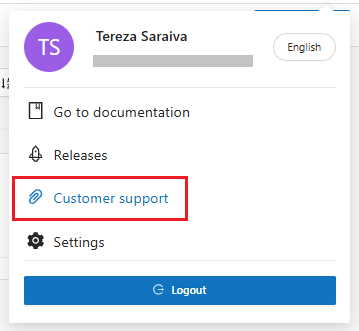
By clicking on the "![](https://1687673077-files.gitbook.io/~/files/v0/b/gitbook-x-prod.appspot.com/o/spaces%2FZ9sinLUl52lDK1vg6b8g%2Fuploads%2FoIqpbQmN7NZ6SIukzPVs%2Fimage.png?alt=media\&token=54f49e3d-8b8e-4f70-8227-235d4eeb6df3)" icon, as illustrated below:

<figure><img src="https://1687673077-files.gitbook.io/~/files/v0/b/gitbook-x-prod.appspot.com/o/spaces%2FZ9sinLUl52lDK1vg6b8g%2Fuploads%2FHNS18a8BQemdKS2fPyDj%2Fimage.png?alt=media&#x26;token=eb962baf-d39e-4800-b8d4-f61a92864675" alt=""><figcaption></figcaption></figure>

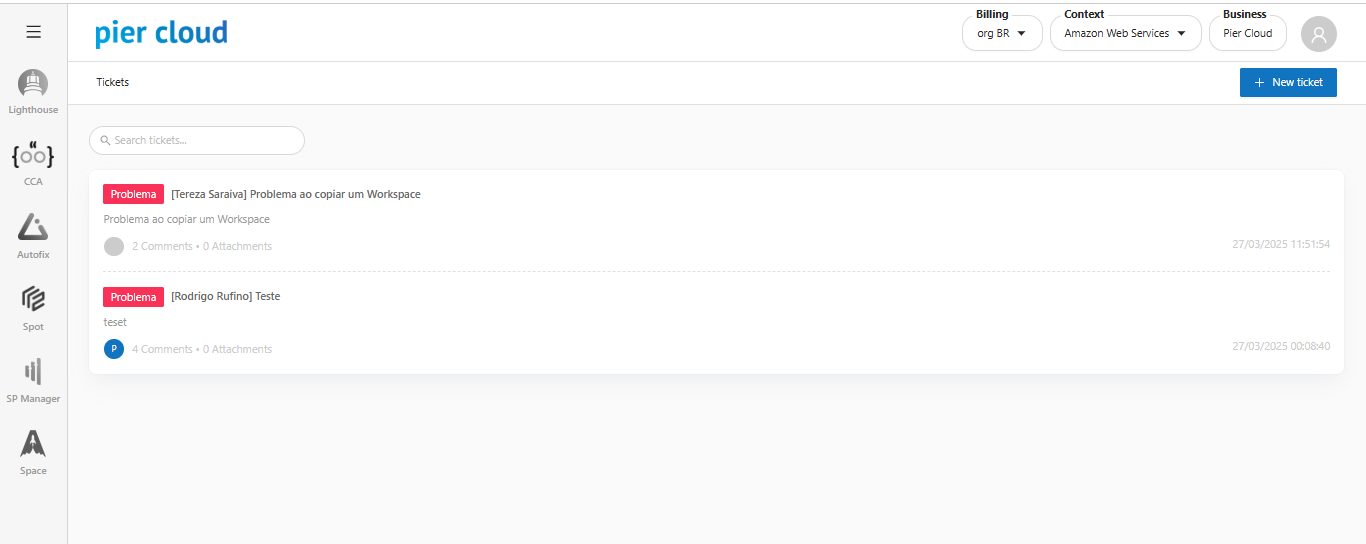
The system will direct you to the Pier Cloud ticket platform, a space where you can contact the Pier team by opening tickets, whether for questions, recommendations for new features, improvements or general problems.

<figure><img src="https://1687673077-files.gitbook.io/~/files/v0/b/gitbook-x-prod.appspot.com/o/spaces%2FZ9sinLUl52lDK1vg6b8g%2Fuploads%2Fxx9Tn9vQwHFYyfz7VODS%2Fimage.png?alt=media&#x26;token=ed45c6a9-3dcf-45d4-8efb-844c0d57bd8e" alt=""><figcaption></figcaption></figure>

* To view Customer Support documentation, click [here](https://docs.piercloud.com.br/plataforma-de-finops/finops-platform-english/accesses/customer-support)!

* **Settings**:

By clicking on the "![](https://1687673077-files.gitbook.io/~/files/v0/b/gitbook-x-prod.appspot.com/o/spaces%2FZ9sinLUl52lDK1vg6b8g%2Fuploads%2Frtwtug6xJ4ZxtHqFZzZu%2Fimage.png?alt=media\&token=552fdfc0-01e5-4d46-9ae2-0d1023d423f2)" icon, as illustrated below:

<figure><img src="https://1687673077-files.gitbook.io/~/files/v0/b/gitbook-x-prod.appspot.com/o/spaces%2FZ9sinLUl52lDK1vg6b8g%2Fuploads%2FwC5HIJI2gAWpkMrJjFL2%2Fimage.png?alt=media&#x26;token=8050b818-41ec-4512-bb8d-f507c64703b0" alt=""><figcaption></figcaption></figure>

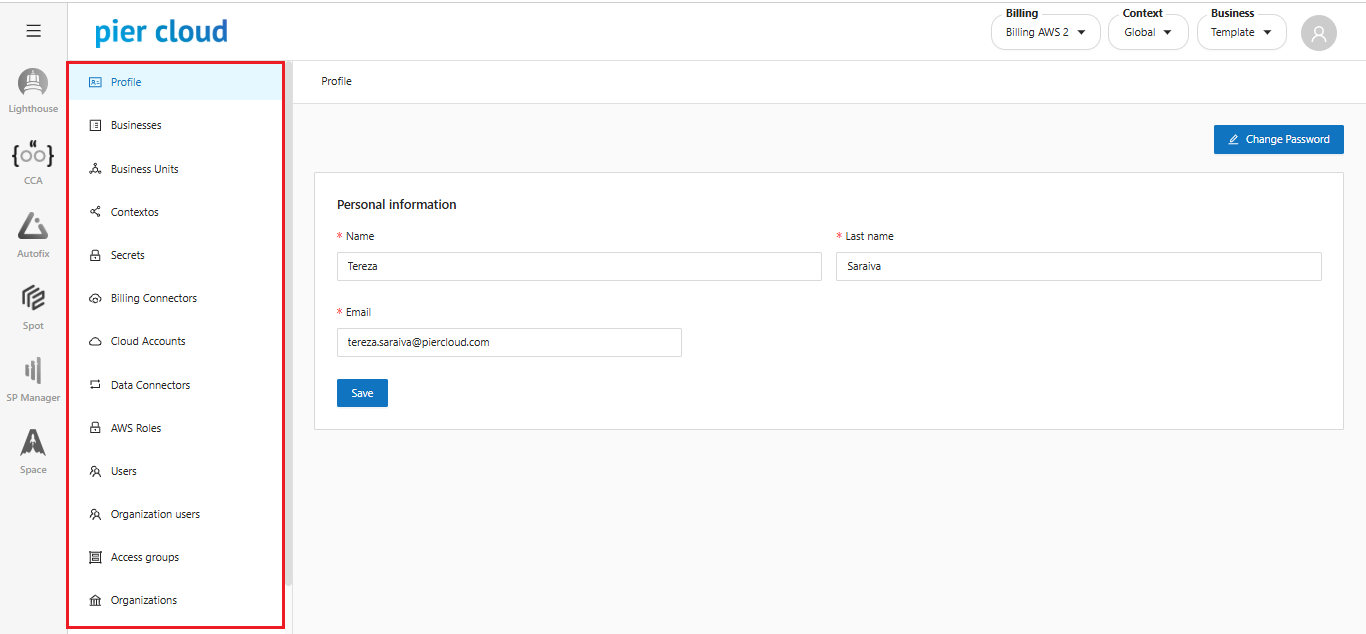
The system will direct you to the screen with the Platform Settings menu, where a list will be presented with all the features that can be configured, depending on the access profile logged into the platform.

<figure><img src="https://1687673077-files.gitbook.io/~/files/v0/b/gitbook-x-prod.appspot.com/o/spaces%2FZ9sinLUl52lDK1vg6b8g%2Fuploads%2FngFuo7K4LuSjWJIBiwce%2Fimage.png?alt=media&#x26;token=87d3d2de-e5a3-4a21-a349-3e09d8a2b520" alt=""><figcaption></figcaption></figure>

These features are related to the Business Super Admin access profile (Platform Administrator); for other profiles, some of these features may not appear.

To view the Platform Settings documentation, click [here](https://docs.piercloud.com.br/plataforma-de-finops/finops-platform-english/platform-configuration/setup-features)!