# Data Connector New Relic

On the main Data Connectors screen, when clicking the “Add” button, the system will display the screen to connect a new data source to the platform.

For each Data Connector option available on the platform, the system will present some additional fields to be filled in.

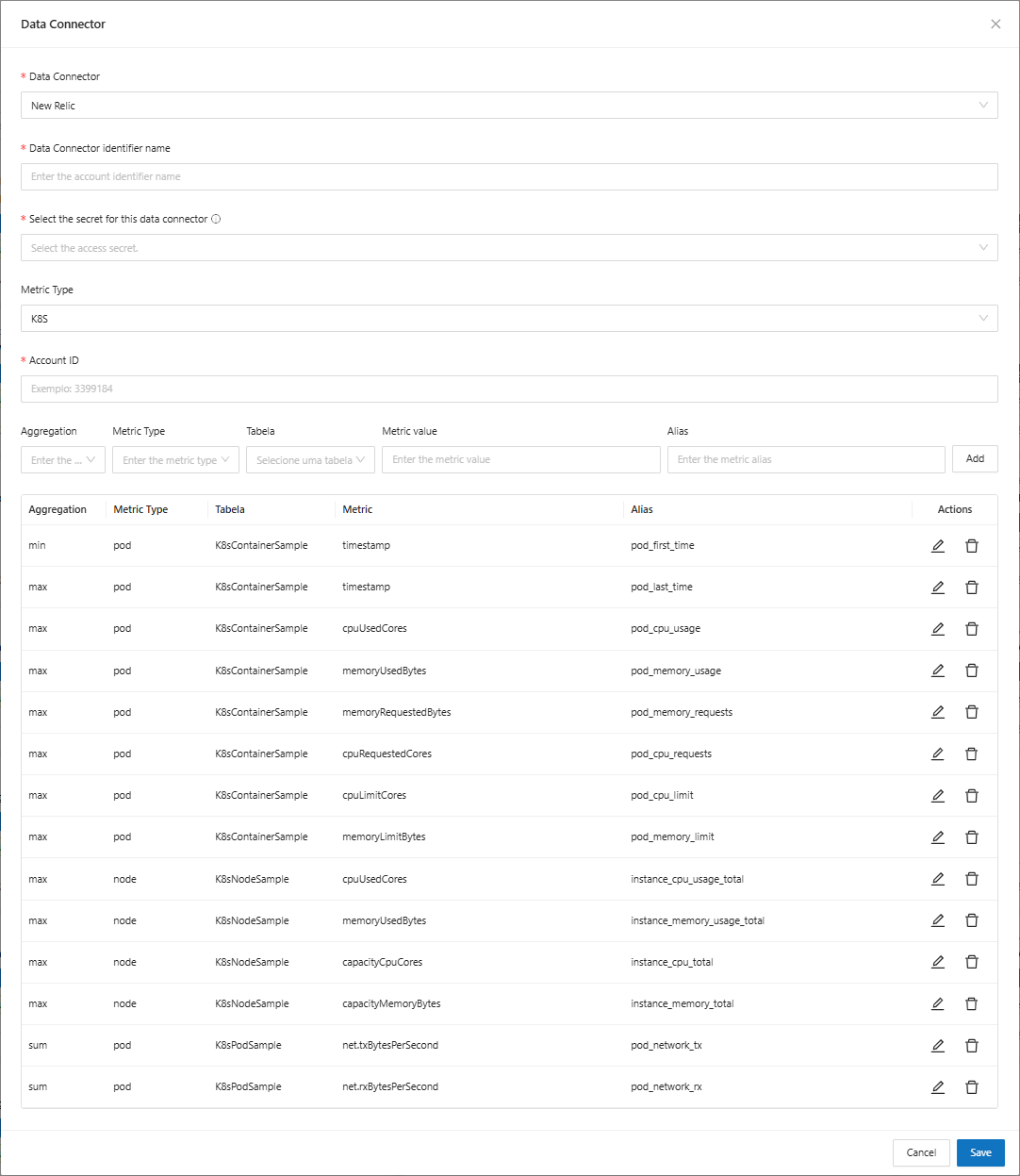
When selecting the **New Relic** option, you will be asked to fill in the following fields:

<figure><img src="https://1687673077-files.gitbook.io/~/files/v0/b/gitbook-x-prod.appspot.com/o/spaces%2FZ9sinLUl52lDK1vg6b8g%2Fuploads%2Fnqo0ajUxPJ8BLWgRwvJL%2Fimage.png?alt=media&#x26;token=0bfa3349-4e0d-416f-bc18-4e962c855572" alt=""><figcaption></figcaption></figure>

* **Data Connector Identifier Name**: Enter the name that will identify the data source that will be connected
* **Select the secret for this data connector**: Select the secret you want to use from the registered options. We will use this secret to connect to the service.
* **Metric Type**: Select the metric that will be used from the available options
* **Account ID**: Enter the account identification number for the account that New Relic uses.
* **Aggregation**: Select the type of aggregator that will be used among the available options (Sum, Average, Minimum and Maximum)

<figure><img src="https://1687673077-files.gitbook.io/~/files/v0/b/gitbook-x-prod.appspot.com/o/spaces%2FZ9sinLUl52lDK1vg6b8g%2Fuploads%2FCi5kux26mOKAZFp94Ogm%2Fimage.png?alt=media&#x26;token=ace1567d-9c9d-42fa-bc84-b1edeb1f9a35" alt=""><figcaption></figcaption></figure>

* **Metric Type**: Select the metric type from the available options

<figure><img src="https://1687673077-files.gitbook.io/~/files/v0/b/gitbook-x-prod.appspot.com/o/spaces%2FZ9sinLUl52lDK1vg6b8g%2Fuploads%2FBnmup9Oqwun8Mm35L4OD%2Fimage.png?alt=media&#x26;token=0363433b-0b83-4474-8301-5f7342c8fba0" alt=""><figcaption></figcaption></figure>

* **Table:** Select the K8S table option you want to use

<figure><img src="https://1687673077-files.gitbook.io/~/files/v0/b/gitbook-x-prod.appspot.com/o/spaces%2FZ9sinLUl52lDK1vg6b8g%2Fuploads%2FDVLbEPJoPamZqulFhbi1%2Fimage.png?alt=media&#x26;token=bd0450ca-39a8-404d-8ee6-a0054ae08398" alt=""><figcaption></figcaption></figure>

* **Metric Value**: Enter the metric value that will be used

<figure><img src="https://1687673077-files.gitbook.io/~/files/v0/b/gitbook-x-prod.appspot.com/o/spaces%2FZ9sinLUl52lDK1vg6b8g%2Fuploads%2FRQly59nz4N4o9WLQyHaC%2Fimage.png?alt=media&#x26;token=afa5dc0f-ccb4-40e3-beb7-d829f6ef2f5e" alt=""><figcaption></figcaption></figure>

* **Alias**: Enter the Alias ​​or name that will be referenced in the metric

<figure><img src="https://1687673077-files.gitbook.io/~/files/v0/b/gitbook-x-prod.appspot.com/o/spaces%2FZ9sinLUl52lDK1vg6b8g%2Fuploads%2FQ14kpj8hjvrmR18KF3kM%2Fimage.png?alt=media&#x26;token=df1625d5-69b0-46a4-a0e0-1a045c1f4cc3" alt=""><figcaption></figcaption></figure>

When filling in the information and clicking the add button, the expression will be displayed as in the report below:

<figure><img src="https://1687673077-files.gitbook.io/~/files/v0/b/gitbook-x-prod.appspot.com/o/spaces%2FZ9sinLUl52lDK1vg6b8g%2Fuploads%2FJXAHQDQnHTJ4kzSJHYPh%2Fimage.png?alt=media&#x26;token=2c930d21-62eb-4a98-a96c-bd0f8589125c" alt=""><figcaption></figcaption></figure>




