# Email

**A service offered by Pier Cloud that allows the platform to integrate with the email provider used for sending notifications.**\
This integration provides visibility into project costs, resource usage, as well as notifications regarding identified anomalies and triggered alerts.

### Integrating the Email Service with the Pier Cloud Platform

1. By clicking on the user profile and selecting the **“Settings”** option, as illustrated below:

<figure><img src="https://1687673077-files.gitbook.io/~/files/v0/b/gitbook-x-prod.appspot.com/o/spaces%2FZ9sinLUl52lDK1vg6b8g%2Fuploads%2FCHGnCUyHOqrLdvbEFWZr%2Fimage.png?alt=media&#x26;token=7da4de41-e9f5-4322-842b-1e68047488bf" alt=""><figcaption></figcaption></figure>

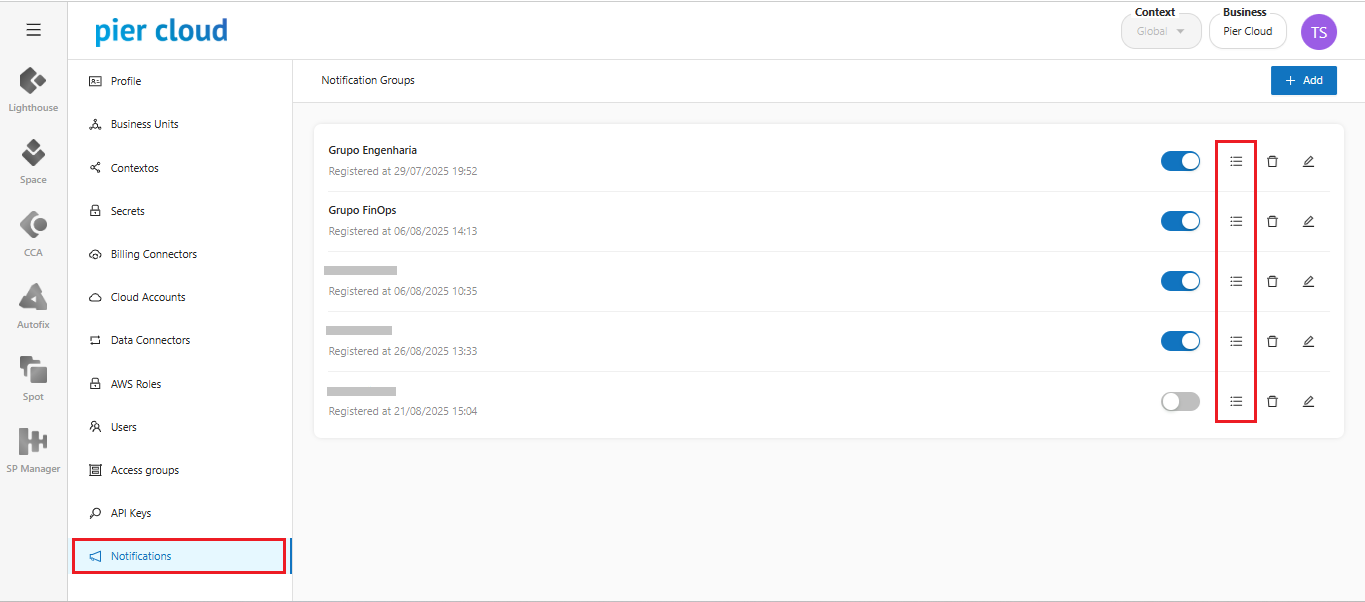
2. The system will display a side menu with several configuration options. Select the **“Notifications”** option:

<figure><img src="https://1687673077-files.gitbook.io/~/files/v0/b/gitbook-x-prod.appspot.com/o/spaces%2FZ9sinLUl52lDK1vg6b8g%2Fuploads%2FxZSEw4DUUEBSqIQldX1l%2Fimage.png?alt=media&#x26;token=e99692bb-21db-40d2-8ec6-37b826d9e0c2" alt=""><figcaption></figcaption></figure>

3. By clicking the "![](https://1687673077-files.gitbook.io/~/files/v0/b/gitbook-x-prod.appspot.com/o/spaces%2FZ9sinLUl52lDK1vg6b8g%2Fuploads%2FGhH2eTQSEu27Te2h88OM%2Fimage.png?alt=media\&token=4a99072b-b5af-4dad-bd2a-88e34f9a8e79)" icon, the system allows you to view the registered provider groups and add new ones.

<figure><img src="https://1687673077-files.gitbook.io/~/files/v0/b/gitbook-x-prod.appspot.com/o/spaces%2FZ9sinLUl52lDK1vg6b8g%2Fuploads%2Funq0mE8s5T4jGCfdVOFh%2Fimage.png?alt=media&#x26;token=04debd93-8e2b-4b8e-8abb-19fd17ac75d9" alt=""><figcaption></figcaption></figure>

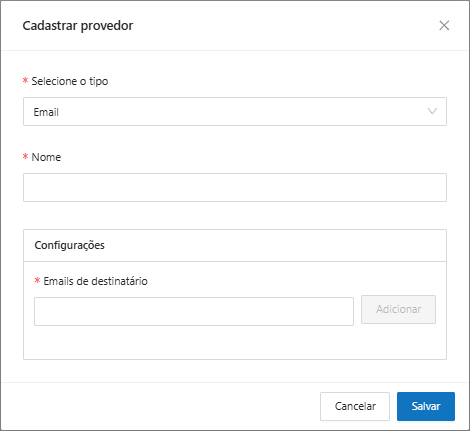
The system will then display a screen requesting the following information:

* **Select type:** Email
* **Name:** Enter a name to identify the provider group
* **Settings:** For the email provider type, it is necessary to add the recipients' email addresses.

<figure><img src="https://1687673077-files.gitbook.io/~/files/v0/b/gitbook-x-prod.appspot.com/o/spaces%2FZ9sinLUl52lDK1vg6b8g%2Fuploads%2FJyR3u6wTgonAyFnrH0Ww%2Fimage.png?alt=media&#x26;token=96e0fce7-85e8-4a81-921f-aa8426298dcd" alt=""><figcaption></figcaption></figure>

4. When clicking the **“Save”** button, the system will store the data and return to the main screen, where the registered provider will be displayed within the notification group.