# Schedules

When selecting the **Schedules** functionality, the system will display the main screen with all appointments that are currently active or scheduled.

<figure><img src="https://1687673077-files.gitbook.io/~/files/v0/b/gitbook-x-prod.appspot.com/o/spaces%2FZ9sinLUl52lDK1vg6b8g%2Fuploads%2F48Q57uEqm18v5qAMN2wB%2Fimage.png?alt=media&#x26;token=3ec5d86a-36c8-48d5-b5a4-89bfe9799166" alt=""><figcaption></figcaption></figure>

1. **Filters**

The system allows to filter by a keyword in the **Search** field:

<figure><img src="https://1687673077-files.gitbook.io/~/files/v0/b/gitbook-x-prod.appspot.com/o/spaces%2FZ9sinLUl52lDK1vg6b8g%2Fuploads%2FWGBGrU1tdelGJ3oOTHCj%2Fimage.png?alt=media&#x26;token=53c4396b-8e2f-4847-b027-09e7567366cc" alt=""><figcaption></figcaption></figure>

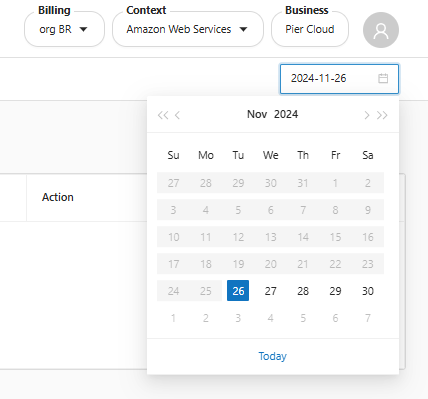
Or filter by a specific day in the **calendar** option:

<figure><img src="https://1687673077-files.gitbook.io/~/files/v0/b/gitbook-x-prod.appspot.com/o/spaces%2FZ9sinLUl52lDK1vg6b8g%2Fuploads%2Fvmkpx0GBVxCqYuHHahlE%2Fimage.png?alt=media&#x26;token=b3bbd31d-53fd-40d1-b7ba-134d555d9929" alt="" width="321"><figcaption></figcaption></figure>

2. **Edit**

The system allows to edit the rule execution time by clicking the "![](https://1687673077-files.gitbook.io/~/files/v0/b/gitbook-x-prod.appspot.com/o/spaces%2FZ9sinLUl52lDK1vg6b8g%2Fuploads%2F0Q5ikxSN2NVFNedgCUT4%2Fimage.png?alt=media\&token=81d0033b-9b68-4ac7-b03c-2c1f8fddc7f0)" button.

<figure><img src="https://1687673077-files.gitbook.io/~/files/v0/b/gitbook-x-prod.appspot.com/o/spaces%2FZ9sinLUl52lDK1vg6b8g%2Fuploads%2FqzrMEk6ZxMOs4giyBRbt%2Fimage.png?alt=media&#x26;token=2817a7fd-72d5-4b18-9072-9429c3a0431a" alt=""><figcaption></figcaption></figure>