# Schedules

When selecting the **Schedules** functionality, the system will display the main screen with all the appointments that are currently active or scheduled.

<figure><img src="https://1687673077-files.gitbook.io/~/files/v0/b/gitbook-x-prod.appspot.com/o/spaces%2FZ9sinLUl52lDK1vg6b8g%2Fuploads%2Fo24aua3LipMgPSYcf8Vg%2Fimage.png?alt=media&#x26;token=36c08d73-b369-47d3-837f-766de6dd752d" alt=""><figcaption></figcaption></figure>

1. **Filters**

* **Search**&#x20;

The system allows to filter by a keyword in the **Search** field

<figure><img src="https://1687673077-files.gitbook.io/~/files/v0/b/gitbook-x-prod.appspot.com/o/spaces%2FZ9sinLUl52lDK1vg6b8g%2Fuploads%2FONon44bBUSX7CSjL2Mfk%2Fimage.png?alt=media&#x26;token=b1639cfc-9d39-4ff0-bb4b-819c57eefb6b" alt=""><figcaption></figcaption></figure>

* **Region**

The system allows to filter by region, selecting the desired region.

<figure><img src="https://1687673077-files.gitbook.io/~/files/v0/b/gitbook-x-prod.appspot.com/o/spaces%2FZ9sinLUl52lDK1vg6b8g%2Fuploads%2F2W8H37C2KMZmsdYkhFyy%2Fimage.png?alt=media&#x26;token=a4d7b3d2-c278-4c0b-933b-4e76d0396acc" alt=""><figcaption></figcaption></figure>

* **Resource**&#x20;

It is possible to filter by resource by selecting the desired resource.

<figure><img src="https://1687673077-files.gitbook.io/~/files/v0/b/gitbook-x-prod.appspot.com/o/spaces%2FZ9sinLUl52lDK1vg6b8g%2Fuploads%2Fh9Uy1PachJExd3AicL0X%2Fimage.png?alt=media&#x26;token=2b97ba21-d83c-4114-b111-13c4ed59dcd9" alt=""><figcaption></figcaption></figure>

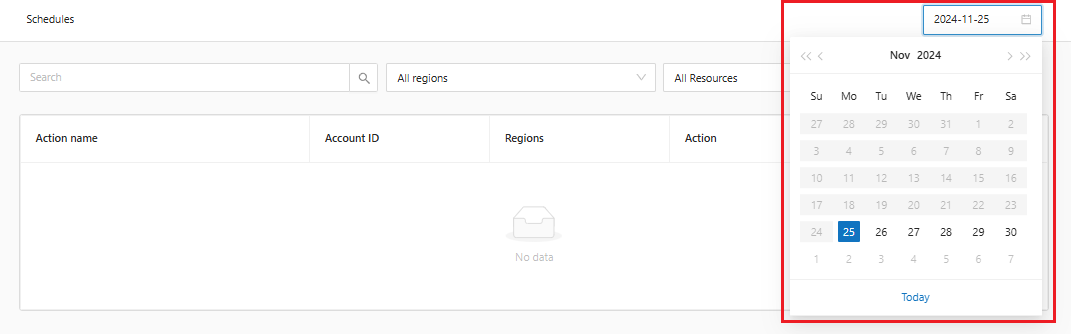
* **Date**

It is possiblem to filter by a specific day in the calendar option.

<figure><img src="https://1687673077-files.gitbook.io/~/files/v0/b/gitbook-x-prod.appspot.com/o/spaces%2FZ9sinLUl52lDK1vg6b8g%2Fuploads%2FnTjeiGX2QzYpxyFaV9S5%2Fimage.png?alt=media&#x26;token=8bf58a0a-5818-4fb4-b401-9f41942fbade" alt=""><figcaption></figcaption></figure>

2. **Editar**

Ao clicar no botão "![](https://1687673077-files.gitbook.io/~/files/v0/b/gitbook-x-prod.appspot.com/o/spaces%2FZ9sinLUl52lDK1vg6b8g%2Fuploads%2F8A82jR5hfxRwgkX8gdLT%2Fimage.png?alt=media\&token=33bbb4c4-2786-4613-a11d-aecc5ceda379)", o sistema permite sobrescrever o horário de execução da ação.

2. **Edit**&#x20;

By clicking on the "![](https://1687673077-files.gitbook.io/~/files/v0/b/gitbook-x-prod.appspot.com/o/spaces%2FZ9sinLUl52lDK1vg6b8g%2Fuploads%2F8A82jR5hfxRwgkX8gdLT%2Fimage.png?alt=media\&token=33bbb4c4-2786-4613-a11d-aecc5ceda379)" button, the system allows to overwrite the action execution time.

<figure><img src="https://1687673077-files.gitbook.io/~/files/v0/b/gitbook-x-prod.appspot.com/o/spaces%2FZ9sinLUl52lDK1vg6b8g%2Fuploads%2FlOatMOGZ9NQpUCIu2Zrn%2Fimage.png?alt=media&#x26;token=99008940-658a-43ad-ad5f-8d19c569accf" alt=""><figcaption></figcaption></figure>