# Override

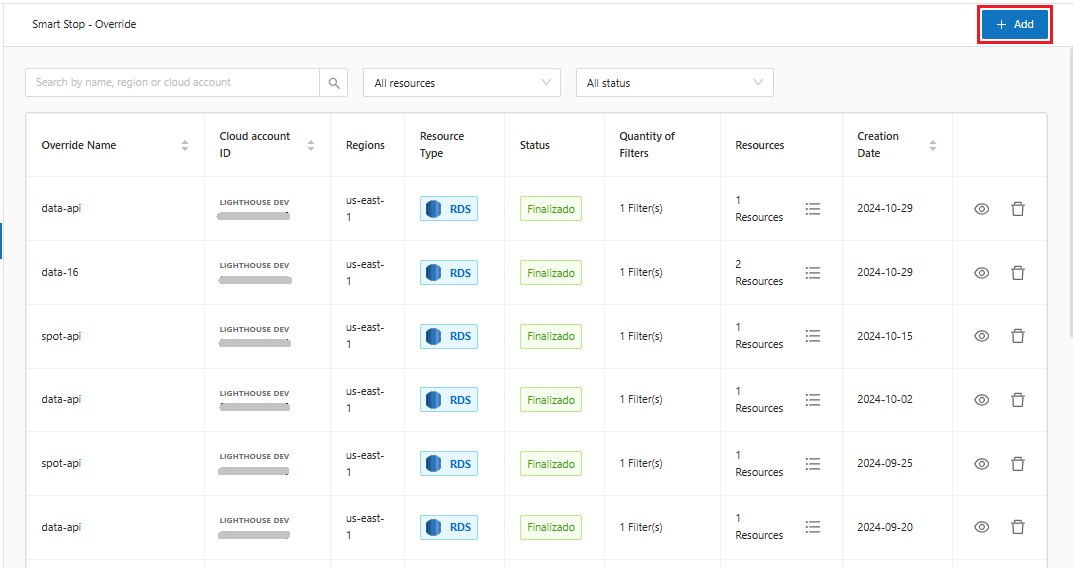
When selecting the Override functionality, the system will display the main screen with all the Override options available in Smart Stop.

<figure><img src="https://1687673077-files.gitbook.io/~/files/v0/b/gitbook-x-prod.appspot.com/o/spaces%2FZ9sinLUl52lDK1vg6b8g%2Fuploads%2FcUxHAHpiLBeU5f5L4f8B%2Fimage.png?alt=media&#x26;token=875b3a01-2d18-461c-85ff-d8684750f2f6" alt=""><figcaption></figcaption></figure>

1. **Creating an Override**

On the main screen, click the "**Add**" button

<figure><img src="https://1687673077-files.gitbook.io/~/files/v0/b/gitbook-x-prod.appspot.com/o/spaces%2FZ9sinLUl52lDK1vg6b8g%2Fuploads%2FptjseBoAQhwXBVjiVJb5%2Fimage.png?alt=media&#x26;token=53c9303c-82d1-473b-8912-4f4fcd06a4b6" alt=""><figcaption></figcaption></figure>

2. **Properties**

<figure><img src="https://1687673077-files.gitbook.io/~/files/v0/b/gitbook-x-prod.appspot.com/o/spaces%2FZ9sinLUl52lDK1vg6b8g%2Fuploads%2F81fAJLD4F0TBSjFBI5FR%2Fimage.png?alt=media&#x26;token=35637d6f-94bf-4531-8d05-557ef6391e61" alt=""><figcaption></figcaption></figure>

* **Override Name**: Define the name that will be assigned to the Override

<figure><img src="https://1687673077-files.gitbook.io/~/files/v0/b/gitbook-x-prod.appspot.com/o/spaces%2FZ9sinLUl52lDK1vg6b8g%2Fuploads%2Fq9rsj33XoGA4f87O0tth%2Fimage.png?alt=media&#x26;token=5611594b-4e24-4ffc-951d-6b97ad19218b" alt=""><figcaption></figcaption></figure>

* **Resource Type**: Define the service that will be used to create the Override

<figure><img src="https://1687673077-files.gitbook.io/~/files/v0/b/gitbook-x-prod.appspot.com/o/spaces%2FZ9sinLUl52lDK1vg6b8g%2Fuploads%2Fy5aJemVA6ujdsMNamOBE%2Fimage.png?alt=media&#x26;token=877e2027-8b84-45ac-a321-a4cbe30cfbce" alt=""><figcaption></figcaption></figure>

* **Regions**: Define the regions where the Override will be applied, it is possible to select more than one region.

<figure><img src="https://1687673077-files.gitbook.io/~/files/v0/b/gitbook-x-prod.appspot.com/o/spaces%2FZ9sinLUl52lDK1vg6b8g%2Fuploads%2Fimc7d0aLo9nC7R9FSTVH%2Fimage.png?alt=media&#x26;token=0db8c4dd-3a35-4ac3-93b0-82a6980b1b3a" alt=""><figcaption></figcaption></figure>

* **Account ID**: Inform the account that will be used to create the Override

<figure><img src="https://1687673077-files.gitbook.io/~/files/v0/b/gitbook-x-prod.appspot.com/o/spaces%2FZ9sinLUl52lDK1vg6b8g%2Fuploads%2F9e2CCdShCrzYDI7W1x9j%2Fimage.png?alt=media&#x26;token=cf75cd10-4407-48a6-b35e-7e4f14023417" alt=""><figcaption></figcaption></figure>

3. **Filtros**

Ao avançar, o sistema irá exibir a tela de filtros, onde é possível adicionar os filtros desejados.

3. **Filters**&#x20;

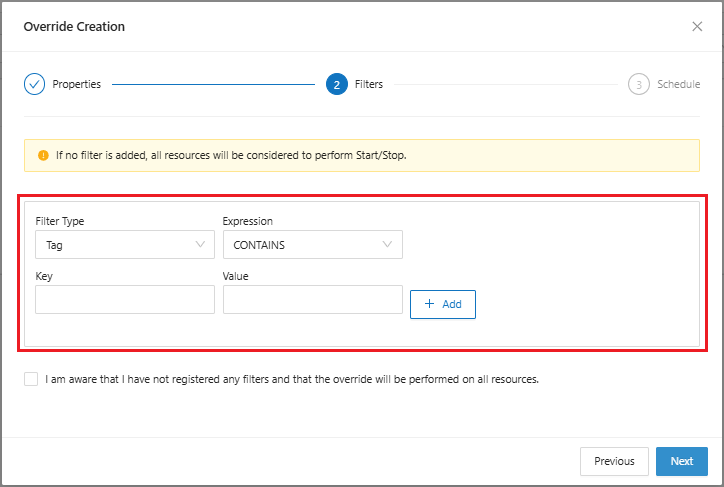
Moving on to the next step, the system will display the filters screen, where it is possible to add the desired filters.

<figure><img src="https://1687673077-files.gitbook.io/~/files/v0/b/gitbook-x-prod.appspot.com/o/spaces%2FZ9sinLUl52lDK1vg6b8g%2Fuploads%2FnZxXuUds6PuC0MoRwlcG%2Fimage.png?alt=media&#x26;token=6e241225-173a-4d13-b6c9-2b49afe2585e" alt=""><figcaption></figcaption></figure>

Filters are where Override will locate resources by key and value.

* In "**Filter Type**" you can locate the resource in three ways: **tag, resource name and resource id**:

<figure><img src="https://1687673077-files.gitbook.io/~/files/v0/b/gitbook-x-prod.appspot.com/o/spaces%2FZ9sinLUl52lDK1vg6b8g%2Fuploads%2FKTNA8UaMaO0dwemi5CZc%2Fimage.png?alt=media&#x26;token=fc67ac6c-e86b-48c7-8eee-410adc0c18c5" alt=""><figcaption></figcaption></figure>

* Set the expression **CONTAINS and NOT CONTAIN**.

<figure><img src="https://1687673077-files.gitbook.io/~/files/v0/b/gitbook-x-prod.appspot.com/o/spaces%2FZ9sinLUl52lDK1vg6b8g%2Fuploads%2Ff5wkfPE2FGy9kByP42Qn%2Fimage.png?alt=media&#x26;token=d5a6aa6b-5563-4ffa-a6da-8c6faa8f6d54" alt=""><figcaption></figcaption></figure>

* In **key** and **value**, add the resource identification so it can be found.

<figure><img src="https://1687673077-files.gitbook.io/~/files/v0/b/gitbook-x-prod.appspot.com/o/spaces%2FZ9sinLUl52lDK1vg6b8g%2Fuploads%2F4426TNALEWFUbW56jzCj%2Fimage.png?alt=media&#x26;token=72886de0-d591-47f7-aa7f-5ccd235bc2d8" alt=""><figcaption></figcaption></figure>

* When adding, it is possible to view the filter of the created resource

<figure><img src="https://1687673077-files.gitbook.io/~/files/v0/b/gitbook-x-prod.appspot.com/o/spaces%2FZ9sinLUl52lDK1vg6b8g%2Fuploads%2FzbBZqXYdnFzSt6sivY9S%2Fimage.png?alt=media&#x26;token=9602a1e8-e743-46fa-be39-0f2fce3476e2" alt=""><figcaption></figcaption></figure>

4. **Agenda**

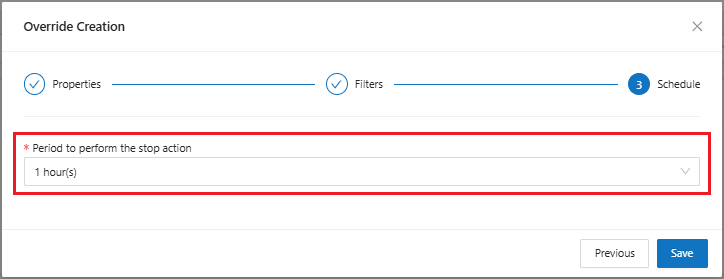
Ao avançar, o sistema irá exibir a tela de Agenda onde é possível definir o periodo para realizar a ação de parada.

<figure><img src="https://1687673077-files.gitbook.io/~/files/v0/b/gitbook-x-prod.appspot.com/o/spaces%2FZ9sinLUl52lDK1vg6b8g%2Fuploads%2FiQPmwIh3ZRvS03sMv1D7%2Fimage.png?alt=media&#x26;token=4fc590c7-4d8b-410f-86db-7649725bed17" alt=""><figcaption></figcaption></figure>

<figure><img src="https://1687673077-files.gitbook.io/~/files/v0/b/gitbook-x-prod.appspot.com/o/spaces%2FZ9sinLUl52lDK1vg6b8g%2Fuploads%2FDk5nMMWJeQxY7rJtx7c0%2Fimage.png?alt=media&#x26;token=9cc4b859-3a23-4c96-b3f8-fd938968fead" alt=""><figcaption></figcaption></figure>

5. **View Override**

When finished, the system will display the created Override on the main screen.

<figure><img src="https://1687673077-files.gitbook.io/~/files/v0/b/gitbook-x-prod.appspot.com/o/spaces%2FZ9sinLUl52lDK1vg6b8g%2Fuploads%2FEAOPR9CRla4X9hvTN8OZ%2Fimage.png?alt=media&#x26;token=4dcabfed-a5f2-4b29-8666-90a3013847d6" alt=""><figcaption></figcaption></figure>

* The system allows to view the settings of the Override created in the button "![](https://1687673077-files.gitbook.io/~/files/v0/b/gitbook-x-prod.appspot.com/o/spaces%2FZ9sinLUl52lDK1vg6b8g%2Fuploads%2Fme8JPLzQa5RbkaTBg2VW%2Fimage.png?alt=media\&token=e44e0f7f-41a8-43cf-a761-7d00e9dfe21a)"

<figure><img src="https://1687673077-files.gitbook.io/~/files/v0/b/gitbook-x-prod.appspot.com/o/spaces%2FZ9sinLUl52lDK1vg6b8g%2Fuploads%2FVxUUk3bteypL3vYYoSMp%2Fimage.png?alt=media&#x26;token=c22b14fa-72ca-407e-9da0-6c497c025e3b" alt=""><figcaption></figcaption></figure>

* The system allows to delete the created Override by clicking on the button "![](https://1687673077-files.gitbook.io/~/files/v0/b/gitbook-x-prod.appspot.com/o/spaces%2FZ9sinLUl52lDK1vg6b8g%2Fuploads%2FwKrPQOCcsP9QBkIg4VKc%2Fimage.png?alt=media\&token=a4728e1f-1d6c-4c32-813e-0a1d4c36c5b2)"