# Logs

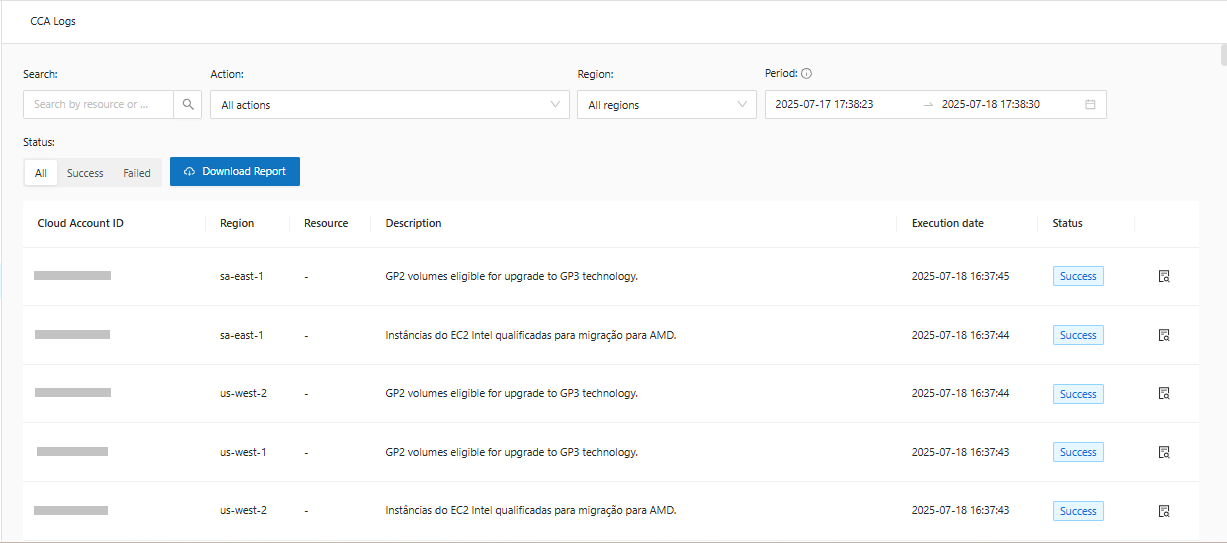
Logs is a CCA feature that allows you to have a complete history of the actions executed within the chosen period. In this history, you can see the **Account ID, Region, Resource, Description, Execution Date, Status** and an even more detailed view of the log.

**Accessing Logs**:

1. In the CCA side menu, select **Logs**:

<figure><img src="https://1687673077-files.gitbook.io/~/files/v0/b/gitbook-x-prod.appspot.com/o/spaces%2FZ9sinLUl52lDK1vg6b8g%2Fuploads%2FuKisZFd0dcmfLKT9wDeT%2Fimage.png?alt=media&#x26;token=daa04def-93af-4651-b1a4-6846a7acd8d6" alt=""><figcaption></figcaption></figure>

2. Important options in Logs:

<figure><img src="https://1687673077-files.gitbook.io/~/files/v0/b/gitbook-x-prod.appspot.com/o/spaces%2FZ9sinLUl52lDK1vg6b8g%2Fuploads%2Fd9urUMr12qkOv4EyRhA4%2Fimage.png?alt=media&#x26;token=853207c8-ca51-43e9-89db-38a1b32a2d31" alt=""><figcaption></figcaption></figure>

3. Search for the **account\_ID** you want to see the actions for:

<figure><img src="https://1687673077-files.gitbook.io/~/files/v0/b/gitbook-x-prod.appspot.com/o/spaces%2FZ9sinLUl52lDK1vg6b8g%2Fuploads%2FIBETTxrlriQudtgT06Zw%2Fimage.png?alt=media&#x26;token=d5364b2e-2ee9-461b-a648-299b0d205ae0" alt=""><figcaption></figcaption></figure>

4. Filter the **actions** option you want to see:

<figure><img src="https://1687673077-files.gitbook.io/~/files/v0/b/gitbook-x-prod.appspot.com/o/spaces%2FZ9sinLUl52lDK1vg6b8g%2Fuploads%2Fzh8pnDha73ZB1Wil5v3N%2Fimage.png?alt=media&#x26;token=c93c7b0e-04bb-46a6-84d7-9ceb9bbdaf1d" alt=""><figcaption></figcaption></figure>

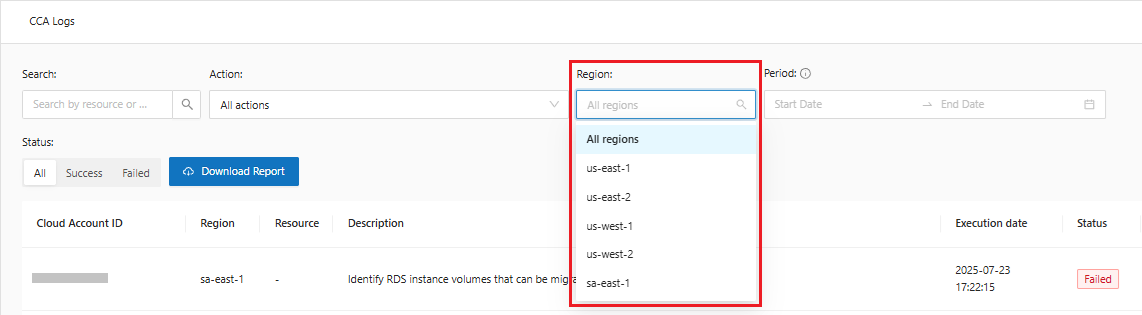
5. Look at the **region** of interest:

<figure><img src="https://1687673077-files.gitbook.io/~/files/v0/b/gitbook-x-prod.appspot.com/o/spaces%2FZ9sinLUl52lDK1vg6b8g%2Fuploads%2FbHaAU41WxgPurA6jk8om%2Fimage.png?alt=media&#x26;token=5255af90-8c5b-4526-99a9-374ed6353d86" alt=""><figcaption></figcaption></figure>

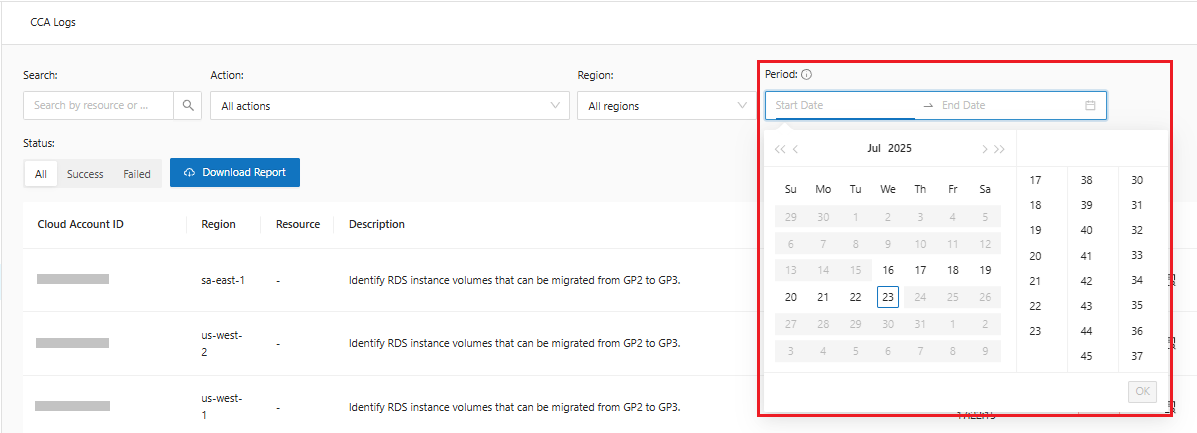
6. Filter by a specific **period**, limited to 7 days:

<figure><img src="https://1687673077-files.gitbook.io/~/files/v0/b/gitbook-x-prod.appspot.com/o/spaces%2FZ9sinLUl52lDK1vg6b8g%2Fuploads%2Fp6K1C2Smfn2i0OPUjjMu%2Fimage.png?alt=media&#x26;token=603174cc-05c4-4799-8e84-4d96b5cafce5" alt=""><figcaption></figcaption></figure>

{% hint style="warning" %}
Logs are available for 7 days.
{% endhint %}

7. Select the action **status** and **Download** the logs:

<figure><img src="https://1687673077-files.gitbook.io/~/files/v0/b/gitbook-x-prod.appspot.com/o/spaces%2FZ9sinLUl52lDK1vg6b8g%2Fuploads%2FaoLsfOlQ7O2O1fJ0Zq1I%2Fimage.png?alt=media&#x26;token=232a7f0b-58e7-4318-9b75-d17910089ad3" alt=""><figcaption></figcaption></figure>

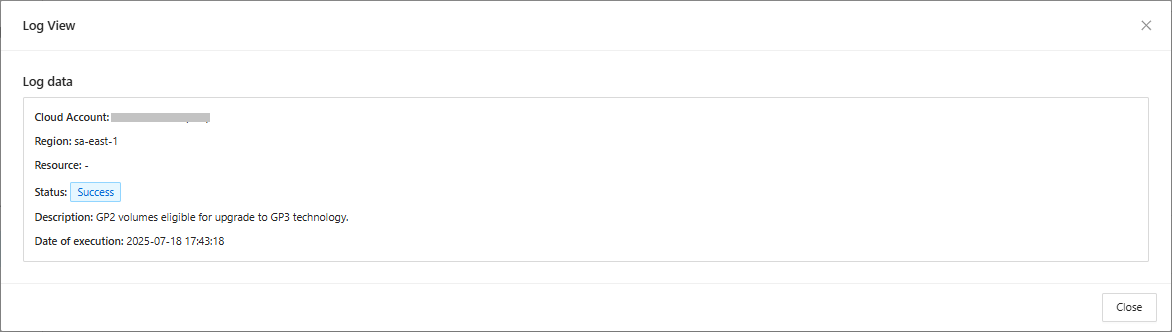
8. Get a **detailed view** of the chosen log by clicking the "![](https://1687673077-files.gitbook.io/~/files/v0/b/gitbook-x-prod.appspot.com/o/spaces%2FZ9sinLUl52lDK1vg6b8g%2Fuploads%2FRnDkmWzQhTLYZOStJWNp%2Fimage.png?alt=media\&token=c455b8f1-c1b7-4fd7-9d2b-f8bee462e4e7)" button:

<figure><img src="https://1687673077-files.gitbook.io/~/files/v0/b/gitbook-x-prod.appspot.com/o/spaces%2FZ9sinLUl52lDK1vg6b8g%2Fuploads%2FiGeWolxBMB2e5yQg7H3a%2Fimage.png?alt=media&#x26;token=242897bd-98c5-46a7-9f18-e655d4776e58" alt=""><figcaption></figcaption></figure>

<figure><img src="https://1687673077-files.gitbook.io/~/files/v0/b/gitbook-x-prod.appspot.com/o/spaces%2FZ9sinLUl52lDK1vg6b8g%2Fuploads%2FRwvphtOi14sx3HaLW5hB%2Fimage.png?alt=media&#x26;token=351e0835-3067-4b07-b80c-aab30fdbaeaa" alt=""><figcaption></figcaption></figure>