# RIs with low use

CCA functionality that monitors reserved instances that are with low use or idle. This functionality includes the following AWS services (EC2, RDS, Redshift, ElastiCache, Opensearch, Memory DB).

**How to get to RIs with low use:**&#x20;

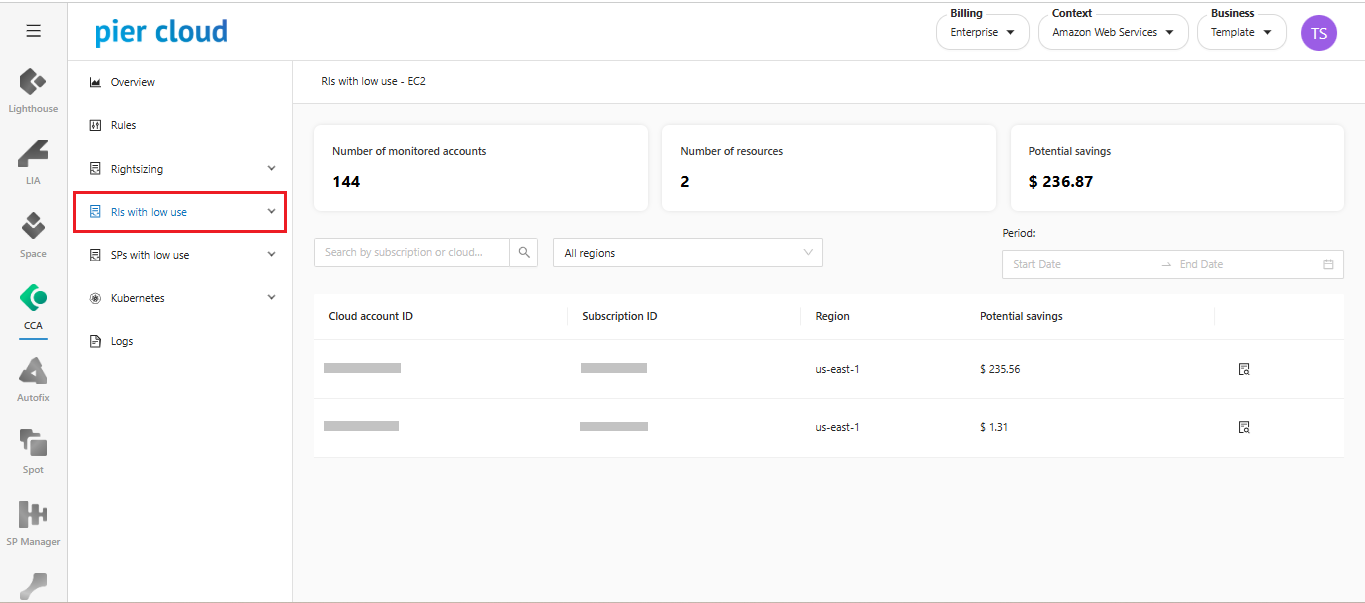
1. In the CCA features menu select **RIs with low use**.

<figure><img src="https://1687673077-files.gitbook.io/~/files/v0/b/gitbook-x-prod.appspot.com/o/spaces%2FZ9sinLUl52lDK1vg6b8g%2Fuploads%2FtPCJmNwBJhHyHx8UkrX8%2Fimage.png?alt=media&#x26;token=a5faca89-3c20-42be-8f9a-9a588c2f6ada" alt=""><figcaption></figcaption></figure>

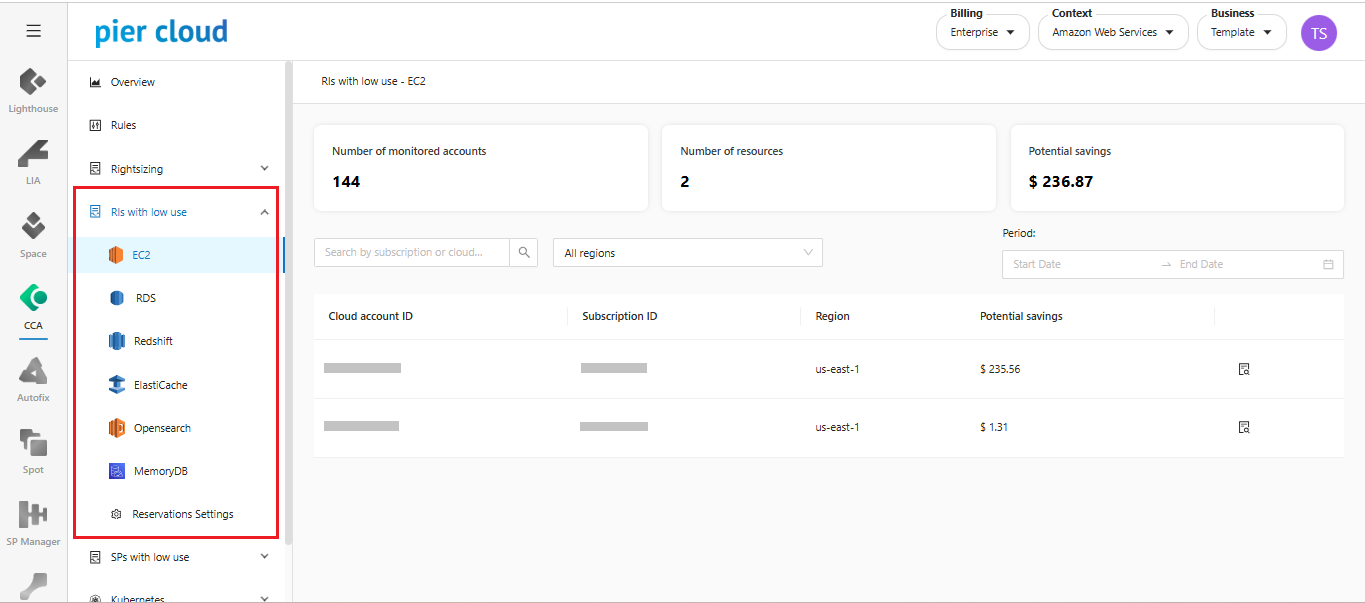
2. **Select the service**

In the side menu, you can select recommendations by AWS services: EC2, RDS, Redshift, ElastiCache, Opensearch, Memory DB.

<figure><img src="https://1687673077-files.gitbook.io/~/files/v0/b/gitbook-x-prod.appspot.com/o/spaces%2FZ9sinLUl52lDK1vg6b8g%2Fuploads%2FDYazFncGaoS876fLKRH1%2Fimage.png?alt=media&#x26;token=c60ed3d9-fd23-4bfa-8fa6-b50cf3b056e1" alt=""><figcaption></figcaption></figure>

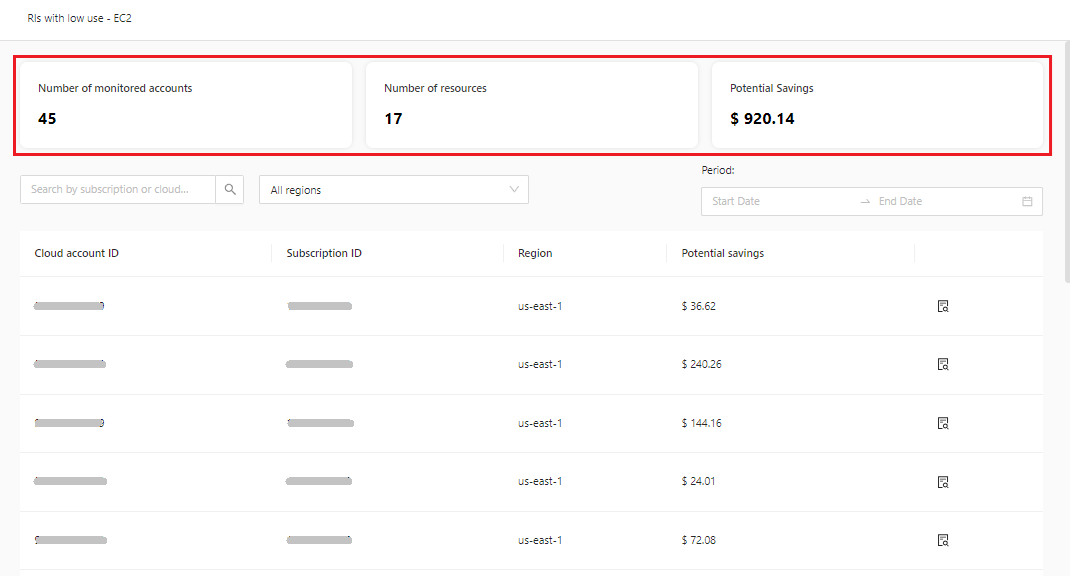
3. **Overview of recommendations**.

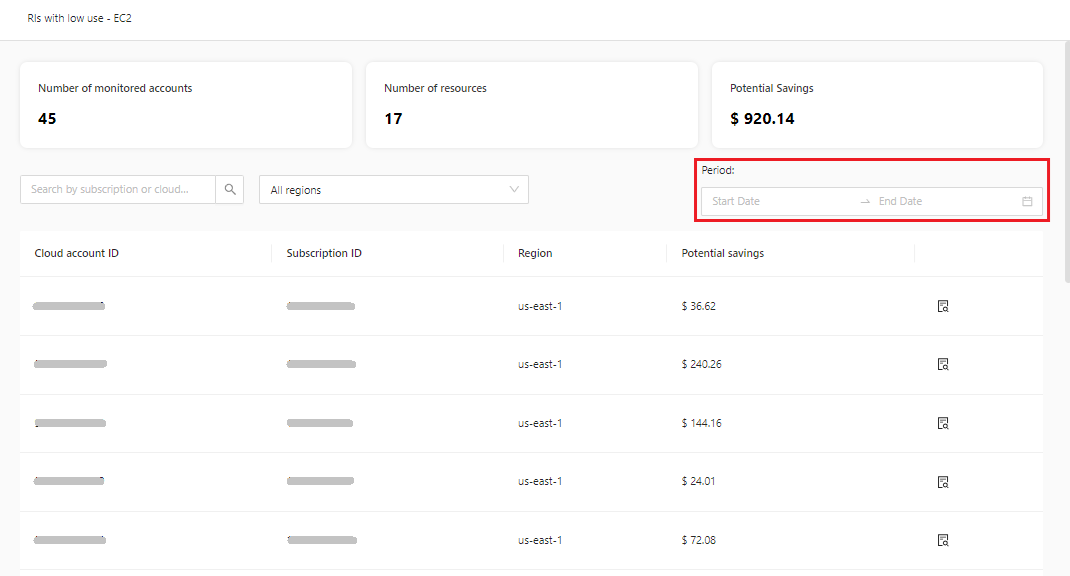
* **Number of monitored accounts:** Indicates the number of accounts that are being monitored for recommendations.&#x20;
* **Number of resources:** Indicates the number of resources available to carry out rightsizing actions.&#x20;
* **Potential Savings:** Total monthly savings to be obtained by executing the recommendations.

<figure><img src="https://1687673077-files.gitbook.io/~/files/v0/b/gitbook-x-prod.appspot.com/o/spaces%2FZ9sinLUl52lDK1vg6b8g%2Fuploads%2FhYGxQKssQ54yuKItL4e9%2Fimage.png?alt=media&#x26;token=8db1d770-ef2b-4b73-a972-380d5db168fc" alt=""><figcaption></figcaption></figure>

4. **Filter**:

* In the selected filter, you can filter recommendations by **Subscription ID** or **Account ID**.

<figure><img src="https://1687673077-files.gitbook.io/~/files/v0/b/gitbook-x-prod.appspot.com/o/spaces%2FZ9sinLUl52lDK1vg6b8g%2Fuploads%2FkOBAL34bvLwoDIProSNQ%2Fimage.png?alt=media&#x26;token=0804ddea-96fa-4d12-aa0c-6c8078b11a2b" alt=""><figcaption></figcaption></figure>

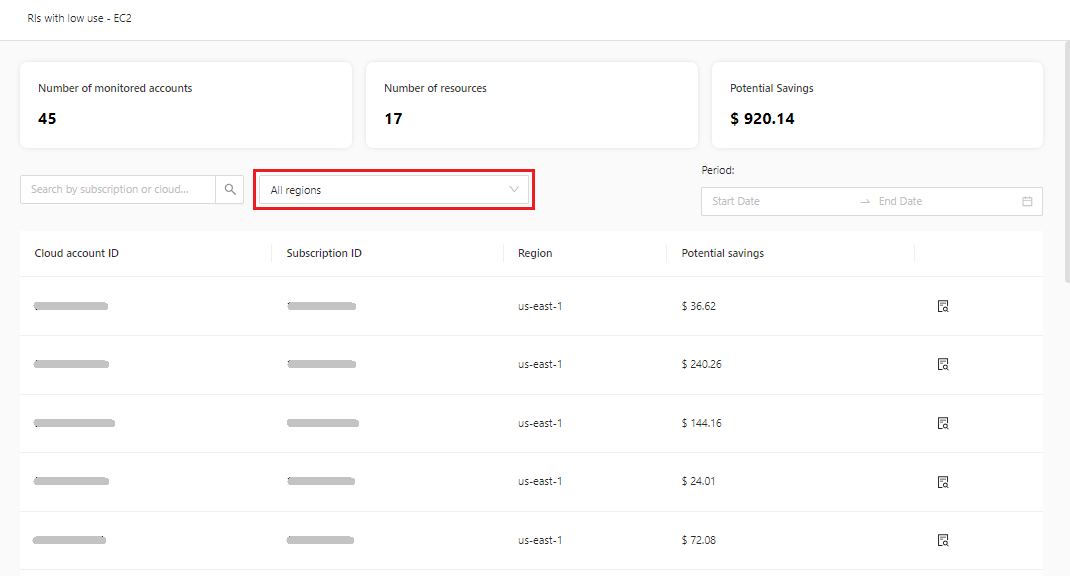
* In the selected filter, you can filter only the regions you want to see in the recommendations.

<figure><img src="https://1687673077-files.gitbook.io/~/files/v0/b/gitbook-x-prod.appspot.com/o/spaces%2FZ9sinLUl52lDK1vg6b8g%2Fuploads%2FcibbDssHpg0BH5RhlrTD%2Fimage.png?alt=media&#x26;token=e982a955-2178-4d5b-8aa9-147439368af3" alt=""><figcaption></figcaption></figure>

* In the selected filter, you can select only the period you want to see from the start date to the end date.

<figure><img src="https://1687673077-files.gitbook.io/~/files/v0/b/gitbook-x-prod.appspot.com/o/spaces%2FZ9sinLUl52lDK1vg6b8g%2Fuploads%2FLOStetQ4zFeTGAUtbNcn%2Fimage.png?alt=media&#x26;token=f78c2ac6-6653-409e-abcc-6402b604cc0a" alt=""><figcaption></figcaption></figure>

5. **View reservation informations**

<figure><img src="https://1687673077-files.gitbook.io/~/files/v0/b/gitbook-x-prod.appspot.com/o/spaces%2FZ9sinLUl52lDK1vg6b8g%2Fuploads%2FOz7W9FLtOcQQxeKqlgLA%2Fimage.png?alt=media&#x26;token=739de3a9-62af-4b31-b052-1e230263c3e0" alt=""><figcaption></figcaption></figure>

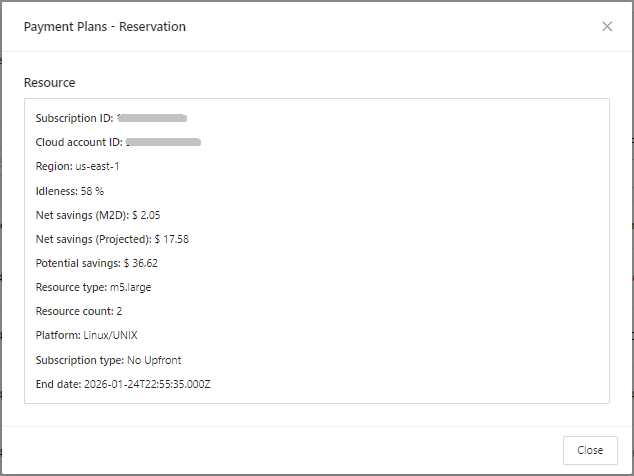
By clicking on the “**View reservation**” button, you can have more detailed information about the recommendation of the selected resource.

<figure><img src="https://1687673077-files.gitbook.io/~/files/v0/b/gitbook-x-prod.appspot.com/o/spaces%2FZ9sinLUl52lDK1vg6b8g%2Fuploads%2F7wP1FOkSsrsakP4NX3Xv%2Fimage.png?alt=media&#x26;token=765ffae0-636c-4da1-ab7c-a34b1927fb91" alt="" width="476"><figcaption></figcaption></figure>

6. **Reservations Settings**

<figure><img src="https://1687673077-files.gitbook.io/~/files/v0/b/gitbook-x-prod.appspot.com/o/spaces%2FZ9sinLUl52lDK1vg6b8g%2Fuploads%2FbmkBFsGjvttx94wNjUAe%2FCaptura%20de%20Tela%202025-08-14%20a%CC%80s%2012.55.56.png?alt=media&#x26;token=b1c94a4f-2ecc-4a83-be41-3f8095af414f" alt=""><figcaption></figcaption></figure>

* **Global Setting:** This is a default percentage that is considered for all types of reservations. Reservations with a utilization percentage below the defined value will be considered idle. If you want to change the default percentage for a specific resource, you can do so in the 'Settings by Resource' tab.&#x20;
* **Status**: The System allows you to activate or deactivate the Low Usage Reservations module at any time by activating the flag below:

<figure><img src="https://1687673077-files.gitbook.io/~/files/v0/b/gitbook-x-prod.appspot.com/o/spaces%2FZ9sinLUl52lDK1vg6b8g%2Fuploads%2Fu52VNXzJwzjx88nUJ8d6%2Fimage.png?alt=media&#x26;token=44b28561-ddcd-4e47-9d63-9ed24161d1c4" alt=""><figcaption></figcaption></figure>

* **Default Config:** A reservation is considered idle when its utilization is below 85%

7. **Settings by Resource**

It is possible to configure recommendations for a metric according to the business rule for each service you want.

The configuration is done by clicking the “**Add**” button.

<figure><img src="https://1687673077-files.gitbook.io/~/files/v0/b/gitbook-x-prod.appspot.com/o/spaces%2FZ9sinLUl52lDK1vg6b8g%2Fuploads%2FyduGEyo5OGqdzxM2LZis%2Fimage.png?alt=media&#x26;token=33cc65cb-d8b9-4e0e-b923-00bac0a7f91b" alt=""><figcaption></figcaption></figure>

8. **Create Setting**

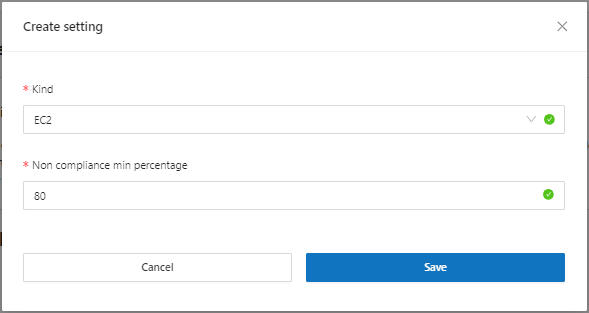
* **Kind:** Which service you want to create a reservation compliance configuration for.&#x20;
* **Non compliance min percentage:** This will insert the idleness percentage that will make the reservation idle for action recommendation on the selected reservation.&#x20;

<figure><img src="https://1687673077-files.gitbook.io/~/files/v0/b/gitbook-x-prod.appspot.com/o/spaces%2FZ9sinLUl52lDK1vg6b8g%2Fuploads%2FAL4EN1lgha3anHF9VDfC%2Fimage.png?alt=media&#x26;token=1f059349-16ca-4c2c-9760-ac2fb8755646" alt="" width="442"><figcaption></figcaption></figure>

When you click save, the system will return to the "**Settings by Resource"** screen.

9. **Actions**

* To **edit** an existing configuration, just click on the selected "![](https://1687673077-files.gitbook.io/~/files/v0/b/gitbook-x-prod.appspot.com/o/spaces%2FZ9sinLUl52lDK1vg6b8g%2Fuploads%2FK5HkEYzVBvspRBASvz4L%2Fimage.png?alt=media\&token=59404319-b51b-4048-a518-83b653974ff9)" button.

<figure><img src="https://1687673077-files.gitbook.io/~/files/v0/b/gitbook-x-prod.appspot.com/o/spaces%2FZ9sinLUl52lDK1vg6b8g%2Fuploads%2Frk1Kjtsyx6PhpDRAfmqB%2Fimage.png?alt=media&#x26;token=b86008f6-7aa3-413f-a37d-b2fc3dbf5727" alt=""><figcaption></figcaption></figure>

This will open a screen with the settings for editing.&#x20;

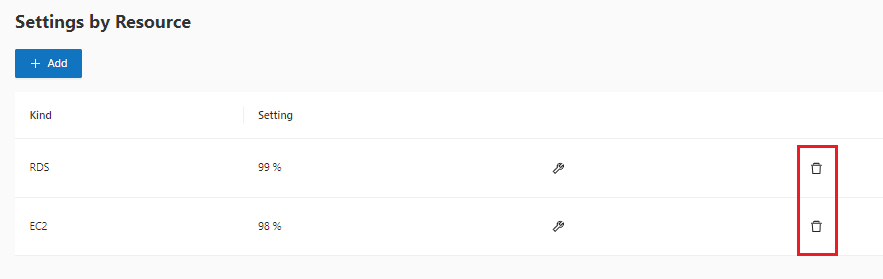
* You can delete the settings in the "![](https://1687673077-files.gitbook.io/~/files/v0/b/gitbook-x-prod.appspot.com/o/spaces%2FZ9sinLUl52lDK1vg6b8g%2Fuploads%2FX1LCk6NRIFPJgnsqSsbC%2Fimage.png?alt=media\&token=85cd24c1-751b-49d0-8598-d0a54cc79206)" trash.

<figure><img src="https://1687673077-files.gitbook.io/~/files/v0/b/gitbook-x-prod.appspot.com/o/spaces%2FZ9sinLUl52lDK1vg6b8g%2Fuploads%2FVHEa5EVH4iwwMDVAHG9m%2Fimage.png?alt=media&#x26;token=47afeff9-fb9c-42dc-9826-d58e7ac200f2" alt=""><figcaption></figcaption></figure>

\
\ <br>