# SPs with low use

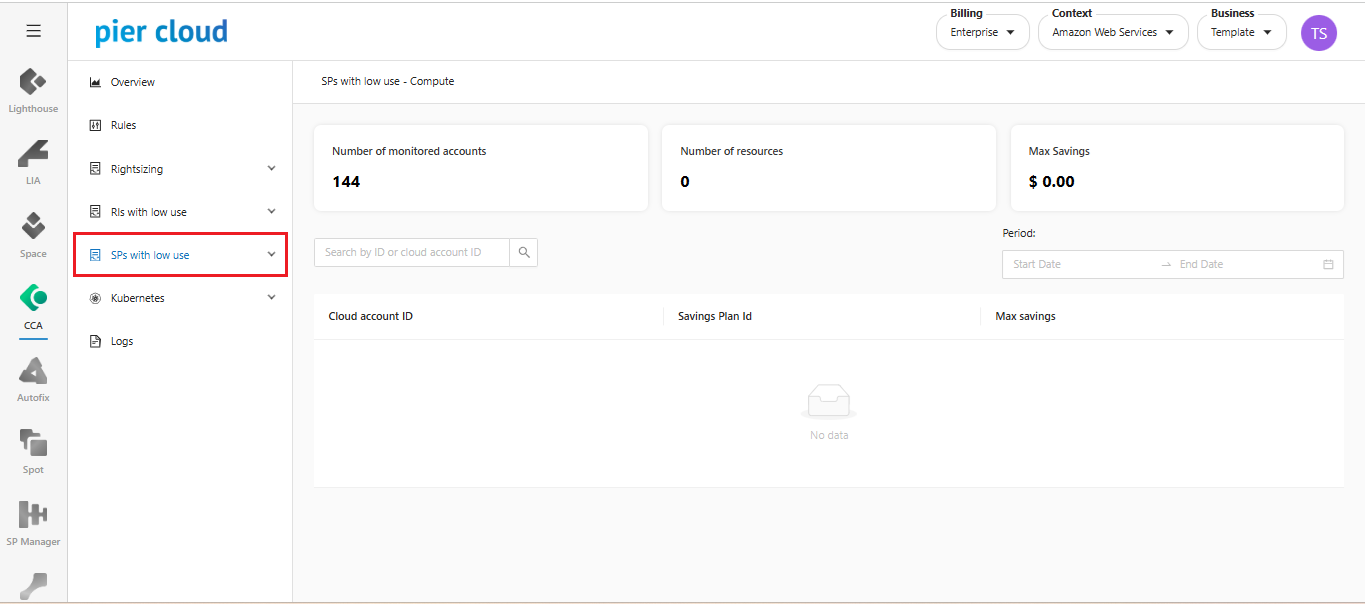
It is a CCA feature that analyzes contracted savings plans that are with low use.

**How to get to SPs with low use:**&#x20;

1. In the CCA features menu select **SPs with low use**.

<figure><img src="https://1687673077-files.gitbook.io/~/files/v0/b/gitbook-x-prod.appspot.com/o/spaces%2FZ9sinLUl52lDK1vg6b8g%2Fuploads%2FCoAQnRLSPhLmjFjHhcwN%2Fimage.png?alt=media&#x26;token=1b6a85c7-3850-47d3-b2aa-6819c68b9c1b" alt=""><figcaption></figcaption></figure>

2. **Select service:**

The SPs with low use make recommendations across three services: **Compute, EC2 Instances and Sage Maker.**

<figure><img src="https://1687673077-files.gitbook.io/~/files/v0/b/gitbook-x-prod.appspot.com/o/spaces%2FZ9sinLUl52lDK1vg6b8g%2Fuploads%2F3enRtHEpCf6GHoRIlInp%2Fimage.png?alt=media&#x26;token=261007aa-12b0-472e-9b83-64f603094cfe" alt=""><figcaption></figcaption></figure>

3. **Overview of recommendations**

* **Number of monitored accounts**: Indicates the number of accounts that are being monitored for recommendations.&#x20;
* **Number of resources**: Indicates the number of resources available to carry out rightsizing actions.
* **Max Savings**: Maximum total monthly savings to be obtained by executing the recommendations.

<figure><img src="https://1687673077-files.gitbook.io/~/files/v0/b/gitbook-x-prod.appspot.com/o/spaces%2FZ9sinLUl52lDK1vg6b8g%2Fuploads%2F8ROnPCBIUW66uEvfV2Rf%2Fimage.png?alt=media&#x26;token=c51f77e8-1ade-479e-859e-9d93287cd756" alt=""><figcaption></figcaption></figure>

4. **Filters**

* In the selected filter, you can filter recommendations by **Account ID** or by **Savings plan ID**.

<figure><img src="https://1687673077-files.gitbook.io/~/files/v0/b/gitbook-x-prod.appspot.com/o/spaces%2FZ9sinLUl52lDK1vg6b8g%2Fuploads%2FWaQYDnfX4oCQXWAhkfz0%2Fimage.png?alt=media&#x26;token=43759fa3-b795-4418-80fe-c42ed8cd6d72" alt=""><figcaption></figcaption></figure>

* In the selected filter, you can select only the period you want to see from the start date to the end date.

<figure><img src="https://1687673077-files.gitbook.io/~/files/v0/b/gitbook-x-prod.appspot.com/o/spaces%2FZ9sinLUl52lDK1vg6b8g%2Fuploads%2F6ztBFfuZm4YgzKOk03tv%2Fimage.png?alt=media&#x26;token=569f209d-e3e1-4297-9060-3101fde3d502" alt=""><figcaption></figcaption></figure>

5. **View information**.

<figure><img src="https://1687673077-files.gitbook.io/~/files/v0/b/gitbook-x-prod.appspot.com/o/spaces%2FZ9sinLUl52lDK1vg6b8g%2Fuploads%2FJfOourgjSyF93TOVcxoc%2Fimage.png?alt=media&#x26;token=7537bc0e-5e8a-4203-a67b-72c675276a6d" alt=""><figcaption></figcaption></figure>

By clicking on the “**View information**” button, you can have more detailed information about the recommendation of the selected resource.

<figure><img src="https://1687673077-files.gitbook.io/~/files/v0/b/gitbook-x-prod.appspot.com/o/spaces%2FZ9sinLUl52lDK1vg6b8g%2Fuploads%2FUp44JVpt2hhz3k4dA0Wx%2Fimage.png?alt=media&#x26;token=67e142bc-cb86-4e4e-b414-531ee3c0c0a9" alt="" width="563"><figcaption></figcaption></figure>

6. **Savings Plans Settings**

* **Global Setting**: This is a default percentage that is considered for all types of savings plans. Savings plans with a utilization percentage below the defined value will be considered idle. If you wish to change the default percentage for a specific resource, you can do so in the '**Settings by Resource**' tab.&#x20;
* **Default Config**: A savings plan is considered idle when its utilization is below 85%.

<figure><img src="https://1687673077-files.gitbook.io/~/files/v0/b/gitbook-x-prod.appspot.com/o/spaces%2FZ9sinLUl52lDK1vg6b8g%2Fuploads%2Fg08vNQH9yhGnwiz16Yzb%2Fimage.png?alt=media&#x26;token=07da001f-d8da-479c-90fb-7d1a727e2697" alt=""><figcaption></figcaption></figure>

7. **Settings by Resource**

* Using the **add** button, it is possible to create a new savings plan configuration.

<figure><img src="https://1687673077-files.gitbook.io/~/files/v0/b/gitbook-x-prod.appspot.com/o/spaces%2FZ9sinLUl52lDK1vg6b8g%2Fuploads%2FoDZjXRpeuIlt7fyNm6dn%2Fimage.png?alt=media&#x26;token=2c877e6e-f5f0-4d42-bd77-ceb332366b54" alt=""><figcaption></figcaption></figure>

8. **Create Setting**

* **Kind**: Which service you want to create a reservation compliance configuration for.
* **Non compliance min percentage**: This will insert the idle percentage that will make the savings plans with low use for recommending action on the resource.

<figure><img src="https://1687673077-files.gitbook.io/~/files/v0/b/gitbook-x-prod.appspot.com/o/spaces%2FZ9sinLUl52lDK1vg6b8g%2Fuploads%2FHrmeZLMSg8SfNb90i21B%2Fimage.png?alt=media&#x26;token=3adfb289-76b1-4dee-978d-fe032f11cf1e" alt="" width="439"><figcaption></figcaption></figure>

9. **Actions**

* It is possible to **edit** an existing configuration in the selected button.

<figure><img src="https://1687673077-files.gitbook.io/~/files/v0/b/gitbook-x-prod.appspot.com/o/spaces%2FZ9sinLUl52lDK1vg6b8g%2Fuploads%2F0bP2bexlmGfMSnHxSgO9%2Fimage.png?alt=media&#x26;token=792ac429-55d6-4d14-90e1-8ebeaf378d1a" alt=""><figcaption></figcaption></figure>

* And you can **delete** the settings in the trash.
<figure><img src="https://1687673077-files.gitbook.io/~/files/v0/b/gitbook-x-prod.appspot.com/o/spaces%2FZ9sinLUl52lDK1vg6b8g%2Fuploads%2F79Du22YYwCTTy1s294Od%2Fimage.png?alt=media&#x26;token=f0d3567f-50e5-45a1-82d2-b41a2c164602" alt=""><figcaption></figcaption></figure>
