# Business anomalies

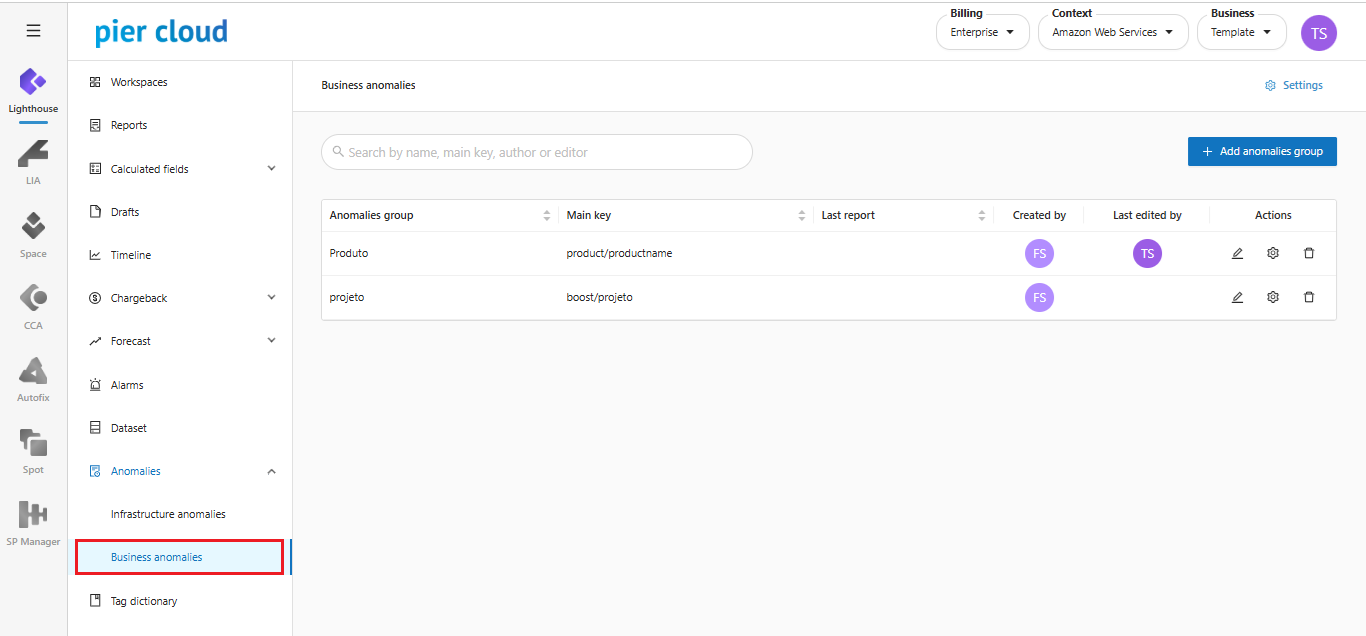
**Step by step execution:**

1. In Anomalies, access the **Business Anomalies** functionality:

<figure><img src="https://1687673077-files.gitbook.io/~/files/v0/b/gitbook-x-prod.appspot.com/o/spaces%2FZ9sinLUl52lDK1vg6b8g%2Fuploads%2FLmhT8f9LqD3pNs1eKkmE%2Fimage.png?alt=media&#x26;token=7dbbcd8c-2a6e-4b9a-9275-540759814a54" alt=""><figcaption></figcaption></figure>

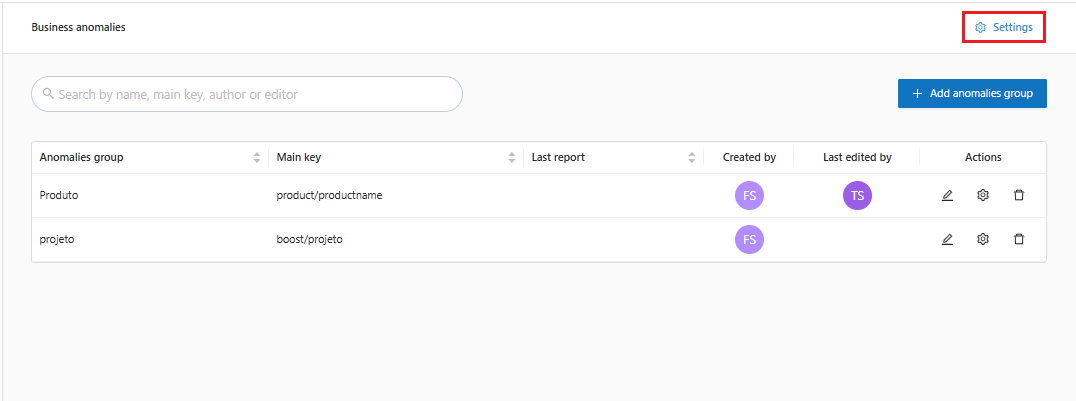
2. The system will open on the main **Business Anomalies** screen with the possibility of configurations, by clicking on the **"**![](https://1687673077-files.gitbook.io/~/files/v0/b/gitbook-x-prod.appspot.com/o/spaces%2FZ9sinLUl52lDK1vg6b8g%2Fuploads%2FCThyjrElsNpNsSG80Nbq%2Fimage.png?alt=media\&token=e30563df-7951-4ad8-9f60-d062cfe4b9c3)**"** icon, as highlighted below:

<figure><img src="https://1687673077-files.gitbook.io/~/files/v0/b/gitbook-x-prod.appspot.com/o/spaces%2FZ9sinLUl52lDK1vg6b8g%2Fuploads%2FGiv68lVlLl5CQxHE3bGy%2Fimage.png?alt=media&#x26;token=c7f66061-5ca7-4177-80b1-870ed2d93c7e" alt=""><figcaption></figcaption></figure>

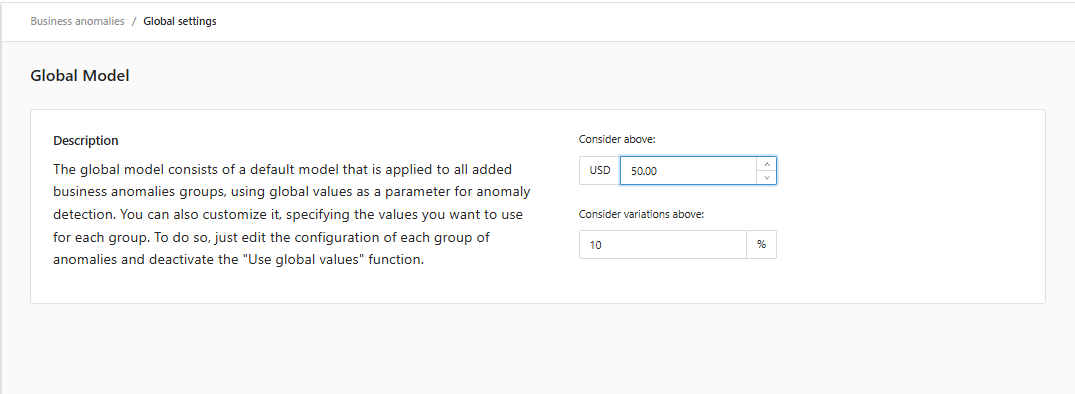
3. The screen for configuring the **Detection Model** will be displayed:

{% hint style="info" %}
Before configuring the model, understand how the anomaly is detected:&#x20;

The model calculates the variation in consumption between the current date **(D0)** and the model date **(D-1, D-7 and D-14)** and checks whether the variation is above the value ($) or % configured in the model.

**D-1**: Date of the previous day&#x20;

**D-7**: Date of 7 days ago&#x20;

**D-14**: Date of the last 14 days (average of the period)
{% endhint %}

4. Configure the model:

There are two options for configuring the template:

{% tabs %}
{% tab title="Global" %}
The parameters configured in this option are propagated to all registered business anomaly groups.&#x20;
{% endtab %}

{% tab title="By Anomaly Group" %}
The parameters configured in this option only affect the specific group.
{% endtab %}
{% endtabs %}

* **Global**    &#x20;

  * Set a value ($) and a percentage (%) that will be considered reasonable for all added anomaly groups.

  <figure><img src="https://1687673077-files.gitbook.io/~/files/v0/b/gitbook-x-prod.appspot.com/o/spaces%2FZ9sinLUl52lDK1vg6b8g%2Fuploads%2F0EX39yX7vjZVfef6xwKS%2Fimage.png?alt=media&#x26;token=a91154c9-91b4-4db8-9fac-2e8edb7760f3" alt=""><figcaption></figcaption></figure>
* **By Anomaly Group**
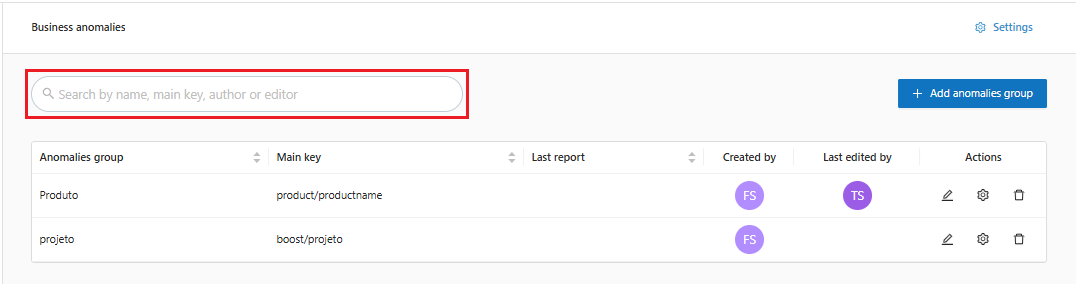
  * In the **Anomaly Groups** list, the system allows you to search by **name, main key, author or editor**.

<figure><img src="https://1687673077-files.gitbook.io/~/files/v0/b/gitbook-x-prod.appspot.com/o/spaces%2FZ9sinLUl52lDK1vg6b8g%2Fuploads%2Fkn2XLgQBrcoZ4Zbh5LlP%2Fimage.png?alt=media&#x26;token=5b76588b-42a6-4445-8907-3fd7bd6f3c9c" alt=""><figcaption></figcaption></figure>

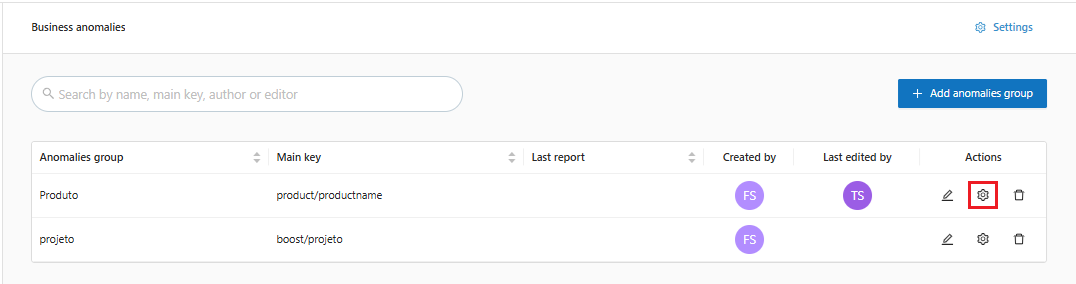
* In addition to adjusting the setting in the anomaly group row by clicking on the "![](https://1687673077-files.gitbook.io/~/files/v0/b/gitbook-x-prod.appspot.com/o/spaces%2FZ9sinLUl52lDK1vg6b8g%2Fuploads%2FEwT2Q5WDDIsjgeLXPdzb%2Fimage.png?alt=media\&token=e3daf3ea-2d2f-49f3-a781-a8d6cb41ddc3)" gear icon as highlighted below:

<figure><img src="https://1687673077-files.gitbook.io/~/files/v0/b/gitbook-x-prod.appspot.com/o/spaces%2FZ9sinLUl52lDK1vg6b8g%2Fuploads%2FHW0pBDjwRYsEdL7EuGYx%2Fimage.png?alt=media&#x26;token=f034a5bd-1e96-4edb-900a-5f7da5c53b84" alt=""><figcaption></figcaption></figure>

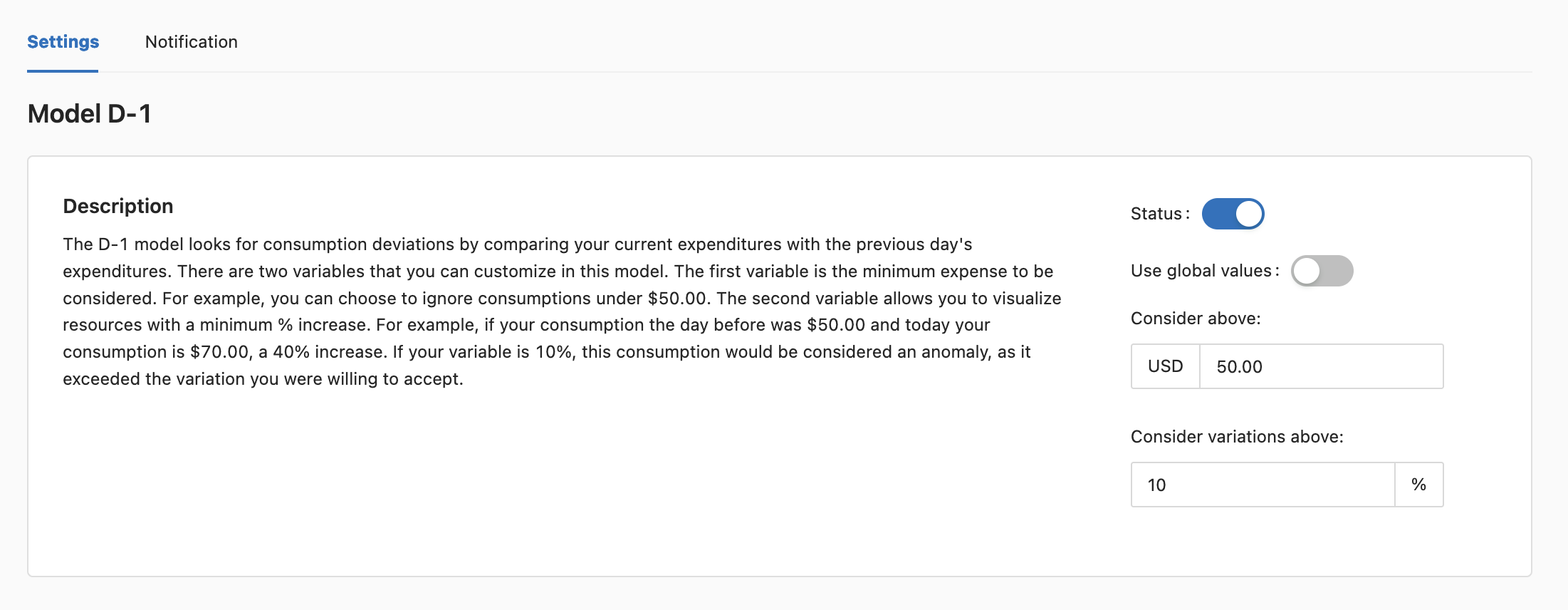
5. On the model configuration screen, the system allows you to:&#x20;

* In the **Settings** tab, the system allows you to:
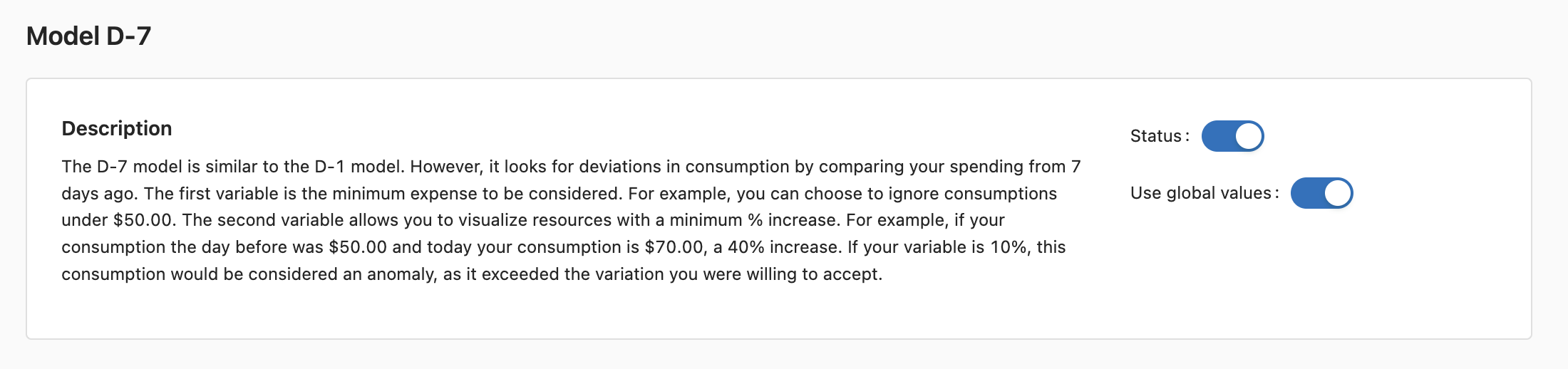
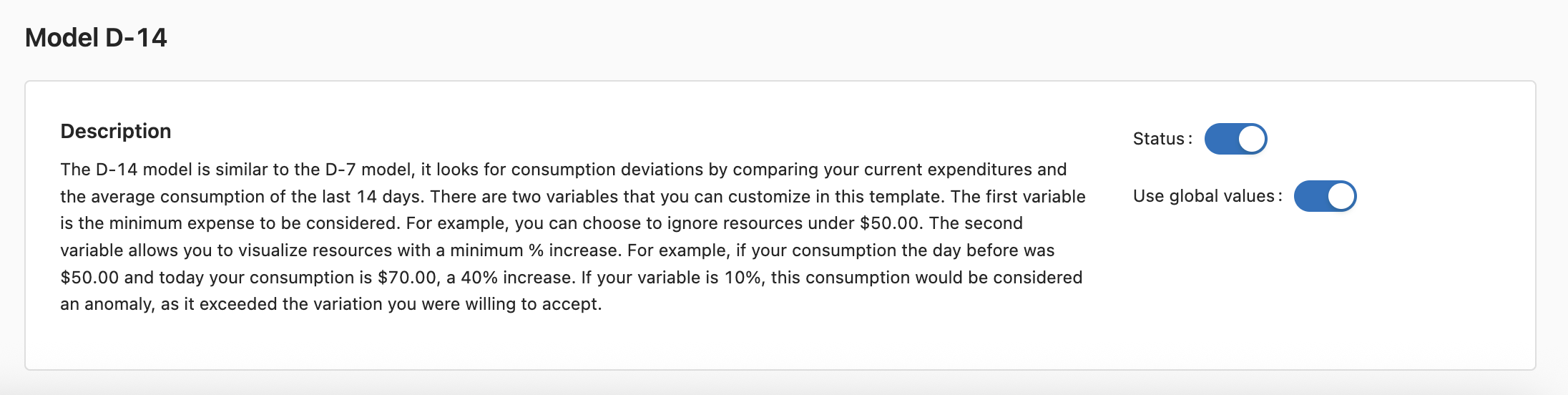
  * Disable the Model that should not be applied by clicking on the **Status** button.&#x20;
  * Disable the "**Use global values**" option to enter the value ($) and the percentage (%) that will be considered outside the acceptable standard for each of the models.

<figure><img src="https://1687673077-files.gitbook.io/~/files/v0/b/gitbook-x-prod.appspot.com/o/spaces%2FZ9sinLUl52lDK1vg6b8g%2Fuploads%2FYsSRfDSzaxrqk4jFWccC%2Fimage.png?alt=media&#x26;token=f9a567f6-275b-4d6e-9f5b-5fe583f75ba1" alt=""><figcaption></figcaption></figure>

<figure><img src="https://1687673077-files.gitbook.io/~/files/v0/b/gitbook-x-prod.appspot.com/o/spaces%2FZ9sinLUl52lDK1vg6b8g%2Fuploads%2F5G7mIMS8ekKkzRF53GS2%2FCaptura%20de%20Tela%202025-09-18%20a%CC%80s%2015.10.35.png?alt=media&#x26;token=ac082215-0ea2-4506-adc9-e712a23b8052" alt=""><figcaption></figcaption></figure>

<figure><img src="https://1687673077-files.gitbook.io/~/files/v0/b/gitbook-x-prod.appspot.com/o/spaces%2FZ9sinLUl52lDK1vg6b8g%2Fuploads%2FgNT1MO9khxOX1CU3bDvz%2FCaptura%20de%20Tela%202025-09-18%20a%CC%80s%2015.11.30.png?alt=media&#x26;token=1fae04d3-ae52-419d-a864-d08bdecf5081" alt=""><figcaption></figcaption></figure>

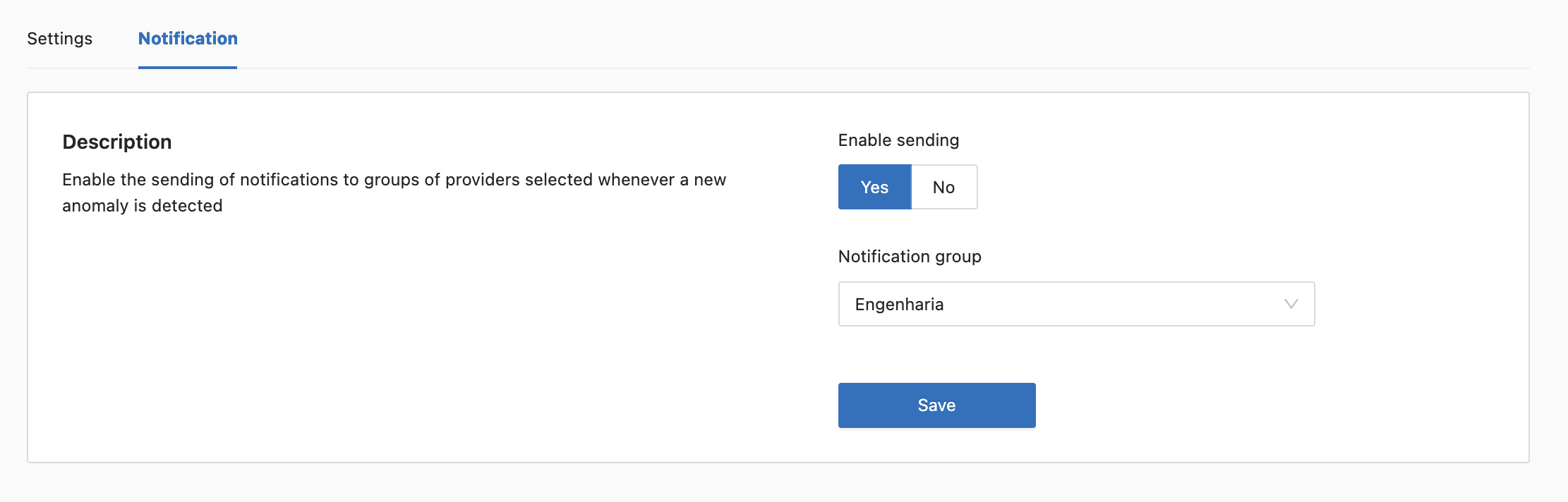
* In the **Notification** tab, the system allows you to enable sending by clicking **Yes** and selecting the desired **Notification Group**.

<figure><img src="https://1687673077-files.gitbook.io/~/files/v0/b/gitbook-x-prod.appspot.com/o/spaces%2FZ9sinLUl52lDK1vg6b8g%2Fuploads%2FCQEBLQ485zGuOzaa1Qxl%2Fimage.png?alt=media&#x26;token=86caf3bb-3753-4444-bdae-8c4141f75b72" alt=""><figcaption></figcaption></figure>

{% hint style="info" %}
To select the Notification Group, it is necessary to configure the desired groups within the [Notifications ](https://docs.piercloud.com.br/plataforma-de-finops/finops-platform-english/platform-configuration/setup-features/notifications)functionality, so that they are pre-registered and available for selection.
{% endhint %}

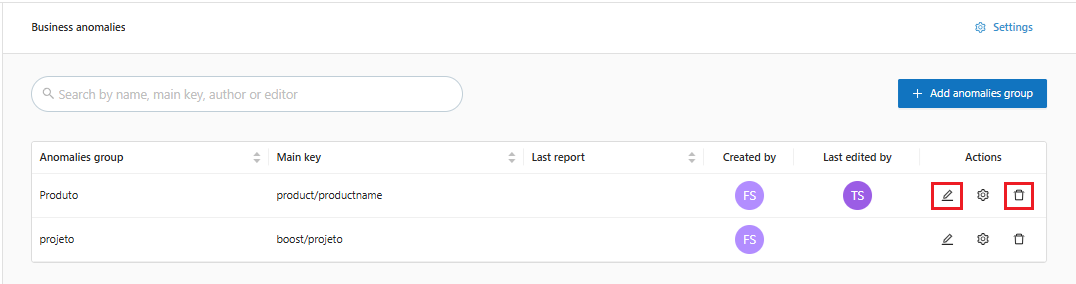
6. When returning to the main business anomalies screen, the system provides a few more action options, as highlighted below:

<figure><img src="https://1687673077-files.gitbook.io/~/files/v0/b/gitbook-x-prod.appspot.com/o/spaces%2FZ9sinLUl52lDK1vg6b8g%2Fuploads%2F0xcZ8r1F4etqCBkJ4rcz%2Fimage.png?alt=media&#x26;token=a8773346-087d-48f1-b292-6f26e08250c0" alt=""><figcaption></figcaption></figure>

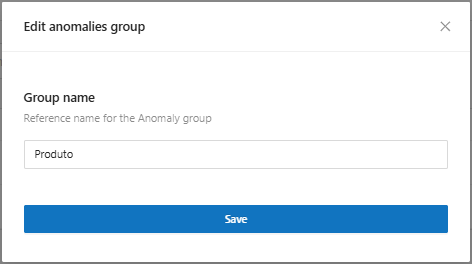
* **Edit**: By clicking the "![](https://1687673077-files.gitbook.io/~/files/v0/b/gitbook-x-prod.appspot.com/o/spaces%2FZ9sinLUl52lDK1vg6b8g%2Fuploads%2FlnWGi0A3hQSkwrhuysQa%2F%7B496B744F-8AFE-499A-9780-7D8F5A43C8E1%7D.png?alt=media\&token=12560161-df7b-495f-9488-77c704c7e81e)" icon, the system allows you to edit the name of the anomaly group.

<figure><img src="https://1687673077-files.gitbook.io/~/files/v0/b/gitbook-x-prod.appspot.com/o/spaces%2FZ9sinLUl52lDK1vg6b8g%2Fuploads%2F47LilkmHsbXRiaanHxhc%2Fimage.png?alt=media&#x26;token=187a032b-ef27-47ee-b503-49056d0fcb12" alt=""><figcaption></figcaption></figure>

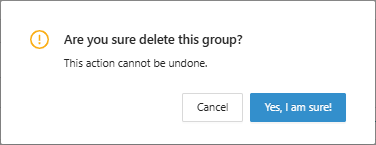
* **Remove**: When clicking on the "![](https://1687673077-files.gitbook.io/~/files/v0/b/gitbook-x-prod.appspot.com/o/spaces%2FZ9sinLUl52lDK1vg6b8g%2Fuploads%2FNM68w3ZVPgAbxpwJa3PJ%2F%7B82624244-11AE-4F6D-985C-8EB75547D768%7D.png?alt=media\&token=ce8fbfae-a8c8-4bf2-ae3f-a36dc1c5e9c2)" icon, the system will display a confirmation screen to carry out the deletion.
<figure><img src="https://1687673077-files.gitbook.io/~/files/v0/b/gitbook-x-prod.appspot.com/o/spaces%2FZ9sinLUl52lDK1vg6b8g%2Fuploads%2Fnu9IX255CQG2wQG8PVf7%2Fimage.png?alt=media&#x26;token=61f9242a-9a51-4184-8174-3899f1e23f3a" alt=""><figcaption></figcaption></figure>