# View Field

1. **Filters**&#x20;

* On the main screen, the system allows to search for a created Field by **name**.&#x20;
* It is also possible to filter by **field type** (String, Number and Date) or all existing types.

<figure><img src="https://1687673077-files.gitbook.io/~/files/v0/b/gitbook-x-prod.appspot.com/o/spaces%2FZ9sinLUl52lDK1vg6b8g%2Fuploads%2FEoVbNAhP2Ck5GHYQDRp4%2Fimage.png?alt=media&#x26;token=40b410cf-56d4-4ed8-96da-6a4f4c099f5a" alt=""><figcaption></figcaption></figure>

When entering the information for the desired field, the system will return the specific field:&#x20;

2. **View Field**&#x20;

By clicking on the **field name**, the system will open a screen to view the information related to the field, in detail.

<figure><img src="https://1687673077-files.gitbook.io/~/files/v0/b/gitbook-x-prod.appspot.com/o/spaces%2FZ9sinLUl52lDK1vg6b8g%2Fuploads%2FxbiadRaRMQPP9aiydrEZ%2Fimage.png?alt=media&#x26;token=27bd54a2-1426-4593-9521-2130eb056c69" alt=""><figcaption></figcaption></figure>

* **Attributes**:&#x20;
  * On the Attributes tab, by clicking the "**Edit**" button, the system allows to edit information regarding the **Field Name, Data Type, Description and Data Connector kinds**.

<figure><img src="https://1687673077-files.gitbook.io/~/files/v0/b/gitbook-x-prod.appspot.com/o/spaces%2FZ9sinLUl52lDK1vg6b8g%2Fuploads%2FPN2MZ4llROHAoE9nXmAl%2Fimage.png?alt=media&#x26;token=4fbd8362-bda8-4248-a625-d53b8eebe849" alt=""><figcaption></figcaption></figure>

* **SQL**&#x20;
  * In the **SQL** tab, by clicking the "**Create version**" button, the system allows to create a new version, editing the current version and Testing the field.

<figure><img src="https://1687673077-files.gitbook.io/~/files/v0/b/gitbook-x-prod.appspot.com/o/spaces%2FZ9sinLUl52lDK1vg6b8g%2Fuploads%2FX3GneSNoDA3PbMdui26J%2Fimage.png?alt=media&#x26;token=22b8f1f6-b642-416b-a389-ddd6710e6c5e" alt=""><figcaption></figcaption></figure>

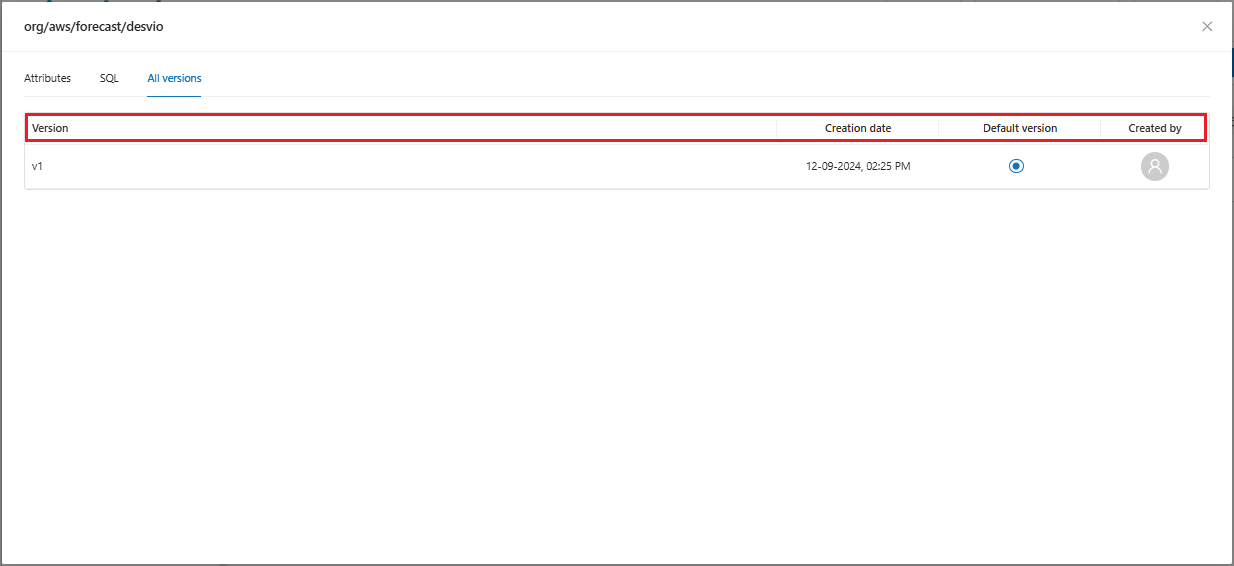
* **All versions**&#x20;
  * On the **All Versions** tab, the system allows to view all existing **versions** of the field, the **creation date** of each version, the **default version** and the person **responsible** for its creation.

<figure><img src="https://1687673077-files.gitbook.io/~/files/v0/b/gitbook-x-prod.appspot.com/o/spaces%2FZ9sinLUl52lDK1vg6b8g%2Fuploads%2Fnxqhz2oRnvHYovREDc7i%2Fimage.png?alt=media&#x26;token=338c37ff-c6b8-4c6c-90bf-d45831e0b92b" alt=""><figcaption></figcaption></figure>

3. **Actions**&#x20;

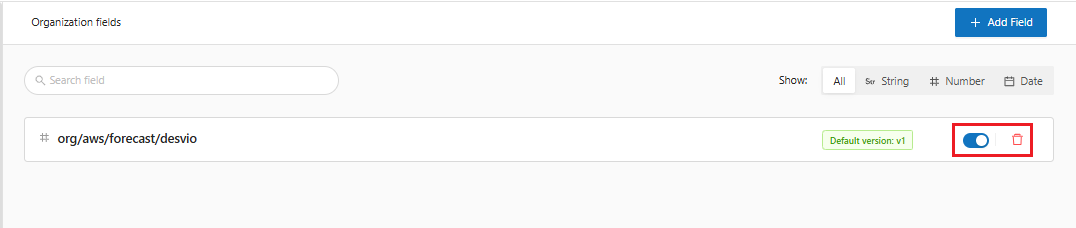
On the main screen, the system allows to:

* **Enable/Disable** the field by clicking the "![](https://1687673077-files.gitbook.io/~/files/v0/b/gitbook-x-prod.appspot.com/o/spaces%2FZ9sinLUl52lDK1vg6b8g%2Fuploads%2FlP8OfnuZ3gynvNtTaD0g%2Fimage.png?alt=media\&token=336a23e8-ed66-4d76-8886-50d1b9d65901)" button and&#x20;
* **Delete** the field by clicking the "![](https://1687673077-files.gitbook.io/~/files/v0/b/gitbook-x-prod.appspot.com/o/spaces%2FZ9sinLUl52lDK1vg6b8g%2Fuploads%2FhGjnR03t02cR58ShHtYA%2Fimage.png?alt=media\&token=1624ef80-b337-4b2a-980b-caea505d93ca)" button.

<figure><img src="https://1687673077-files.gitbook.io/~/files/v0/b/gitbook-x-prod.appspot.com/o/spaces%2FZ9sinLUl52lDK1vg6b8g%2Fuploads%2FwQbV3Bkw6atsqYEtD1HW%2Fimage.png?alt=media&#x26;token=f1bc675b-1f0c-47f6-b85e-8d9198b5ac4f" alt=""><figcaption></figcaption></figure>

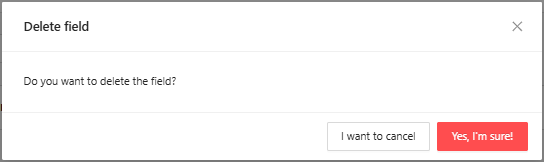
By clicking the "**Delete**" button, the system will display a screen to confirm the deletion:

<figure><img src="https://1687673077-files.gitbook.io/~/files/v0/b/gitbook-x-prod.appspot.com/o/spaces%2FZ9sinLUl52lDK1vg6b8g%2Fuploads%2FqqLenbcxHIUZoRal6fJ1%2Fimage.png?alt=media&#x26;token=46c86290-92d6-4543-b35a-485f53b1839a" alt=""><figcaption></figcaption></figure>

in the "**Yes, I'm sure!**" option, the system will confirm the deletion and will no longer display the field on the screen.