# Organizational Map

**Step by step execution**:&#x20;

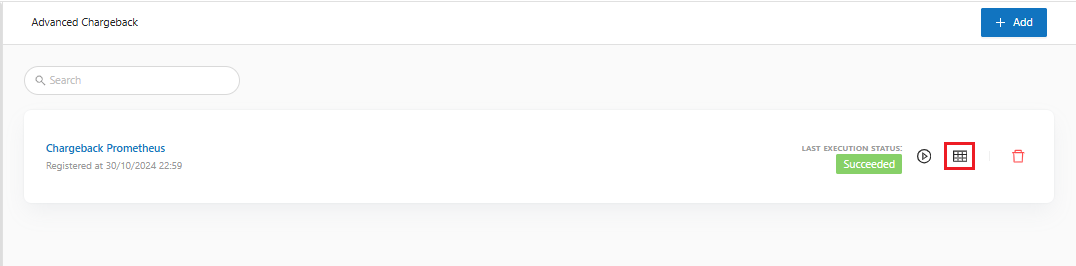
**Step 1**: On the main screen, when clicking on the **Organizational Map** button "![](https://1687673077-files.gitbook.io/~/files/v0/b/gitbook-x-prod.appspot.com/o/spaces%2FZ9sinLUl52lDK1vg6b8g%2Fuploads%2FQx5j72U9muel9zRndM6q%2Fimage.png?alt=media\&token=8d3d824e-b5cf-4aed-a40d-536ba1508f52)":

<figure><img src="https://1687673077-files.gitbook.io/~/files/v0/b/gitbook-x-prod.appspot.com/o/spaces%2FZ9sinLUl52lDK1vg6b8g%2Fuploads%2F9ase8ASqiBURTOwlqfml%2Fimage.png?alt=media&#x26;token=329f140c-6f32-4610-ae60-41a0b164c5a6" alt=""><figcaption></figcaption></figure>

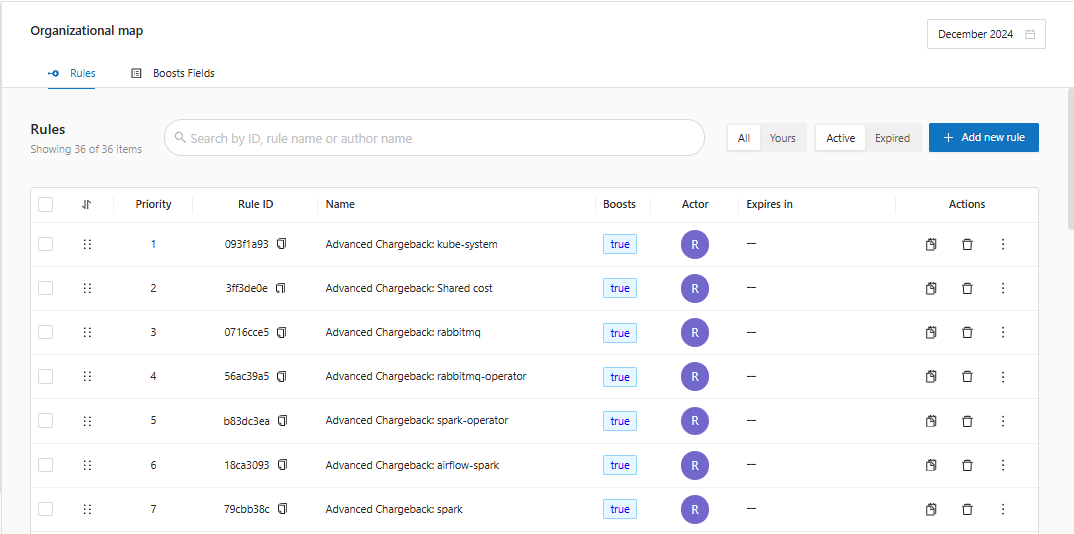
**Step 2**: The system will open the **Organizational Map** screen built for Advanced Chargeback:

<figure><img src="https://1687673077-files.gitbook.io/~/files/v0/b/gitbook-x-prod.appspot.com/o/spaces%2FZ9sinLUl52lDK1vg6b8g%2Fuploads%2FKhk91M2Dv9FcwGtdhhYP%2Fimage.png?alt=media&#x26;token=597a1ba2-c0e0-414e-943d-bda10e3ca90a" alt=""><figcaption></figcaption></figure>

Note: Everything that was not found in the observability is sent to the rule with the name: "**Advanced Chargeback: Shared cost**".

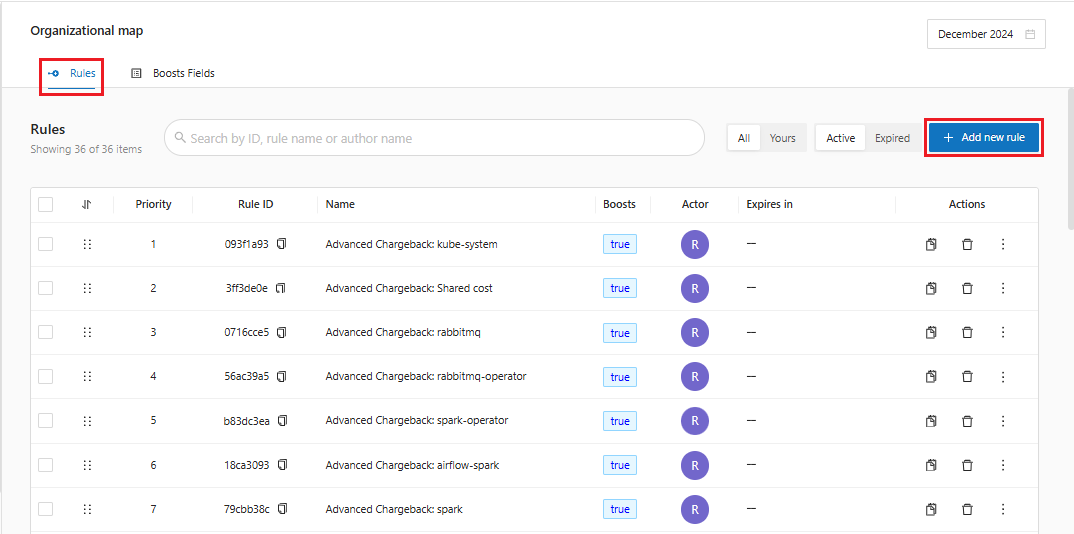
**Step 3**: In the **Rules** tab, the system allows you to add a new rule by clicking on the "![](https://1687673077-files.gitbook.io/~/files/v0/b/gitbook-x-prod.appspot.com/o/spaces%2FZ9sinLUl52lDK1vg6b8g%2Fuploads%2F7CvBiAqqiORD5Vrg5qCz%2Fimage.png?alt=media\&token=ff709960-b360-4189-8f70-0bf4b091f760)" button, which will work in the same way as creating a rule in the Organizational Map for a normal Chargeback.

<figure><img src="https://1687673077-files.gitbook.io/~/files/v0/b/gitbook-x-prod.appspot.com/o/spaces%2FZ9sinLUl52lDK1vg6b8g%2Fuploads%2Fl7pjR0Yjh1uqBAFmkE9D%2Fimage.png?alt=media&#x26;token=8aba1f4f-596c-4733-a755-08ef019f85eb" alt=""><figcaption></figcaption></figure>

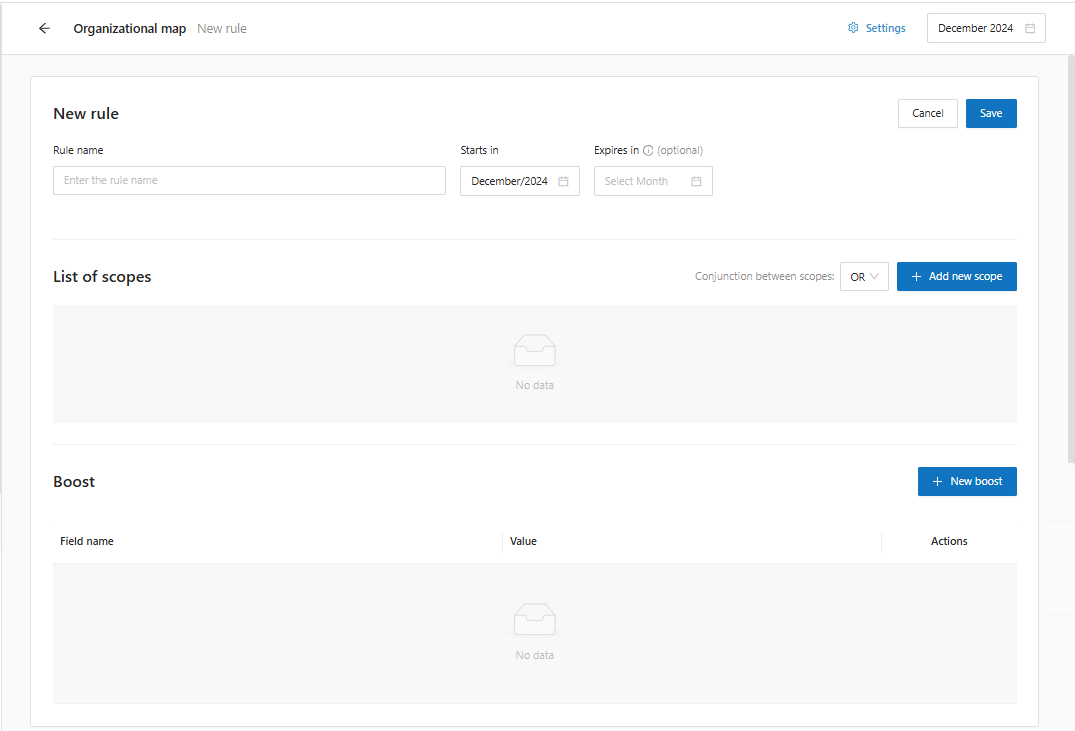
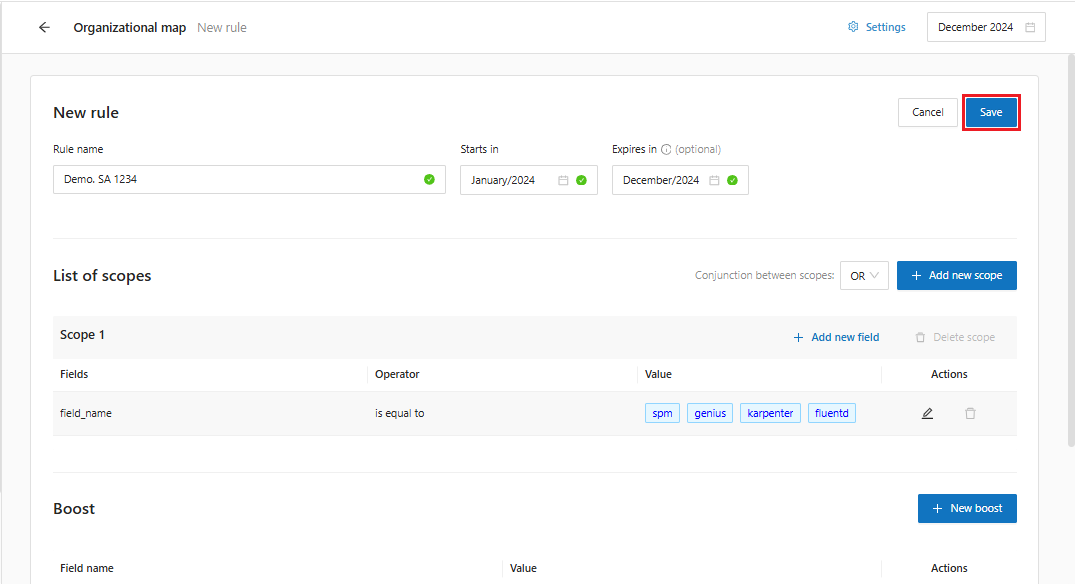
The system will display the rule addition screen divided into 3 parts: **New rule, Scope list and Boost**.

<figure><img src="https://1687673077-files.gitbook.io/~/files/v0/b/gitbook-x-prod.appspot.com/o/spaces%2FZ9sinLUl52lDK1vg6b8g%2Fuploads%2FkCiKRVtQju1qHXG9HDZm%2Fimage.png?alt=media&#x26;token=384b03c8-5eb5-4c9a-8201-1d5f261df94e" alt=""><figcaption></figcaption></figure>

**New Rule**

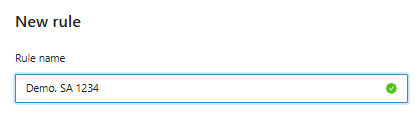
**Step 4**: Add the Rule Name. We recommend that the rule name be related to its scope and/or the corresponding business rule. In **Table 1**, we followed this recommendation by combining the "**company**" column with the "**cost\_center**" column, separating them with a " - " character.

<figure><img src="https://1687673077-files.gitbook.io/~/files/v0/b/gitbook-x-prod.appspot.com/o/spaces%2FZ9sinLUl52lDK1vg6b8g%2Fuploads%2FKfDvDt6KSgSGQrHKASPL%2Fimage.png?alt=media&#x26;token=da430b8c-a7fe-4e58-b2e8-62eb51536c8d" alt=""><figcaption></figcaption></figure>

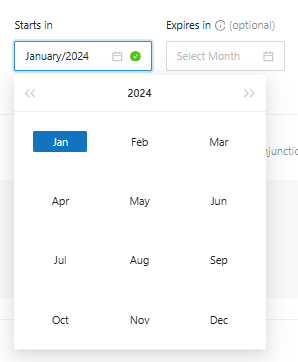
**Step 5:** Add a **Start Date** and/or **Expiration Date**. In this example, we will select January/2024.

<figure><img src="https://1687673077-files.gitbook.io/~/files/v0/b/gitbook-x-prod.appspot.com/o/spaces%2FZ9sinLUl52lDK1vg6b8g%2Fuploads%2FCQvVHm2XXDCRsjTqg5yw%2Fimage.png?alt=media&#x26;token=eb8ca22f-4a2c-47fe-9549-a5fa7a7c0e38" alt=""><figcaption></figcaption></figure>

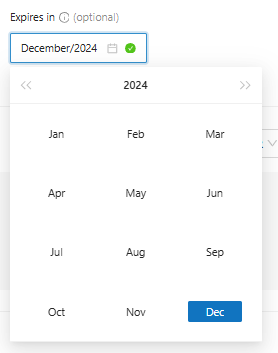
The Expiration Date is optional and can be used, for example, if a certain cost center will exist for a specific period of time. In this case, we will select December/2024.

<figure><img src="https://1687673077-files.gitbook.io/~/files/v0/b/gitbook-x-prod.appspot.com/o/spaces%2FZ9sinLUl52lDK1vg6b8g%2Fuploads%2FBEw9jK3vvd2Lxii2yCyd%2Fimage.png?alt=media&#x26;token=9df5048a-1845-4069-beef-a9a8f0da41ad" alt=""><figcaption></figcaption></figure>

Once this is done, let's go to the **Scopes List**.&#x20;

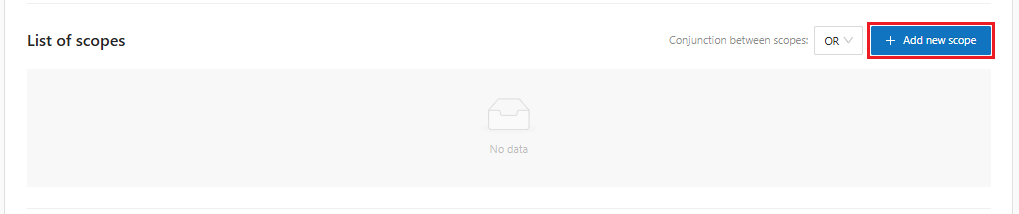
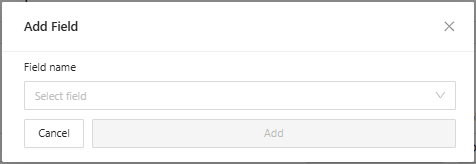
**Step 6:** Add a new scope. In the scope, we will identify the key that will assign a certain resource to a business.

<figure><img src="https://1687673077-files.gitbook.io/~/files/v0/b/gitbook-x-prod.appspot.com/o/spaces%2FZ9sinLUl52lDK1vg6b8g%2Fuploads%2FjiQp2f3H19qvKL6nYCY9%2Fimage.png?alt=media&#x26;token=1ecf5670-3f2f-420e-8b11-4c1070a44d14" alt=""><figcaption></figcaption></figure>

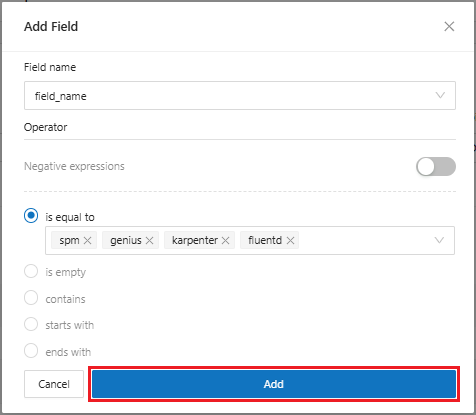
**Step 7**: Add the Field Name and logical operation.

<figure><img src="https://1687673077-files.gitbook.io/~/files/v0/b/gitbook-x-prod.appspot.com/o/spaces%2FZ9sinLUl52lDK1vg6b8g%2Fuploads%2F98pksyRON0NA5iRZwr0v%2Fimage.png?alt=media&#x26;token=e863f870-141c-4768-b72c-e519497dd8f5" alt=""><figcaption></figcaption></figure>

In the logical operation, we will select "**is equal to**" and choose the value listed in the "**Scope**" column.

**The types of operators are:**

* is equals to -> when the objective is to map exact values ​​from a specific billing line;&#x20;
* is empty -> when the objective is to map empty values ​​from a billing line;&#x20;
* contains -> when the value we want to map is contained in specific parts of the billing line;&#x20;
* starts with -> when the value we want to map is contained at the beginning of the specific billing line;
* ends with -> when the value we want to map is contained at the end of the specific billing line;

<figure><img src="https://1687673077-files.gitbook.io/~/files/v0/b/gitbook-x-prod.appspot.com/o/spaces%2FZ9sinLUl52lDK1vg6b8g%2Fuploads%2FZRVEZvpo4cxRrScE7TXt%2Fimage.png?alt=media&#x26;token=8f859aeb-61e2-4bbb-acc0-0e1d06d9f0f1" alt=""><figcaption></figcaption></figure>

Once done, we click on "**Add**".

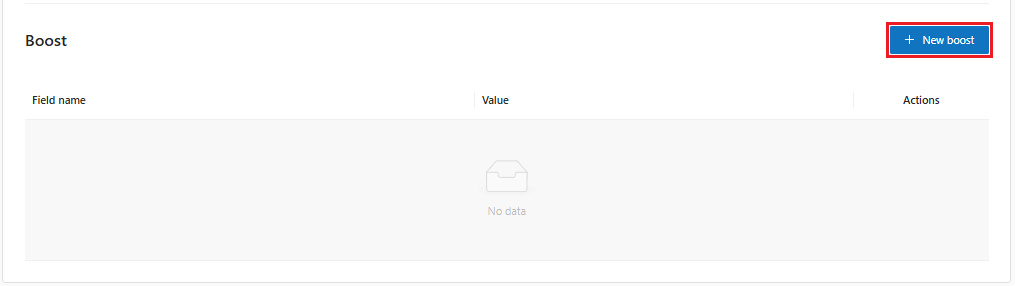
To close, let's go to the **Boost** registration&#x20;

**Step 8**: New boost. Here, we will enrich the billing linked to the business rule.

<figure><img src="https://1687673077-files.gitbook.io/~/files/v0/b/gitbook-x-prod.appspot.com/o/spaces%2FZ9sinLUl52lDK1vg6b8g%2Fuploads%2FtcowOCYk3VnbqXCplZBi%2Fimage.png?alt=media&#x26;token=1ccbb9ef-8eb8-4df7-b380-7c2bc3f36750" alt=""><figcaption></figcaption></figure>

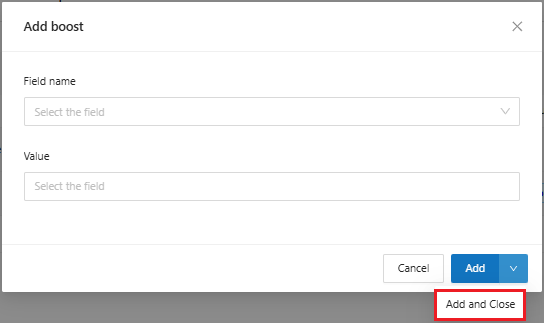
The "**Field Name**" icon will list the boosts that have already been configured in the tool.

**Step 9**: Enter the **field name** and **value**.

<figure><img src="https://1687673077-files.gitbook.io/~/files/v0/b/gitbook-x-prod.appspot.com/o/spaces%2FZ9sinLUl52lDK1vg6b8g%2Fuploads%2FrElKgy06Hsx7iepPDBoL%2Fimage.png?alt=media&#x26;token=5e6b3aa0-c449-4988-8d53-91bf30079c61" alt=""><figcaption></figcaption></figure>

Click **Add and Close** to move on to the next step.

Once this is done, we will click on **Save**.

<figure><img src="https://1687673077-files.gitbook.io/~/files/v0/b/gitbook-x-prod.appspot.com/o/spaces%2FZ9sinLUl52lDK1vg6b8g%2Fuploads%2FAhv3KFzyRyrDChrqcUcz%2Fimage.png?alt=media&#x26;token=b6365132-1f86-4e2e-aadf-e89cc45bb013" alt=""><figcaption></figcaption></figure>

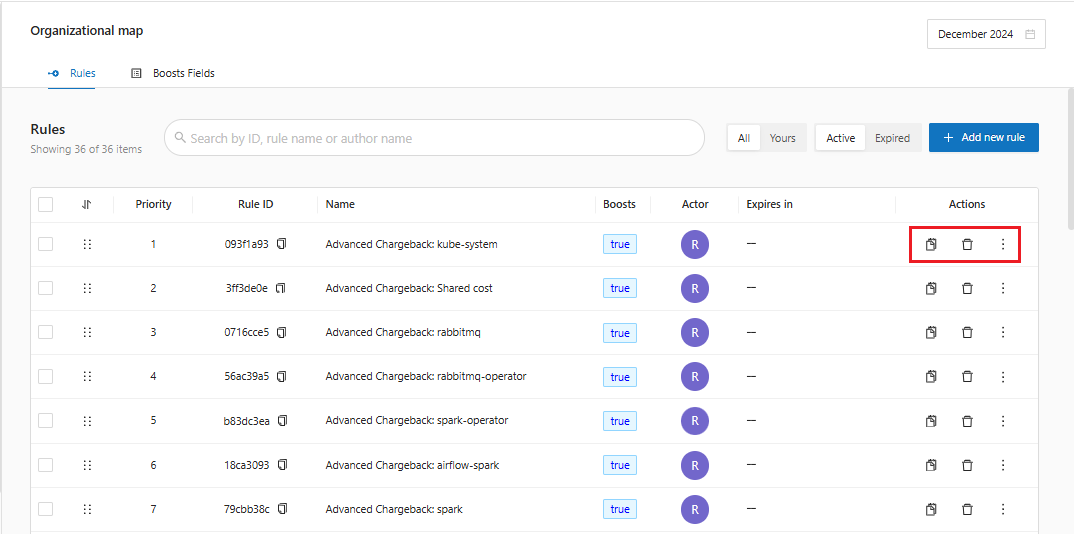
Now the rule will be listed on the Organizational Map home screen. When you finish a rule, it is possible to perform some Actions.

![](https://content.gitbook.com/content/Z9sinLUl52lDK1vg6b8g/blobs/Wjf7k05V0V4HBriDn4ln/image.png)We can Copy the Rule, reusing the boosts or scopes already inserted.

![](https://lh7-rt.googleusercontent.com/docsz/AD_4nXeW0fcoxxJXi4Z3_NtkUNfmikqPtLfCl0hw5ZFRdz3mOLfksPnOUaEa26AOxJYehBc91zpYuXcBUpLdrfEOBHBcosAMOSaHz27iIyjRdeUNKtmalanQmrLzFGvUAwK16JDgbx1h0wZ4oxfs5bwLFfgGEdY?key=nOzVRIXFFL068mvnH7X-VQ)We can delete the rule.

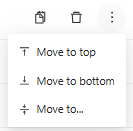
![](https://lh7-rt.googleusercontent.com/docsz/AD_4nXe2-uDZ0N57xTq71JKnUcS0nJfPy6gNe8sMOeEj-CyerAzAKaeNaskeI8aigm0kASRDqxFUYOX-3ar7K4-Fzt9VfGkfnLFWlO4YJhU1wvxsXS38zQp5hVy_OtvQNe07T3fvp721_YbufOCzbIP4BfUmGPsL?key=nOzVRIXFFL068mvnH7X-VQ)In the More Actions icon, we can move the rule according to its priority order.

<figure><img src="https://1687673077-files.gitbook.io/~/files/v0/b/gitbook-x-prod.appspot.com/o/spaces%2FZ9sinLUl52lDK1vg6b8g%2Fuploads%2F3pavZKc2uXvSt7lFcwyQ%2Fimage.png?alt=media&#x26;token=fc7d7cc0-8a0f-446c-800d-bb333e9fdc8a" alt=""><figcaption></figcaption></figure>

<figure><img src="https://1687673077-files.gitbook.io/~/files/v0/b/gitbook-x-prod.appspot.com/o/spaces%2FZ9sinLUl52lDK1vg6b8g%2Fuploads%2F5YMRaTeIRCFGzQ7WtbRu%2Fimage.png?alt=media&#x26;token=116d6862-0419-4f79-8ec6-34b059773bb0" alt=""><figcaption></figcaption></figure>

Now, we need to perform billing processing so that the enrichment fields are useful in the tool.

**Step 10**: Finally, on the **Rules** tab, the system allows you to filter the search by the following fields:&#x20;

* Rule ID&#x20;
* Rule Name or&#x20;
* Author Name

<figure><img src="https://1687673077-files.gitbook.io/~/files/v0/b/gitbook-x-prod.appspot.com/o/spaces%2FZ9sinLUl52lDK1vg6b8g%2Fuploads%2FC9GEZLCCdajYnC2EBw3t%2Fimage.png?alt=media&#x26;token=01230052-bea2-4a0b-a370-cf3059909677" alt=""><figcaption></figcaption></figure>

* All authors or&#x20;
* Only your created rules

<figure><img src="https://1687673077-files.gitbook.io/~/files/v0/b/gitbook-x-prod.appspot.com/o/spaces%2FZ9sinLUl52lDK1vg6b8g%2Fuploads%2FXiGNJuL6hWjQaeBFtCE6%2Fimage.png?alt=media&#x26;token=f39cd2d8-777f-487a-8713-c0ac67f48a60" alt=""><figcaption></figcaption></figure>

* Active Rules&#x20;
* Expired Rules

<figure><img src="https://1687673077-files.gitbook.io/~/files/v0/b/gitbook-x-prod.appspot.com/o/spaces%2FZ9sinLUl52lDK1vg6b8g%2Fuploads%2FaoGeWJNY8RZiqspyzoeP%2Fimage.png?alt=media&#x26;token=6b09415e-47a9-4b5d-b9e0-022c1d5eef6a" alt=""><figcaption></figcaption></figure>

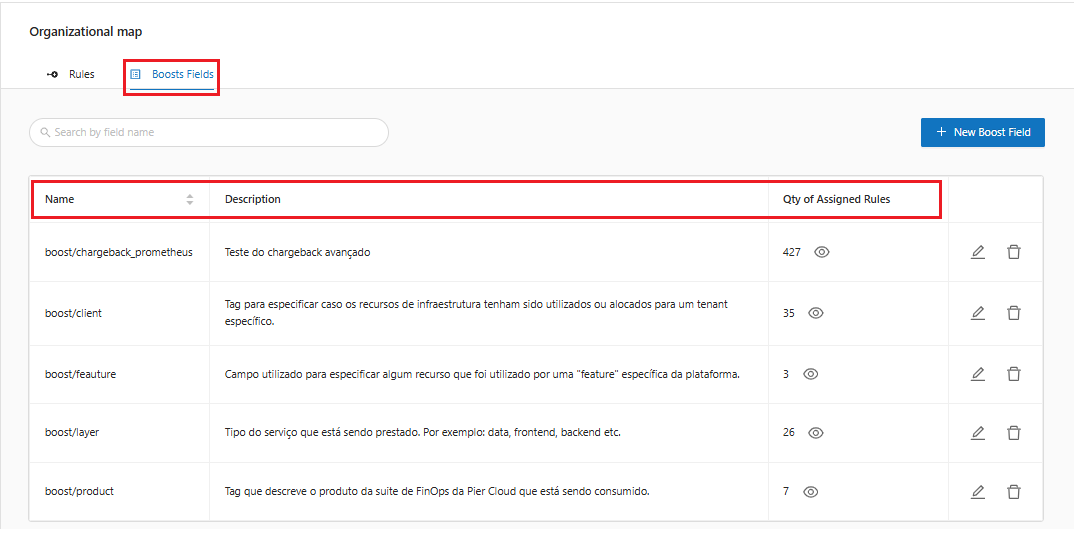
**Step 11**: Moving on to the **Boost Fields** tab, the system will list all the Boost fields created with their respective **name**, **description** and the **number of rules** that were assigned to the field.

<figure><img src="https://1687673077-files.gitbook.io/~/files/v0/b/gitbook-x-prod.appspot.com/o/spaces%2FZ9sinLUl52lDK1vg6b8g%2Fuploads%2FbKBEUt83n8Uh9tAA0UzB%2Fimage.png?alt=media&#x26;token=9ba8978f-5e65-4ce3-b4c9-b6e50ca3fb1a" alt=""><figcaption></figcaption></figure>

**Step 12**: For each Boost field, it is possible to edit the Name and Description by clicking the "![](https://1687673077-files.gitbook.io/~/files/v0/b/gitbook-x-prod.appspot.com/o/spaces%2FZ9sinLUl52lDK1vg6b8g%2Fuploads%2FhPPyjNnacXFRJQz6FCWC%2Fimage.png?alt=media\&token=7b8d4158-e222-41e5-bd1f-39e9e77791f5)" button, and remove the field by clicking the "![](https://1687673077-files.gitbook.io/~/files/v0/b/gitbook-x-prod.appspot.com/o/spaces%2FZ9sinLUl52lDK1vg6b8g%2Fuploads%2FmEchawujcrryFhmOlhJB%2Fimage.png?alt=media\&token=d060139e-9812-4dfd-bd2c-3f3965ee654a)" button.

<figure><img src="https://1687673077-files.gitbook.io/~/files/v0/b/gitbook-x-prod.appspot.com/o/spaces%2FZ9sinLUl52lDK1vg6b8g%2Fuploads%2FV1MKPgwAoS6bT2HSxcef%2Fimage.png?alt=media&#x26;token=08012cd9-6d6d-4805-8a57-930ef422087c" alt=""><figcaption></figcaption></figure>