# Budget Groups

## Create Budget Groups

Instructions for creating budget groups​

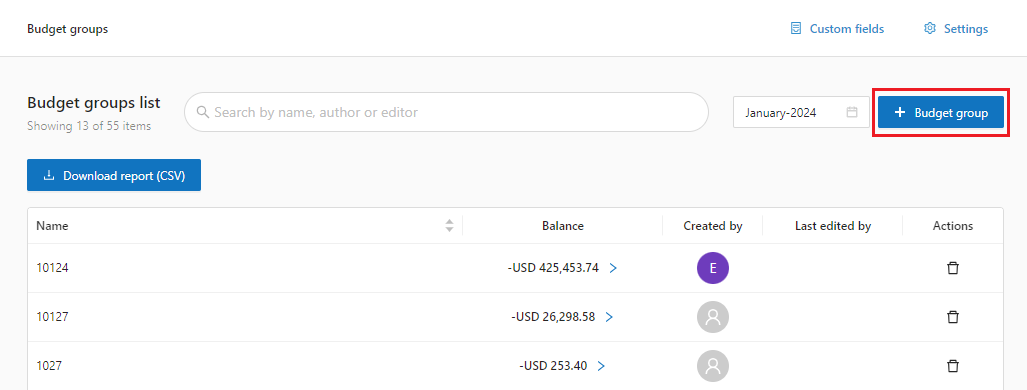
1. In Chargeback access **Budget Groups:**

<figure><img src="https://1687673077-files.gitbook.io/~/files/v0/b/gitbook-x-prod.appspot.com/o/spaces%2FZ9sinLUl52lDK1vg6b8g%2Fuploads%2Fn8twHtQdS31WUNpE5Ubp%2Fimage.png?alt=media&#x26;token=600c856c-bc34-4d79-bb3c-1e8f86e6de11" alt=""><figcaption></figcaption></figure>

2. Click add **Budget Groups** &#x20;

<figure><img src="https://1687673077-files.gitbook.io/~/files/v0/b/gitbook-x-prod.appspot.com/o/spaces%2FZ9sinLUl52lDK1vg6b8g%2Fuploads%2FzQNvswcIpAjKRG3TXGmN%2Fimage.png?alt=media&#x26;token=d9149eea-5c6d-41f9-80ed-5bf48d0090cc" alt=""><figcaption></figcaption></figure>

3. Inform the name of the budget group and click **Save**

<figure><img src="https://1687673077-files.gitbook.io/~/files/v0/b/gitbook-x-prod.appspot.com/o/spaces%2FZ9sinLUl52lDK1vg6b8g%2Fuploads%2FPkhVGY4T8Bs510AfHHVf%2Fimage.png?alt=media&#x26;token=2d34fd86-ae38-4ca6-8d78-318cfc507c6c" alt=""><figcaption></figcaption></figure>

## **Manage transactions**&#x20;

Transfer amounts from budget groups to accounts.&#x20;

1. In Chargeback, access Budget Groups, Search for the desired budget group.

<figure><img src="https://1687673077-files.gitbook.io/~/files/v0/b/gitbook-x-prod.appspot.com/o/spaces%2FZ9sinLUl52lDK1vg6b8g%2Fuploads%2FcZvsgbYUrolh5wtmB6SP%2Fimage.png?alt=media&#x26;token=51279e01-d829-412c-8344-eed3629b9dc5" alt=""><figcaption></figcaption></figure>

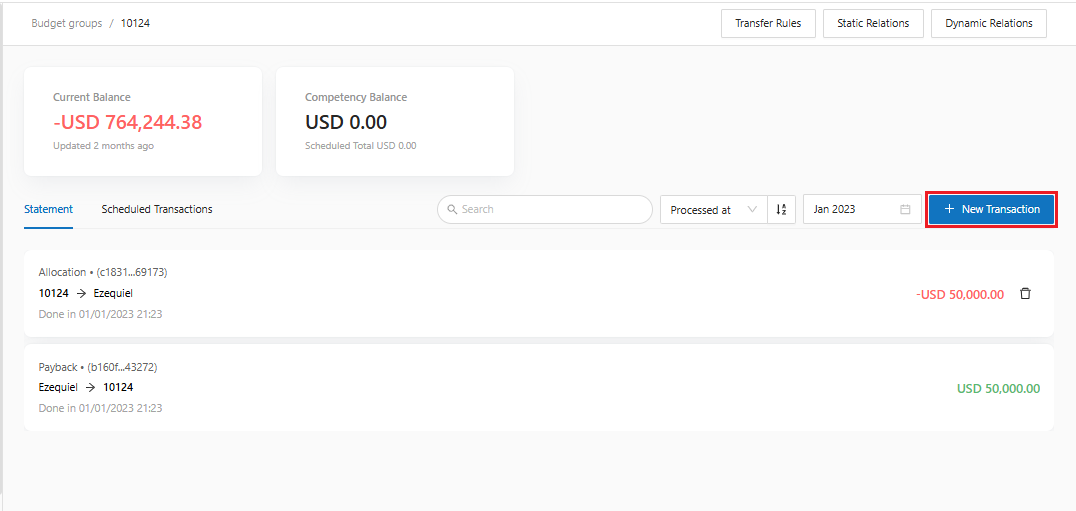
2. Click on the balance

<figure><img src="https://1687673077-files.gitbook.io/~/files/v0/b/gitbook-x-prod.appspot.com/o/spaces%2FZ9sinLUl52lDK1vg6b8g%2Fuploads%2FjqqNIbSBARrD3AJrRSNe%2Fimage.png?alt=media&#x26;token=9b2e67df-0b05-4548-9017-d3b9c16ea3cd" alt=""><figcaption></figcaption></figure>

3. Inform the competency and click on **New Transaction**

<figure><img src="https://1687673077-files.gitbook.io/~/files/v0/b/gitbook-x-prod.appspot.com/o/spaces%2FZ9sinLUl52lDK1vg6b8g%2Fuploads%2Fvn3RQbNxNrBoYb0r6OVi%2Fimage.png?alt=media&#x26;token=26626e32-3525-4d6f-a08d-66f43334aeb9" alt=""><figcaption></figcaption></figure>

4. Inform the transaction data

* **To**: Select the Consumption Group from the list&#x20;
* **Amount to be transferred**: Inform the amount&#x20;
* **When to transfer:** Inform the transfer date

<figure><img src="https://1687673077-files.gitbook.io/~/files/v0/b/gitbook-x-prod.appspot.com/o/spaces%2FZ9sinLUl52lDK1vg6b8g%2Fuploads%2FhwjCKOkwSmjoLFB2MxKL%2Fimage.png?alt=media&#x26;token=2e55e5c5-5202-40f5-a4d1-e92d4f47acd0" alt=""><figcaption></figcaption></figure>

5. Save the transaction