# Licenses

1. In the **Licenses** **tab**, the system allows you to view the registered licenses, including both standard fields and custom fields:

<figure><img src="https://1687673077-files.gitbook.io/~/files/v0/b/gitbook-x-prod.appspot.com/o/spaces%2FZ9sinLUl52lDK1vg6b8g%2Fuploads%2F98AZlvNFAjorCQgGo0Ri%2Fimage.png?alt=media&#x26;token=47c42490-56f2-40f8-82a8-8857ed66d780" alt=""><figcaption></figcaption></figure>

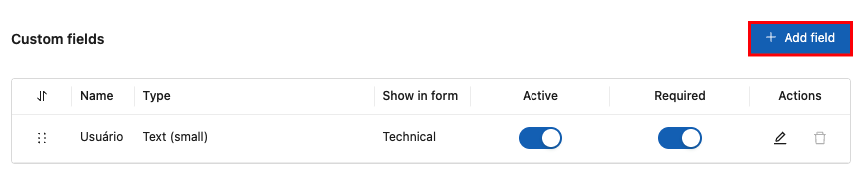
2. In addition, the system allows you to add new custom license fields by clicking the “**Add field**” button:

<figure><img src="https://1687673077-files.gitbook.io/~/files/v0/b/gitbook-x-prod.appspot.com/o/spaces%2FZ9sinLUl52lDK1vg6b8g%2Fuploads%2FfNqI2TJ1Ywmhk5kP0QjA%2Fimage.png?alt=media&#x26;token=8283ce17-3613-4699-a9d5-bd48aa22a5ca" alt=""><figcaption></figcaption></figure>

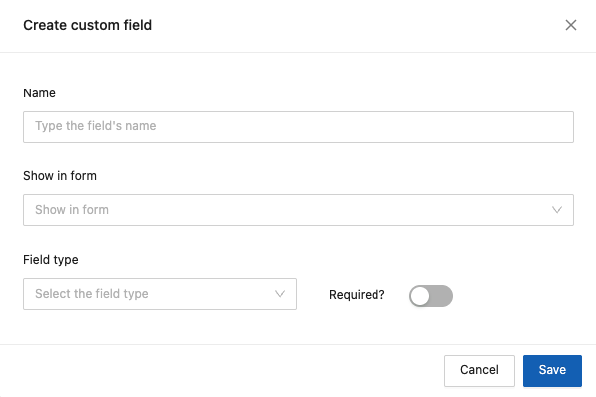
2. The system will display the screen to add new custom fields, where you must provide the following information:

<figure><img src="https://1687673077-files.gitbook.io/~/files/v0/b/gitbook-x-prod.appspot.com/o/spaces%2FZ9sinLUl52lDK1vg6b8g%2Fuploads%2Fsz9GGJBwHz0vtRNhuOc7%2Fimage.png?alt=media&#x26;token=8f9ec56d-956c-4ea4-ab37-2437ea8311e1" alt=""><figcaption></figcaption></figure>

* **Name**: Enter the name that represents the field.
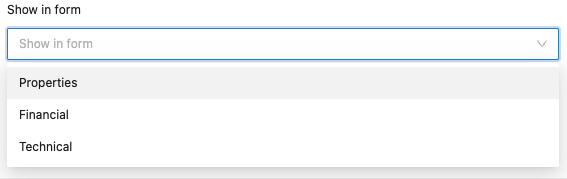
* **Show in form**: Specify where this field should be displayed in the form. Select one of the available options: Properties, Financial, or Technical.

<figure><img src="https://1687673077-files.gitbook.io/~/files/v0/b/gitbook-x-prod.appspot.com/o/spaces%2FZ9sinLUl52lDK1vg6b8g%2Fuploads%2FErByr1VGwPkb1YU1416x%2Fimage.png?alt=media&#x26;token=3d2d6d68-9ad3-4d60-8b69-a2c8cace21e5" alt=""><figcaption></figcaption></figure>

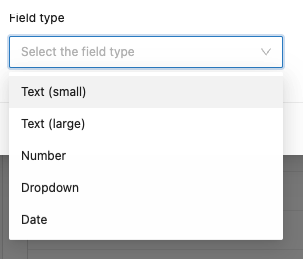
* **Field type**: Specify the input type for the field. Select one of the available options: Text (Small), Text (Large), Number, Dropdown, or Date.

<figure><img src="https://1687673077-files.gitbook.io/~/files/v0/b/gitbook-x-prod.appspot.com/o/spaces%2FZ9sinLUl52lDK1vg6b8g%2Fuploads%2Fnbvpny2c9Anog5eqvSnN%2Fimage.png?alt=media&#x26;token=820b454d-596c-4dc0-a7d2-88b0b0711aeb" alt=""><figcaption></figcaption></figure>

* **Required**: Indicate whether the field must be filled out or not.

3. Finally, by clicking the “**Save**” button, the system will store the new field and return to the main screen in the Licenses tab.
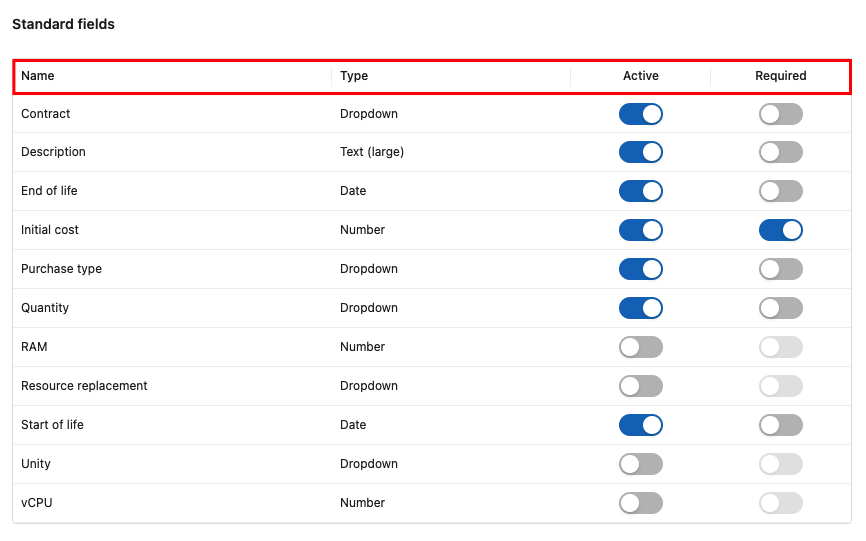
4. On the main screen, the following information is displayed:

#### Standard fields:

* **Name**: Shows the name that describes the field.
* **Type**: Shows the type of information for the field.
* **Active**: Indicates whether the field is active and allows you to change its status.
* **Required**: Indicates whether the field is mandatory and allows changing the requirement.

<figure><img src="https://1687673077-files.gitbook.io/~/files/v0/b/gitbook-x-prod.appspot.com/o/spaces%2FZ9sinLUl52lDK1vg6b8g%2Fuploads%2FjWtVOyEoTp1Jbfu4sSXZ%2Fimage.png?alt=media&#x26;token=1a37dd8a-76cc-47f4-a33f-017a0c4e1c69" alt=""><figcaption></figcaption></figure>

#### Custom fields:

* **Name**: Shows the name that describes the field.
* **Type**: Shows the type of information for the field.
* **Show in form**: Indicates where this field is displayed in the form.
* **Active**: Indicates whether the field is active and allows you to change its status.
* **Required**: Indicates whether the field is mandatory and allows changing the requirement.

<figure><img src="https://1687673077-files.gitbook.io/~/files/v0/b/gitbook-x-prod.appspot.com/o/spaces%2FZ9sinLUl52lDK1vg6b8g%2Fuploads%2FK6zCghCqCA3yawE9NAd6%2Fimage.png?alt=media&#x26;token=a80e6d92-f237-4e7a-bdf8-9b8ee6dfaa96" alt=""><figcaption></figcaption></figure>

* **Actions**: The system provides the following action options:

<figure><img src="https://1687673077-files.gitbook.io/~/files/v0/b/gitbook-x-prod.appspot.com/o/spaces%2FZ9sinLUl52lDK1vg6b8g%2Fuploads%2F8x0kY2DvATpqwcU4J8Tk%2Fimage.png?alt=media&#x26;token=d313a87b-f075-49e0-9e27-88f2dfec79e3" alt=""><figcaption></figcaption></figure>

1. **Edit field**: By clicking the “![](https://1687673077-files.gitbook.io/~/files/v0/b/gitbook-x-prod.appspot.com/o/spaces%2FZ9sinLUl52lDK1vg6b8g%2Fuploads%2FkW2c2UUt0StOW5iv4SUT%2Fimage.png?alt=media\&token=83ba5e7a-6e3a-4497-9cb0-43279c5fe9db)” icon, the system will display the editing screen for the custom field, where you can modify the following information:

* Name
* Show in form
* Field type
* Required

<figure><img src="https://1687673077-files.gitbook.io/~/files/v0/b/gitbook-x-prod.appspot.com/o/spaces%2FZ9sinLUl52lDK1vg6b8g%2Fuploads%2FKcl1lKTnWFeiZALkW2LP%2Fimage.png?alt=media&#x26;token=a3b4fc50-2f57-4edc-89ac-e84f34e173c1" alt=""><figcaption></figcaption></figure>

2. **Delete field**: By clicking the “![](https://1687673077-files.gitbook.io/~/files/v0/b/gitbook-x-prod.appspot.com/o/spaces%2FZ9sinLUl52lDK1vg6b8g%2Fuploads%2FN2318TNagEWDMa2KYT6O%2Fimage.png?alt=media\&token=237699ed-a1e7-4942-ac4a-81236e60d30a) ” icon, the system will complete the deletion and remain on the main screen in the Licenses tab.