# View Workspace

After building the Workspace views, let's understand the actions allowed within the view:

* **Activate edit mode**:

<figure><img src="https://1687673077-files.gitbook.io/~/files/v0/b/gitbook-x-prod.appspot.com/o/spaces%2FZ9sinLUl52lDK1vg6b8g%2Fuploads%2Fv066rIf7HCgAtqVinVR3%2Fimage.png?alt=media&#x26;token=cb7a5b59-5378-4f67-9de8-552b54902bf0" alt=""><figcaption></figcaption></figure>

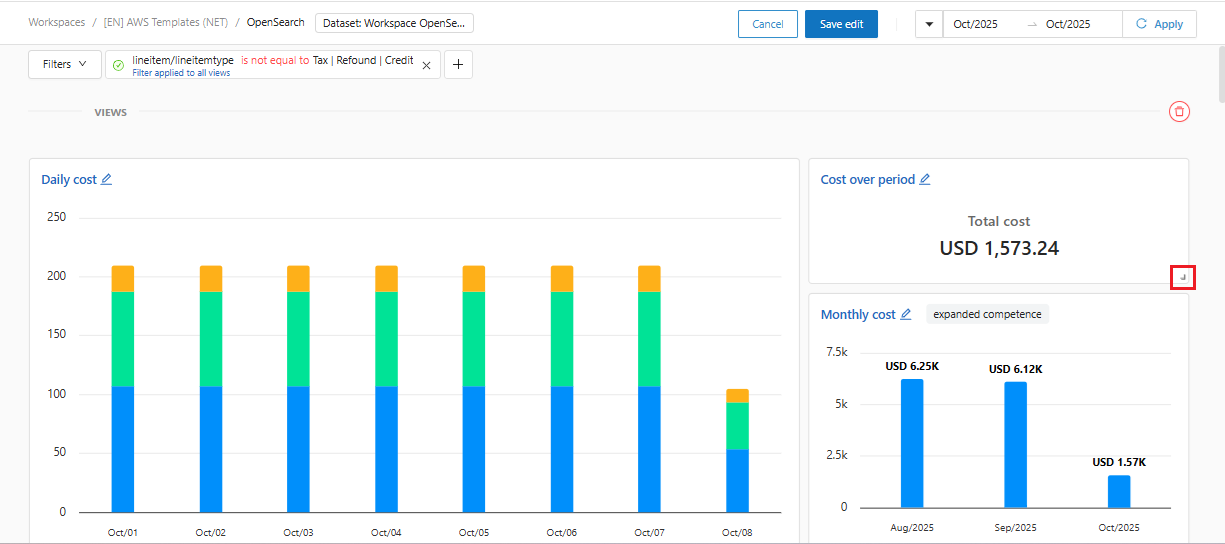
In the "**activate edit mode**" option, the system allows us to drag a graph to the desired position and enlarge or reduce the graph by clicking on the indicated edge of the graph or table.

<figure><img src="https://1687673077-files.gitbook.io/~/files/v0/b/gitbook-x-prod.appspot.com/o/spaces%2FZ9sinLUl52lDK1vg6b8g%2Fuploads%2FL1G64HoyNWT4p2EdR1Uw%2Fimage.png?alt=media&#x26;token=8a10590c-1e36-40eb-9b33-586d8f683732" alt=""><figcaption></figcaption></figure>

By clicking **Save Edit**, the changes will be saved and reflected in the workspace, and by clicking **Cancel**, the changes will be disregarded.

<figure><img src="https://1687673077-files.gitbook.io/~/files/v0/b/gitbook-x-prod.appspot.com/o/spaces%2FZ9sinLUl52lDK1vg6b8g%2Fuploads%2F2dA8Y6xFozuMDUZghVBq%2Fimage.png?alt=media&#x26;token=1389723f-68bf-40e5-9927-c44a59cf84e4" alt=""><figcaption></figcaption></figure>

* **Add filters**

The system allows us to add the desired filters by clicking on the "+" button and filling in the information regarding the desired filter.

<figure><img src="https://1687673077-files.gitbook.io/~/files/v0/b/gitbook-x-prod.appspot.com/o/spaces%2FZ9sinLUl52lDK1vg6b8g%2Fuploads%2FWRuAtMtPJypfp6HTE93q%2Fimage.png?alt=media&#x26;token=b1c407f8-babb-434a-ad17-c5a07fec65c8" alt=""><figcaption></figcaption></figure>

The system also allows us to enable or disable the added filter by clicking on the indicated "![](https://1687673077-files.gitbook.io/~/files/v0/b/gitbook-x-prod.appspot.com/o/spaces%2FZ9sinLUl52lDK1vg6b8g%2Fuploads%2FWPBd1gjgMHp4sMkhzD1o%2Fimage.png?alt=media\&token=f58e0aef-d333-4b9d-85fd-aaf589295776)" symbol:

<figure><img src="https://1687673077-files.gitbook.io/~/files/v0/b/gitbook-x-prod.appspot.com/o/spaces%2FZ9sinLUl52lDK1vg6b8g%2Fuploads%2FXH3FXBJPO2j9BfDbdd08%2Fimage.png?alt=media&#x26;token=fdbb17aa-9f8c-4bc9-8e53-a82f788cf32e" alt=""><figcaption></figcaption></figure>

So that the filter is enabled and considered when searching for the records presented:

<figure><img src="https://1687673077-files.gitbook.io/~/files/v0/b/gitbook-x-prod.appspot.com/o/spaces%2FZ9sinLUl52lDK1vg6b8g%2Fuploads%2FS3qlIXXNKkvNQaDSkJsP%2Fimage.png?alt=media&#x26;token=5215f92e-4ee9-40b3-ac97-c305123e907d" alt=""><figcaption></figcaption></figure>

* **Copy Workspace**

By clicking on copy workspace, the system allows you to create a copy of all views, just like on the main Workspace screen, in more actions:

<figure><img src="https://1687673077-files.gitbook.io/~/files/v0/b/gitbook-x-prod.appspot.com/o/spaces%2FZ9sinLUl52lDK1vg6b8g%2Fuploads%2FCFwIfTCKBaDDgbTfOYxW%2Fimage.png?alt=media&#x26;token=c4c92185-3824-4d0c-8c95-efe979a4edf3" alt=""><figcaption></figcaption></figure>

The copy screen will be displayed, allowing you to change the **name**, **description** and select a **Workspace group**, optional.

<figure><img src="https://1687673077-files.gitbook.io/~/files/v0/b/gitbook-x-prod.appspot.com/o/spaces%2FZ9sinLUl52lDK1vg6b8g%2Fuploads%2FAPNOZLjGTtk7dEbgnopA%2Fimage.png?alt=media&#x26;token=c4405d2c-aa00-4b27-a319-618d8a99d772" alt=""><figcaption></figcaption></figure>

* **Delete many views**: Click the "![](https://1687673077-files.gitbook.io/~/files/v0/b/gitbook-x-prod.appspot.com/o/spaces%2FZ9sinLUl52lDK1vg6b8g%2Fuploads%2F1yTQxb7QUe60E2XWRG9Q%2Fimage.png?alt=media\&token=a966e78e-7666-4f40-a821-eac3441845f7)" icon, as highlighted below:

<figure><img src="https://1687673077-files.gitbook.io/~/files/v0/b/gitbook-x-prod.appspot.com/o/spaces%2FZ9sinLUl52lDK1vg6b8g%2Fuploads%2F7SjXgFghNHFgacbyMNEW%2Fimage.png?alt=media&#x26;token=24b7213f-cf48-41b2-a836-7765defecc39" alt=""><figcaption></figcaption></figure>

The system will display a screen that allows you to search for the view you want to delete, as well as select all the existing views in the Workspace. Then, the **Delete** button will be enabled so you can delete only the desired views.

<figure><img src="https://1687673077-files.gitbook.io/~/files/v0/b/gitbook-x-prod.appspot.com/o/spaces%2FZ9sinLUl52lDK1vg6b8g%2Fuploads%2FiqTwzDXQUWJ07bnkQXZR%2Fimage.png?alt=media&#x26;token=5a7da09c-3f6b-407e-befc-3e1df2cafd63" alt=""><figcaption></figcaption></figure>
