# Move to

**Step by step execution**:

**Step 1**: On the main Workspaces screen, click on a Workspace Group:

<figure><img src="https://1687673077-files.gitbook.io/~/files/v0/b/gitbook-x-prod.appspot.com/o/spaces%2FZ9sinLUl52lDK1vg6b8g%2Fuploads%2FSOq0r4TvZZKu7mCggwao%2Fimage.png?alt=media&#x26;token=c05fdaf8-d7dc-44a9-8937-9bc0e99ba06c" alt=""><figcaption></figcaption></figure>

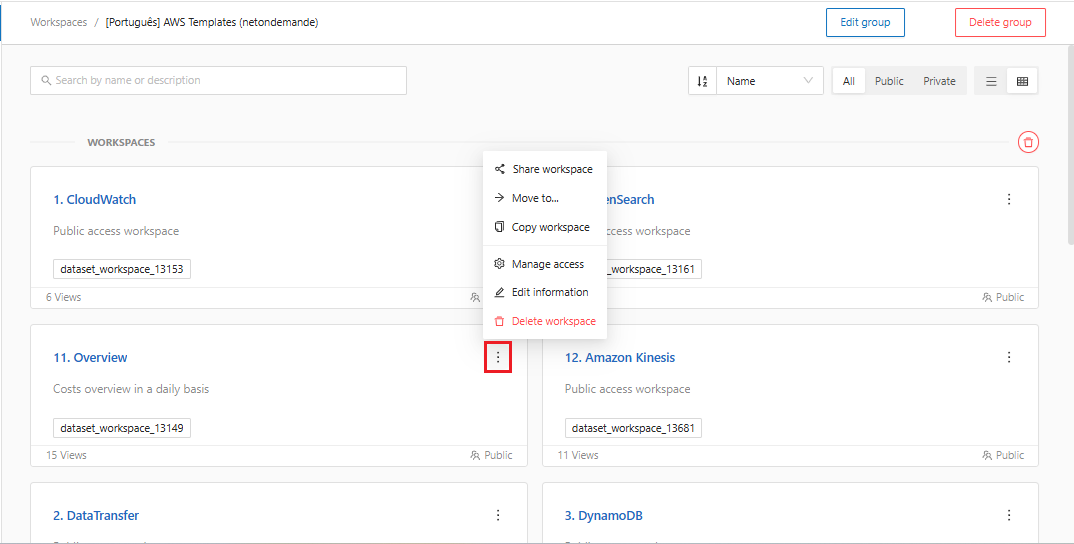
**Step 2:** The system will open a screen displaying the existing workspaces within the group. Click the **more actions** icon "![](https://1687673077-files.gitbook.io/~/files/v0/b/gitbook-x-prod.appspot.com/o/spaces%2FZ9sinLUl52lDK1vg6b8g%2Fuploads%2FBfiLr1vsPvIG7AA4R3TY%2Fimage.png?alt=media\&token=bc0d5521-a0ba-463a-9a3b-8d97fd04f8ec)" in the upper right corner of the desired Workspace.

<figure><img src="https://1687673077-files.gitbook.io/~/files/v0/b/gitbook-x-prod.appspot.com/o/spaces%2FZ9sinLUl52lDK1vg6b8g%2Fuploads%2Fzf5I0QiPpNKtMngQkdgr%2Fimage.png?alt=media&#x26;token=caa6d463-b173-496b-82ef-a63f233b854b" alt=""><figcaption></figcaption></figure>

**Step 3:** Select the option **“Move to...”**

<figure><img src="https://1687673077-files.gitbook.io/~/files/v0/b/gitbook-x-prod.appspot.com/o/spaces%2FZ9sinLUl52lDK1vg6b8g%2Fuploads%2FSDjQZOUYtzIsDtCv1NSh%2Fimage.png?alt=media&#x26;token=ad2559e0-b39a-43ca-8b70-9c3e442a24b4" alt=""><figcaption></figcaption></figure>

**Step 4:** The system will display a screen allowing you to select the group to which you want to move the Workspace.

<figure><img src="https://1687673077-files.gitbook.io/~/files/v0/b/gitbook-x-prod.appspot.com/o/spaces%2FZ9sinLUl52lDK1vg6b8g%2Fuploads%2Fuauf8fGjNqNAKcYb7j4L%2Fimage.png?alt=media&#x26;token=94ed5e67-5b18-48cc-94c9-0a29c799ec86" alt=""><figcaption></figcaption></figure>

Click the **"OK"** button, and your Workspace will be moved to the selected group.