# Actions

## Add Action

For each capability define and record the actions to be executed and monitored.&#x20;

**Step 1**: In the selected journey, enter the capability to be worked on by clicking on the capability name.

Note: It's possible adjust the priority of the capabilities according to your organization's needs by moving the capability up or down by clicking on the "![](https://1687673077-files.gitbook.io/~/files/v0/b/gitbook-x-prod.appspot.com/o/spaces%2FZ9sinLUl52lDK1vg6b8g%2Fuploads%2FSsEiHNa90Y8Xpkn3bkXj%2Fimage.png?alt=media\&token=ca9b29db-a49b-4208-bff2-2286c2387343)" sign and dragging.

<figure><img src="https://1687673077-files.gitbook.io/~/files/v0/b/gitbook-x-prod.appspot.com/o/spaces%2FZ9sinLUl52lDK1vg6b8g%2Fuploads%2FhjI2RttmhfdakM0ETsd5%2Fimage.png?alt=media&#x26;token=67c8a759-cab8-434b-a4e1-cd8d6c75ab98" alt=""><figcaption></figcaption></figure>

**Step 2**: In the selected capability, click the **Add action** button:&#x20;

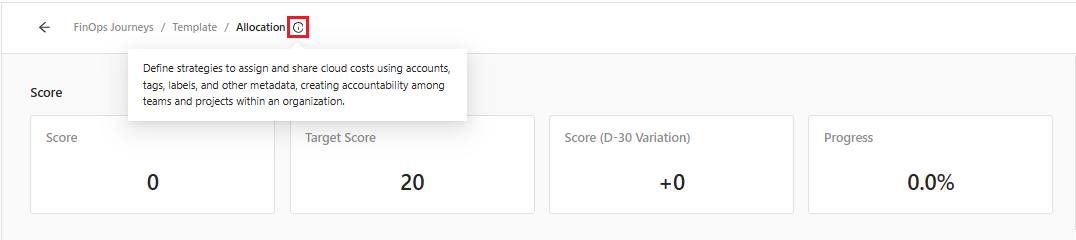
* Note: If there is any questions about the capability, click the "![](https://1687673077-files.gitbook.io/~/files/v0/b/gitbook-x-prod.appspot.com/o/spaces%2FZ9sinLUl52lDK1vg6b8g%2Fuploads%2FJlr71msscCcTGzmaUhhZ%2Fimage.png?alt=media\&token=62917104-e856-4b24-829d-1c6515e8b825)" icon to view a brief description of the possible actions that can be associated with the capability.

<figure><img src="https://1687673077-files.gitbook.io/~/files/v0/b/gitbook-x-prod.appspot.com/o/spaces%2FZ9sinLUl52lDK1vg6b8g%2Fuploads%2FnmsnUxMgfpnyEoxwk2oD%2Fimage.png?alt=media&#x26;token=927b136e-132c-4f4f-a270-1608aaff92e1" alt=""><figcaption></figcaption></figure>

<figure><img src="https://1687673077-files.gitbook.io/~/files/v0/b/gitbook-x-prod.appspot.com/o/spaces%2FZ9sinLUl52lDK1vg6b8g%2Fuploads%2FCyR79zmc7dX9IMkECLLE%2Fimage.png?alt=media&#x26;token=973998b8-63b4-454b-a345-23b576e7852d" alt=""><figcaption></figcaption></figure>

**Step 3**: After opening the new action, fill in the following information:

**Action Description:**&#x20;

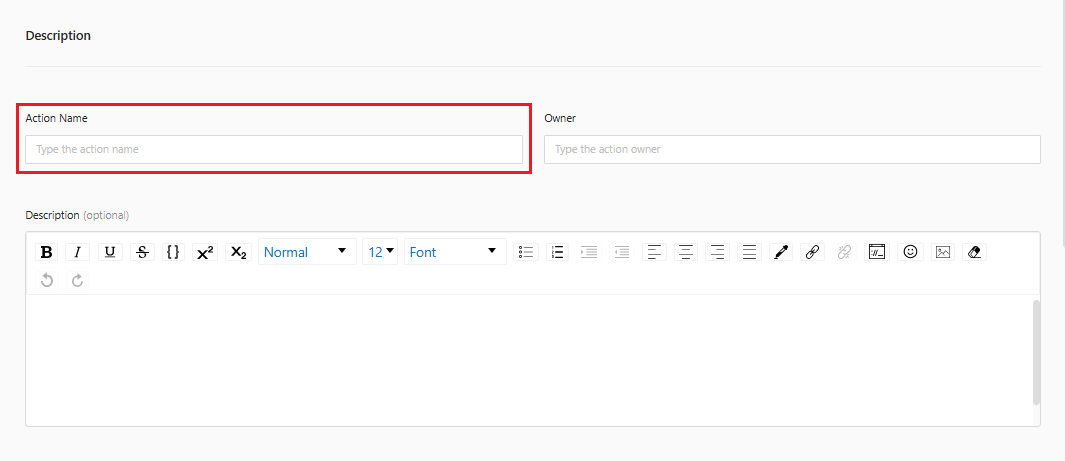
* **Action Name:** Inform the name of the action

<figure><img src="https://1687673077-files.gitbook.io/~/files/v0/b/gitbook-x-prod.appspot.com/o/spaces%2FZ9sinLUl52lDK1vg6b8g%2Fuploads%2FgpetCFhszqs0goEkI0Hh%2Fimage.png?alt=media&#x26;token=4f7537f5-7497-4d6b-a82d-92ef74568526" alt=""><figcaption></figcaption></figure>

* **Owner:** Inform the person responsible for the action

<figure><img src="https://1687673077-files.gitbook.io/~/files/v0/b/gitbook-x-prod.appspot.com/o/spaces%2FZ9sinLUl52lDK1vg6b8g%2Fuploads%2F4K4RuqQA9hf3HkxiMwcV%2Fimage.png?alt=media&#x26;token=a996a2a3-11d9-4185-a842-78a7c2d14d23" alt=""><figcaption></figcaption></figure>

* **Description:** Describe the current procedure for performing the action, including applicable methods, rules, and guidelines.

<figure><img src="https://1687673077-files.gitbook.io/~/files/v0/b/gitbook-x-prod.appspot.com/o/spaces%2FZ9sinLUl52lDK1vg6b8g%2Fuploads%2FG2S7NTCmiSfjCZiRmL0j%2Fimage.png?alt=media&#x26;token=e096a36d-bebb-4103-afbd-d54596476a6c" alt=""><figcaption></figcaption></figure>

**Status:**

<figure><img src="https://1687673077-files.gitbook.io/~/files/v0/b/gitbook-x-prod.appspot.com/o/spaces%2FZ9sinLUl52lDK1vg6b8g%2Fuploads%2FaLXDBA23ON4mvZhPQicc%2Fimage.png?alt=media&#x26;token=63b2c70f-3457-4d67-8b17-10dc84392940" alt=""><figcaption></figcaption></figure>

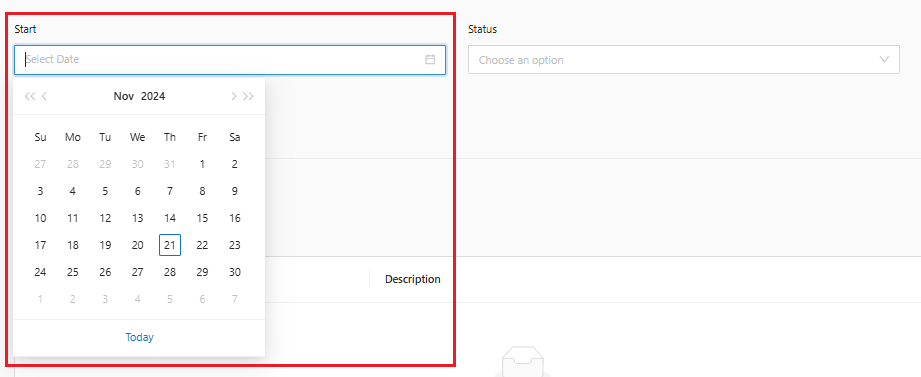
* **Start**: Inform the start date for mapping this action

<figure><img src="https://1687673077-files.gitbook.io/~/files/v0/b/gitbook-x-prod.appspot.com/o/spaces%2FZ9sinLUl52lDK1vg6b8g%2Fuploads%2Fz4jEaKi1vRqzJRtIlioS%2Fimage.png?alt=media&#x26;token=5a6c0592-3b36-440f-bd1b-b752913f6663" alt=""><figcaption></figcaption></figure>

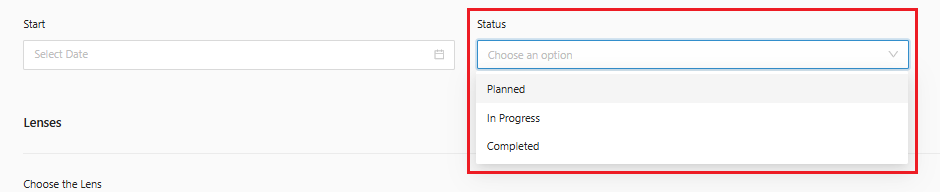
* **Status**: Select the Mapping Status for this action

<figure><img src="https://1687673077-files.gitbook.io/~/files/v0/b/gitbook-x-prod.appspot.com/o/spaces%2FZ9sinLUl52lDK1vg6b8g%2Fuploads%2FTEtMwdTvyRkZReihJlqc%2Fimage.png?alt=media&#x26;token=5d21f5ab-a89e-4fb9-b451-6b22382c901e" alt=""><figcaption></figcaption></figure>

**Lenses:**

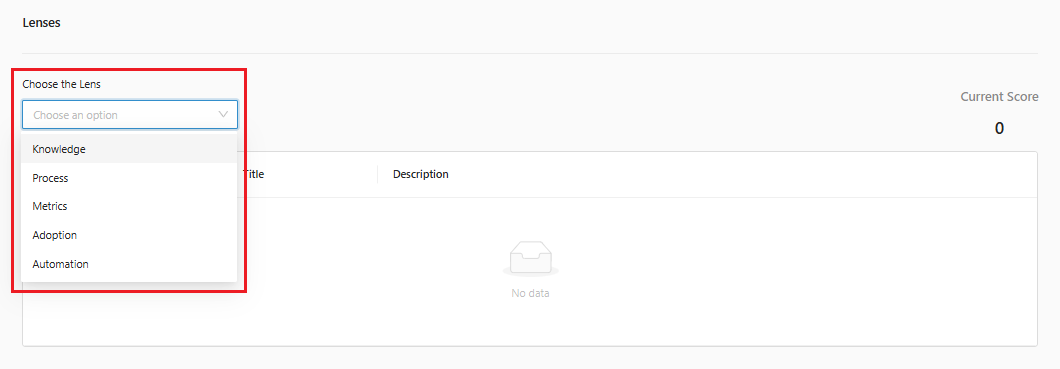
* **Choose the lens**: Select the lens that will work on the action (Knowledge, Process, Metrics, Adoption and Automation)

<figure><img src="https://1687673077-files.gitbook.io/~/files/v0/b/gitbook-x-prod.appspot.com/o/spaces%2FZ9sinLUl52lDK1vg6b8g%2Fuploads%2FwuIqlny6pSNYNbBqvI8D%2Fimage.png?alt=media&#x26;token=9bf29c16-37e7-4ab2-8661-70316050ce86" alt=""><figcaption></figcaption></figure>

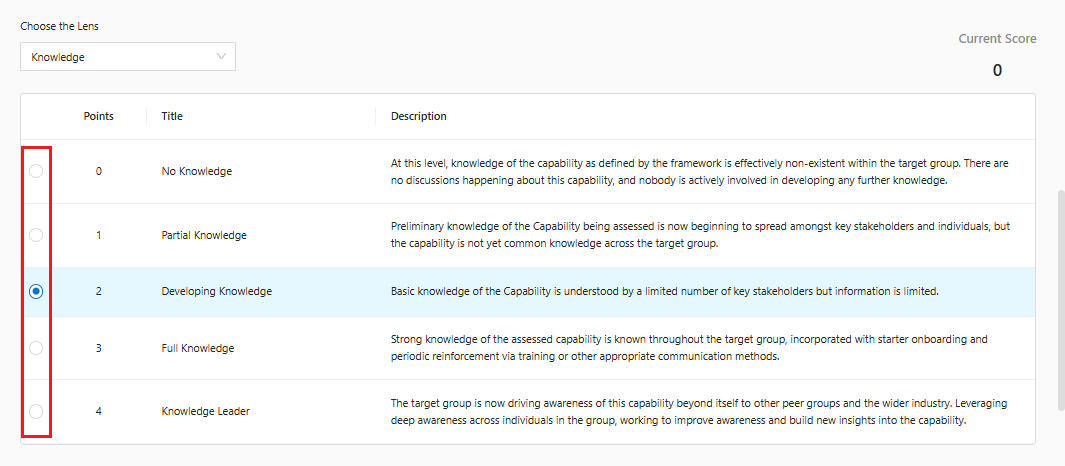
* **Points**: Inform the score for the action and lens context

<figure><img src="https://1687673077-files.gitbook.io/~/files/v0/b/gitbook-x-prod.appspot.com/o/spaces%2FZ9sinLUl52lDK1vg6b8g%2Fuploads%2FiLRatwHgSdskQum1d6UU%2Fimage.png?alt=media&#x26;token=067db9d3-5557-4256-98a4-9a124593bc59" alt=""><figcaption></figcaption></figure>

Note: When completing the action, it is necessary to record the completion date and provide evidence that the action was actually completed.

<figure><img src="https://1687673077-files.gitbook.io/~/files/v0/b/gitbook-x-prod.appspot.com/o/spaces%2FZ9sinLUl52lDK1vg6b8g%2Fuploads%2FCIQ8c9kUIzUnFwhePpTs%2Fimage.png?alt=media&#x26;token=174fed9e-04c6-44b8-a2df-7ef9c468d25f" alt=""><figcaption></figcaption></figure>

Note: The action evidence can be edited as needed. Click “**Edit**”

<figure><img src="https://1687673077-files.gitbook.io/~/files/v0/b/gitbook-x-prod.appspot.com/o/spaces%2FZ9sinLUl52lDK1vg6b8g%2Fuploads%2FitzfD0Ua7IBfInT25uXX%2Fimage.png?alt=media&#x26;token=60263565-7e51-44e6-b079-16c3c2eac227" alt=""><figcaption></figcaption></figure>

**Finalize the creation of the Action**

* After filling in all the information, click the **Add action** button to finish.

<figure><img src="https://1687673077-files.gitbook.io/~/files/v0/b/gitbook-x-prod.appspot.com/o/spaces%2FZ9sinLUl52lDK1vg6b8g%2Fuploads%2FirzqShzUrqeexcfGtX2p%2Fimage.png?alt=media&#x26;token=3f27df4b-3d2c-4aa0-9643-c6ad440ee5e6" alt=""><figcaption></figcaption></figure>

## Edit Action

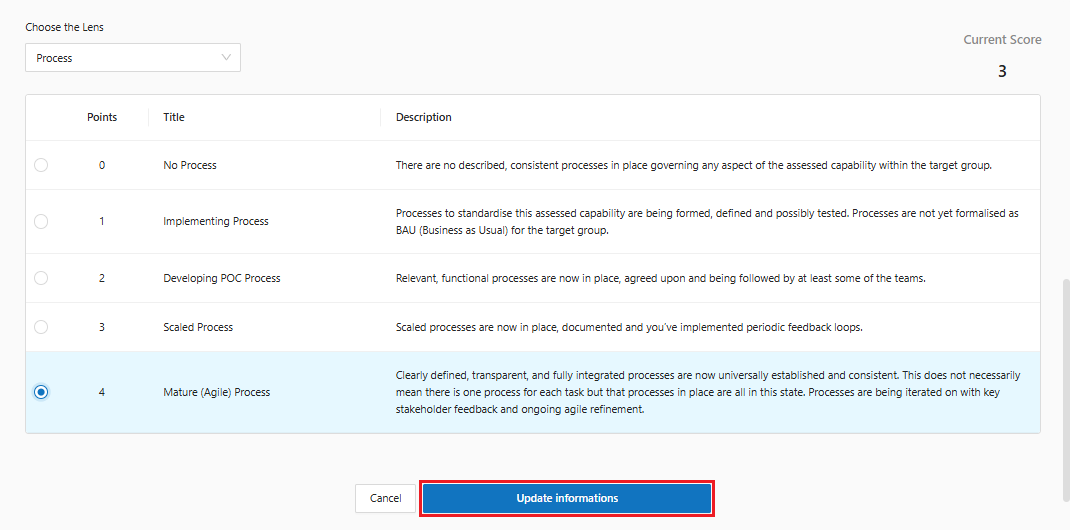
**Step 1**: To change the registered action, click on the corresponding action name. It is possible change the action name, Owner, Description, action Start date and Status, and Lens information.

<figure><img src="https://1687673077-files.gitbook.io/~/files/v0/b/gitbook-x-prod.appspot.com/o/spaces%2FZ9sinLUl52lDK1vg6b8g%2Fuploads%2FCfkbBPx2eGu7W3lzOQGr%2Fimage.png?alt=media&#x26;token=07f4f92c-f813-49e8-be20-d17ae2c14e91" alt=""><figcaption></figcaption></figure>

**Step 2**: Then click on “**Update informations**”.

<figure><img src="https://1687673077-files.gitbook.io/~/files/v0/b/gitbook-x-prod.appspot.com/o/spaces%2FZ9sinLUl52lDK1vg6b8g%2Fuploads%2Fnjvw0MJELfkxcwrPTpSs%2Fimage.png?alt=media&#x26;token=fdee276d-d365-4616-91cd-37591d867f7b" alt=""><figcaption></figcaption></figure>

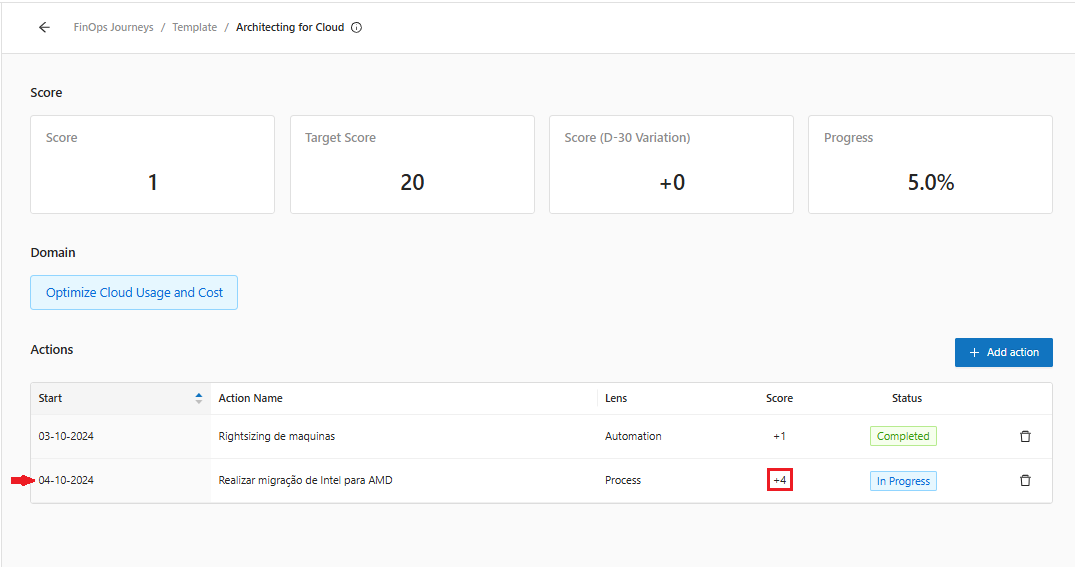
**Step 3:** After updating the information, will be possible to see the changes.

<figure><img src="https://1687673077-files.gitbook.io/~/files/v0/b/gitbook-x-prod.appspot.com/o/spaces%2FZ9sinLUl52lDK1vg6b8g%2Fuploads%2F2RosOJxrYz0Tq31sVtrA%2Fimage.png?alt=media&#x26;token=077bbf2f-094b-4878-89ad-5692b4394d0b" alt=""><figcaption></figcaption></figure>

Note: Updates to the action score will only be reflected in the overall score when the action is completed.

## Remove Action

**Step 1**: Identify the action to be removed and press **Remove Action** **"**![](https://1687673077-files.gitbook.io/~/files/v0/b/gitbook-x-prod.appspot.com/o/spaces%2FZ9sinLUl52lDK1vg6b8g%2Fuploads%2FHEAWnjryzPuWhKtUuHUL%2Fimage.png?alt=media\&token=647c83b2-40b6-4246-a379-323b736c64a0)**".**

<figure><img src="https://1687673077-files.gitbook.io/~/files/v0/b/gitbook-x-prod.appspot.com/o/spaces%2FZ9sinLUl52lDK1vg6b8g%2Fuploads%2F8BsEybQaWUpGufsNWtyb%2Fimage.png?alt=media&#x26;token=58f68e54-bc32-4321-b004-9bbdf81993d9" alt=""><figcaption></figcaption></figure>