# Journeys

The FinOps journey consists of implementing practices and tools to control and optimize cloud spend, enabling companies to maximize return on their investments, reduce unnecessary costs, and improve business agility.&#x20;

Create a Journey to monitoring the maturity of a project, process, or organization.&#x20;

Instructions for creating, editing, and removing a Journey.

1. **Creating a Journey**

* In the Space side menu, go to Journeys. Click on “+ **Create Journey**”:

<figure><img src="https://1687673077-files.gitbook.io/~/files/v0/b/gitbook-x-prod.appspot.com/o/spaces%2FZ9sinLUl52lDK1vg6b8g%2Fuploads%2FssBTNzpWeuOVKwnFvX7E%2Fimage.png?alt=media&#x26;token=1b2dedc1-50ce-4b30-91b2-cc4444e81c1b" alt=""><figcaption></figcaption></figure>

* Inform a name for your journey, select a representative icon for it, and click save.

<figure><img src="https://1687673077-files.gitbook.io/~/files/v0/b/gitbook-x-prod.appspot.com/o/spaces%2FZ9sinLUl52lDK1vg6b8g%2Fuploads%2FezP0ckIUz6CITcAmWf6D%2Fimage.png?alt=media&#x26;token=63f52808-021b-4ba0-acfa-f59b6fa5d6af" alt=""><figcaption></figcaption></figure>

2. **Actions**

By clicking on the **more actions** icon "<img src="https://lh7-rt.googleusercontent.com/docsz/AD_4nXf8eqGEwh97H9cmxCmfEIC2A-As51nZp8bsmEu9RlPKiA8yQ4yXO6Zyk4MooFAdE2DXGjdj3hEfHcOzb1CEXOR8s2bQqaww9IwyyTj3X6Z__Ke2sC51ou9u3J1H1vA8Fe4JhmfYGJW25VVD4wyfRj_upYc?key=TCB4NyHt8D0pHe5udMwg4w" alt="" data-size="line">", the system allows you to perform the following actions:

<figure><img src="https://1687673077-files.gitbook.io/~/files/v0/b/gitbook-x-prod.appspot.com/o/spaces%2FZ9sinLUl52lDK1vg6b8g%2Fuploads%2FWaZtKta4ZR0El70NTOtO%2Fimage.png?alt=media&#x26;token=129a7ee1-6cf5-4822-81d3-a6ece5cdf795" alt=""><figcaption></figcaption></figure>

* **Edit Journey**: By clicking on the **edit** icon "![](https://1687673077-files.gitbook.io/~/files/v0/b/gitbook-x-prod.appspot.com/o/spaces%2FZ9sinLUl52lDK1vg6b8g%2Fuploads%2F5bNvkYZzw7bbsUCLsZ2W%2Fimage.png?alt=media\&token=fa351568-91cb-415a-a708-8c747be47e70)", the system allows you to change the **Journey Name** and **Shortcut Icon** as needed.

<figure><img src="https://1687673077-files.gitbook.io/~/files/v0/b/gitbook-x-prod.appspot.com/o/spaces%2FZ9sinLUl52lDK1vg6b8g%2Fuploads%2FwGTWeq4qszUr2WIkZ6Zu%2Fimage.png?alt=media&#x26;token=4db255cd-756e-4b25-b3ae-275045497017" alt=""><figcaption></figcaption></figure>

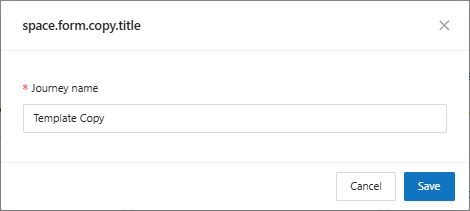
* **Copy journey**: By clicking on the **copy** icon "![](https://1687673077-files.gitbook.io/~/files/v0/b/gitbook-x-prod.appspot.com/o/spaces%2FZ9sinLUl52lDK1vg6b8g%2Fuploads%2F3VUByzMivWDwVnuKeXtd%2Fimage.png?alt=media\&token=4676c59e-a335-4d59-a51f-65e128a44c4a)", the system will display a screen where you can enter the name you want to assign to the new journey that will be created as a replica of the original journey.

<figure><img src="https://1687673077-files.gitbook.io/~/files/v0/b/gitbook-x-prod.appspot.com/o/spaces%2FZ9sinLUl52lDK1vg6b8g%2Fuploads%2FkDD3HZwRYxmyTCv8w0xb%2Fimage.png?alt=media&#x26;token=febfa318-3ea0-4771-86b9-4a16aaee0944" alt=""><figcaption></figcaption></figure>

* **Remove journey**: By clicking on the **remove journey** icon "![](https://1687673077-files.gitbook.io/~/files/v0/b/gitbook-x-prod.appspot.com/o/spaces%2FZ9sinLUl52lDK1vg6b8g%2Fuploads%2FJQAnr77jqqOH2f72gGLJ%2Fimage.png?alt=media\&token=c934da17-c2a6-4bb0-99f2-92678b554055)", the system will display a screen confirming the action.

<figure><img src="https://1687673077-files.gitbook.io/~/files/v0/b/gitbook-x-prod.appspot.com/o/spaces%2FZ9sinLUl52lDK1vg6b8g%2Fuploads%2FbqbSACCLFcmeTWhhIerd%2Fimage.png?alt=media&#x26;token=c29be868-5283-4f08-b133-f4badedbba9f" alt=""><figcaption></figcaption></figure>

When you click "**Yes**", the system will remove the existing journey.

3. **Accessing an existing Journey**

By clicking on the Journey, the system will display the main screen with a view of the Journey and the Capabilities used in the Journey.

<figure><img src="https://1687673077-files.gitbook.io/~/files/v0/b/gitbook-x-prod.appspot.com/o/spaces%2FZ9sinLUl52lDK1vg6b8g%2Fuploads%2FuSHSxebDxjD1hXiaDWBi%2Fimage.png?alt=media&#x26;token=72c86906-e049-4109-b0db-583183e24fd2" alt=""><figcaption></figcaption></figure>

<figure><img src="https://1687673077-files.gitbook.io/~/files/v0/b/gitbook-x-prod.appspot.com/o/spaces%2FZ9sinLUl52lDK1vg6b8g%2Fuploads%2FEnnDuooi1XhfgEzGH2QU%2F%7B556CD46C-0DE3-42C9-B792-B0B6D0FD2A2D%7D.png?alt=media&#x26;token=7735dac4-f9cd-495c-a554-7c9a2401371b" alt=""><figcaption></figcaption></figure>

4. **Filters**

The system allows to filter by Domain, being able to select a specific domain or all of them.

<figure><img src="https://1687673077-files.gitbook.io/~/files/v0/b/gitbook-x-prod.appspot.com/o/spaces%2FZ9sinLUl52lDK1vg6b8g%2Fuploads%2FRowGq9pwt7mKd5zR4yFA%2Fimage.png?alt=media&#x26;token=1bedd981-a648-494d-b456-e89ee894afe7" alt=""><figcaption></figcaption></figure>

5. **Configure the Journey**

* To configure the journey, go to the "**Settings**" section.

<figure><img src="https://1687673077-files.gitbook.io/~/files/v0/b/gitbook-x-prod.appspot.com/o/spaces%2FZ9sinLUl52lDK1vg6b8g%2Fuploads%2F1bG8WdFq0ZBR0kQCQoiY%2Fimage.png?alt=media&#x26;token=92884fc9-9faa-46bc-a394-650f021c4cde" alt=""><figcaption></figcaption></figure>

* The system will display the "**Set Up Journey"** screen with information such as: Total available Capacities, the number of currently active capacities and a filter by Capacity name.

<figure><img src="https://1687673077-files.gitbook.io/~/files/v0/b/gitbook-x-prod.appspot.com/o/spaces%2FZ9sinLUl52lDK1vg6b8g%2Fuploads%2Ff80qNTZA4QeJz3oO5spP%2Fimage.png?alt=media&#x26;token=46e96c30-8750-44f1-bea8-b0e55936e7cb" alt="" width="515"><figcaption></figcaption></figure>

Select the capabilities that will be used during the journey and disable those that do not apply at the moment using the corresponding flag.

<figure><img src="https://1687673077-files.gitbook.io/~/files/v0/b/gitbook-x-prod.appspot.com/o/spaces%2FZ9sinLUl52lDK1vg6b8g%2Fuploads%2FzAdwrk2o6BOG7GGiX9aD%2Fimage.png?alt=media&#x26;token=bfe1b0fb-d792-4cbf-b1ee-79a09ee52baf" alt=""><figcaption></figcaption></figure>

Set the score to be achieved throughout the journey. Remember that the maximum score for each capabilities is 25 points (run level)

<figure><img src="https://1687673077-files.gitbook.io/~/files/v0/b/gitbook-x-prod.appspot.com/o/spaces%2FZ9sinLUl52lDK1vg6b8g%2Fuploads%2F2AhniVhf3Moc88h01YUt%2Fimage.png?alt=media&#x26;token=eaa151a4-4961-4ae1-8696-1eb9561d1dab" alt=""><figcaption></figcaption></figure>