# ECS

An Amazon ECS cluster is a regional grouping of one or more container instances on which it is possible to run tasks, within a logical grouping of containers.

The system allows to configure this cluster normally in the Spot module ECS service, selecting the cluster size desired.

**How to get to ECS**:&#x20;

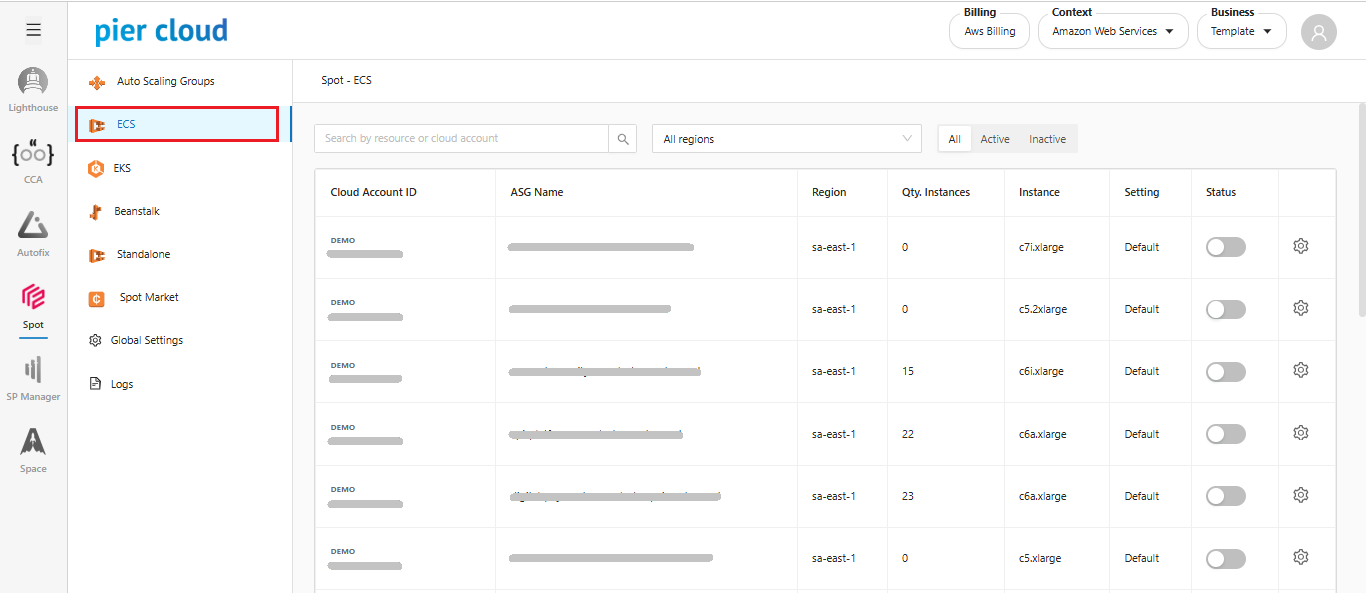
1. In the SPOT side feature menu, select **ECS**

<figure><img src="https://1687673077-files.gitbook.io/~/files/v0/b/gitbook-x-prod.appspot.com/o/spaces%2FZ9sinLUl52lDK1vg6b8g%2Fuploads%2F7ARBTgttYAaXP2Knk2Uj%2Fimage.png?alt=media&#x26;token=9691bbf8-1420-48ba-99ea-f5a5de879175" alt=""><figcaption></figcaption></figure>

The system will display the "**Spot - ECS**" main screen

2. **Filters**

The system allows to filter by:

* **Resource or Cloud Account**: Filter by a specific resource or account.

<figure><img src="https://1687673077-files.gitbook.io/~/files/v0/b/gitbook-x-prod.appspot.com/o/spaces%2FZ9sinLUl52lDK1vg6b8g%2Fuploads%2FasRQJrcQUHl2B0N5K8Qo%2Fimage.png?alt=media&#x26;token=94f2aaf3-ab78-4eb6-9e40-477b2c5e723a" alt=""><figcaption></figcaption></figure>

* **Regions**: Inform the desired region. By default, the system will return all regions.

<figure><img src="https://1687673077-files.gitbook.io/~/files/v0/b/gitbook-x-prod.appspot.com/o/spaces%2FZ9sinLUl52lDK1vg6b8g%2Fuploads%2FSpQa0Y1slqDUqC9S1BbF%2Fimage.png?alt=media&#x26;token=f1bf0241-b6aa-4199-830e-3b9f1a540d55" alt=""><figcaption></figcaption></figure>

* **Status**: Filter by desired status, which can be: Active, Inactive or all

<figure><img src="https://1687673077-files.gitbook.io/~/files/v0/b/gitbook-x-prod.appspot.com/o/spaces%2FZ9sinLUl52lDK1vg6b8g%2Fuploads%2F6ppFvz1vcAN19LWajWvT%2Fimage.png?alt=media&#x26;token=d612e9a2-cb34-4c02-b0bd-39df494dd73d" alt=""><figcaption></figcaption></figure>

3. **Actions:**

* The system allows to activate and deactivate the status by clicking on the "![](https://1687673077-files.gitbook.io/~/files/v0/b/gitbook-x-prod.appspot.com/o/spaces%2FZ9sinLUl52lDK1vg6b8g%2Fuploads%2FX8SkxaRr2g7UcBUBZV2i%2Fimage.png?alt=media\&token=55999ae9-4c79-4057-8eec-af63531a7307)" button

<figure><img src="https://1687673077-files.gitbook.io/~/files/v0/b/gitbook-x-prod.appspot.com/o/spaces%2FZ9sinLUl52lDK1vg6b8g%2Fuploads%2FIE4j3ZfkcmWW87AxwFBE%2Fimage.png?alt=media&#x26;token=8069f5a7-34a2-472b-8a42-0c651ec9f9b2" alt=""><figcaption></figcaption></figure>

* And adjust the setting by clicking the "![](https://1687673077-files.gitbook.io/~/files/v0/b/gitbook-x-prod.appspot.com/o/spaces%2FZ9sinLUl52lDK1vg6b8g%2Fuploads%2FdbwrQM3Db7UuqM5LnUvk%2Fimage.png?alt=media\&token=d83f1640-3db8-40b9-b6dd-ca958948985d)" button

<figure><img src="https://1687673077-files.gitbook.io/~/files/v0/b/gitbook-x-prod.appspot.com/o/spaces%2FZ9sinLUl52lDK1vg6b8g%2Fuploads%2FWoT51wm8lzlciUAbEgO8%2Fimage.png?alt=media&#x26;token=88da90e1-776b-4783-aa24-c96b16579a63" alt=""><figcaption></figcaption></figure>