# EKS

For better use of the Amazon EKS with Spot instances, some precautions are necessary to avoid downtime for applications running on the cluster.

To define which instance types and families to use, It is necessary to determine groups with the lowest chance of interruption. Will be necessary to weigh up the tolerance, application interruptions, and cost reduction goals when selecting a Spot instance. The lower the interruption rate, the longer the Spot instances will run. The Balanced strategy can be used.

**How to get to EKS**:&#x20;

1. In the SPOT side feature menu, select **EKS**

<figure><img src="https://1687673077-files.gitbook.io/~/files/v0/b/gitbook-x-prod.appspot.com/o/spaces%2FZ9sinLUl52lDK1vg6b8g%2Fuploads%2F7N2k4cri9Lwna6usfeBM%2Fimage.png?alt=media&#x26;token=1f86a143-f82b-4956-b7e3-ecc0ed514311" alt=""><figcaption></figcaption></figure>

The system will display the "**Spot - EKS**" main screen

2. **Filters**

The system allows to filter by:

* **Resource or Cloud Account**: Filter by a specific resource or account.

<figure><img src="https://1687673077-files.gitbook.io/~/files/v0/b/gitbook-x-prod.appspot.com/o/spaces%2FZ9sinLUl52lDK1vg6b8g%2Fuploads%2FNsCqV2oy5d18nLfBXEUC%2Fimage.png?alt=media&#x26;token=6a57f904-8777-4104-a69b-14c77b0d2c79" alt=""><figcaption></figcaption></figure>

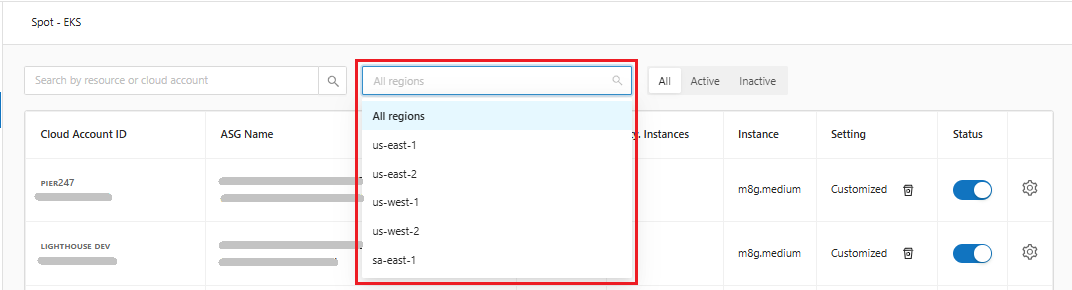
* **Regions**: Inform the desired region. By default, the system will return all regions.

<figure><img src="https://1687673077-files.gitbook.io/~/files/v0/b/gitbook-x-prod.appspot.com/o/spaces%2FZ9sinLUl52lDK1vg6b8g%2Fuploads%2FbymJTYxHRITk0Jno5g4W%2Fimage.png?alt=media&#x26;token=369103c1-09cb-4002-81ea-8939720a6dcf" alt=""><figcaption></figcaption></figure>

* **Status**: Filter by desired status, which can be: Active, Inactive or all

<figure><img src="https://1687673077-files.gitbook.io/~/files/v0/b/gitbook-x-prod.appspot.com/o/spaces%2FZ9sinLUl52lDK1vg6b8g%2Fuploads%2FUfdHJjDv1ZNPJWSvgFNn%2Fimage.png?alt=media&#x26;token=792e0b92-2f09-4ac0-9276-2b97391295d5" alt=""><figcaption></figcaption></figure>

3. **Actions**:

* The system allows to activate and deactivate the status by clicking on the "![](https://1687673077-files.gitbook.io/~/files/v0/b/gitbook-x-prod.appspot.com/o/spaces%2FZ9sinLUl52lDK1vg6b8g%2Fuploads%2FX8SkxaRr2g7UcBUBZV2i%2Fimage.png?alt=media\&token=55999ae9-4c79-4057-8eec-af63531a7307)" button

<figure><img src="https://1687673077-files.gitbook.io/~/files/v0/b/gitbook-x-prod.appspot.com/o/spaces%2FZ9sinLUl52lDK1vg6b8g%2Fuploads%2FmWBbi7NTOnS55WSnyW1s%2Fimage.png?alt=media&#x26;token=aeaab1c1-3fa8-4b47-963f-abd983bfbd7e" alt=""><figcaption></figcaption></figure>

* And adjust the setting by clicking the "![](https://1687673077-files.gitbook.io/~/files/v0/b/gitbook-x-prod.appspot.com/o/spaces%2FZ9sinLUl52lDK1vg6b8g%2Fuploads%2FdbwrQM3Db7UuqM5LnUvk%2Fimage.png?alt=media\&token=d83f1640-3db8-40b9-b6dd-ca958948985d)" button

<figure><img src="https://1687673077-files.gitbook.io/~/files/v0/b/gitbook-x-prod.appspot.com/o/spaces%2FZ9sinLUl52lDK1vg6b8g%2Fuploads%2FVO2tEhIv4PMqseiSYaFz%2Fimage.png?alt=media&#x26;token=711dbf99-447c-4ced-ac60-9891c4b20b80" alt=""><figcaption></figcaption></figure>